Software License and Support Agreement 2026

Get Form
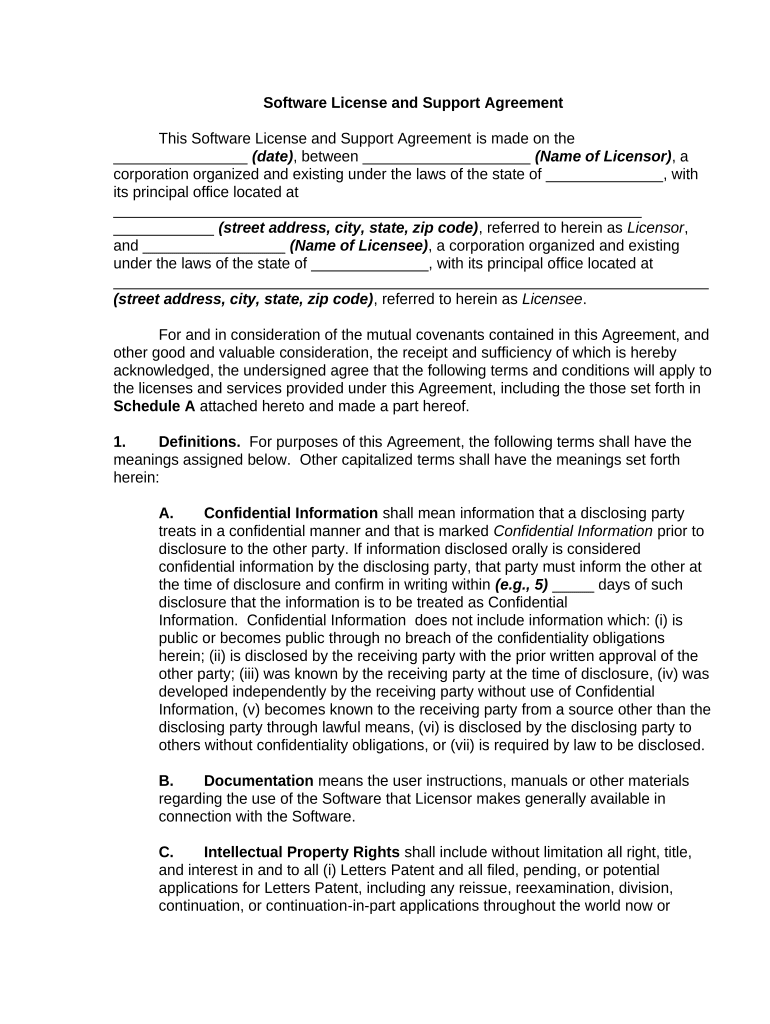
Software License and Support Agreement Preview on Page 1

Here's how it works

01. Edit your form online
Type text, add images, blackout confidential details, add comments, highlights and more.
02. Sign it in a few clicks
Draw your signature, type it, upload its image, or use your mobile device as a signature pad.
03. Share your form with others
Send it via email, link, or fax. You can also download it, export it or print it out.

How to use or fill out Software License and Support Agreement with our platform

Form edit decoration
9.5
Ease of Setup
DocHub User Ratings on G2
9.0
Ease of Use
DocHub User Ratings on G2
  1. Click ‘Get Form’ to open the Software License and Support Agreement in the editor.
  2. Begin by filling in the date at the top of the document, followed by the names of both the Licensor and Licensee, including their respective addresses.
  3. Proceed to Section 1, Definitions. Carefully read through each definition and ensure you understand terms like 'Confidential Information' and 'Software'.
  4. In Section 2, License Grant, specify the number of devices that will be using the software as outlined in your agreement.
  5. Complete Section 6 regarding Term and Termination by entering relevant dates and notice periods for termination.
  6. Review Sections 7 through 12 for any fees, warranties, or indemnification clauses that may require your attention.
  7. Finally, sign at the bottom of the document where indicated for both parties to finalize the agreement.

Start using our platform today to streamline your document editing and signing process for free!

be ready to get more

Complete this form in 5 minutes or less

Get form

Got questions?

We have answers to the most popular questions from our customers. If you can't find an answer to your question, please contact us.
Contact us

eSignatures are an excellent alternative to traditional signing, as they save time, effort, and costs people spend on printing, scanning, and paper delivery. You can eSign your Software License and Support Agreement using a trustworthy and powerful online document processing tool like DocHub. It complies with main eSignature regulations (ESIGN and UETA), so all documents approved there are legally binding and have the same validity as physically signed ones.

If you are using Chrome, there are two easy ways to modify your Software License and Support Agreement online. First, go to the DocHub site, add your document, and modify it using our toolbar. You may also set up our Chrome extension and modify any document by dragging and dropping it in your web browser window.

# A software license agreement (SLA) is a legal agreement between a software developer or vendor and a user that defines how the program should be used. It contains the terms and conditions of acquiring, installing and using the software.
An agreement to perform support services for specified on-site software or remotely-accessed software services (SaaS) that provides credits to the software licensee or SaaS customer if the service provider fails to meet required service levels.
By using the software, you accept these terms. If you dont accept them, do not use the software.

Security and compliance

At DocHub, your data security is our priority. We follow HIPAA, SOC2, GDPR, and other standards, so you can work on your documents with confidence.

Learn more
ccpa2
pci-dss
gdpr-compliance
hipaa
soc-compliance

People also ask

The difference between an End User License Agreement (EULA) and a Software License Agreement (SLA) depends on intended usage. The EULA generally governs the continuous use of the software by a group of individuals. Meanwhile, an SLA targets a specific entity for a finite period.
A Software License Agreement is a contract that allows a licensee to use software, but not own it. The software maker keeps some rights that the licensee doesnt get, like continuing to sell the software to others and granting the licensee permission to use the software on a lone computer.

Related links