Type text, add images, blackout confidential details, add comments, highlights and more.
02. Sign it in a few clicks
Draw your signature, type it, upload its image, or use your mobile device as a signature pad.
03. Share your form with others
Send it via email, link, or fax. You can also download it, export it or print it out.
How to use or fill out bill lading with our platform
Ease of Setup
DocHub User Ratings on G2
Ease of Use
DocHub User Ratings on G2
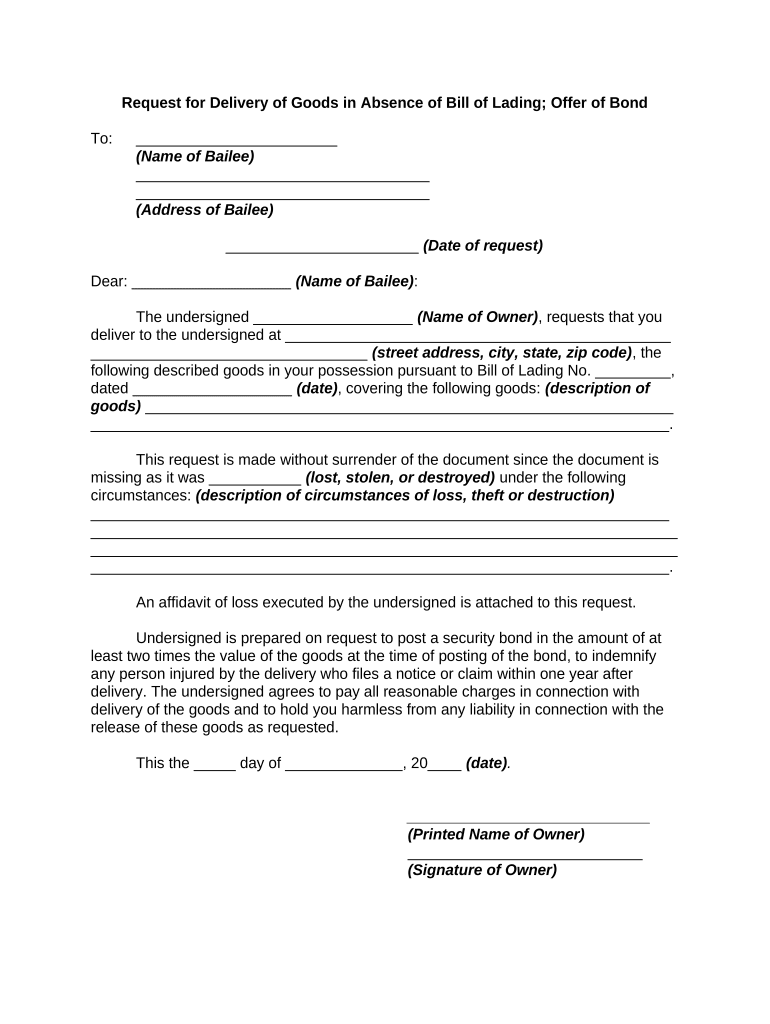
Click ‘Get Form’ to open the bill lading document in the editor.
Begin by entering the name of the bailee in the designated field, followed by their address. Ensure accuracy to avoid delivery issues.
Fill in the date of your request and address it to the bailee, ensuring that all details are clear and legible.
In the section for goods description, provide a detailed account of the items you wish to retrieve. Include any relevant identifiers such as serial numbers or quantities.
Indicate the circumstances under which the bill of lading was lost, stolen, or destroyed. This information is crucial for processing your request.
Attach an affidavit of loss if required, and ensure you are prepared to post a security bond if necessary.
Finally, sign and print your name at the bottom of the form before submitting it through our platform for processing.
Start using our platform today for free to streamline your bill lading process!
Bill of Lading PDFBill of Lading exampleWho issues bill of ladingBill of Lading formBill of Lading template ExcelBill of Lading SHORT FORM PDFBill lading template pdfStraight bill of lading
Security and compliance
At DocHub, your data security is our priority. We follow HIPAA, SOC2, GDPR, and other standards, so you can work on your documents with confidence.
bill of lading | Wex | US Law | LII / Legal Information Institute
A bill of lading is a legal instrument used in the transportation and shipping industries which lists the goods being shipped and the terms under which theyRead more
(a) General Rules .(1) A negotiable bill of lading may be negotiated by indorsement. An indorsement may be made in blank or to a specified person. If the goodsRead more
Cookie consent notice
This site uses cookies to enhance site navigation and personalize your experience.
By using this site you agree to our use of cookies as described in our Privacy Notice.
You can modify your selections by visiting our Cookie and Advertising Notice.