How to copyright photographs 2026

Get Form
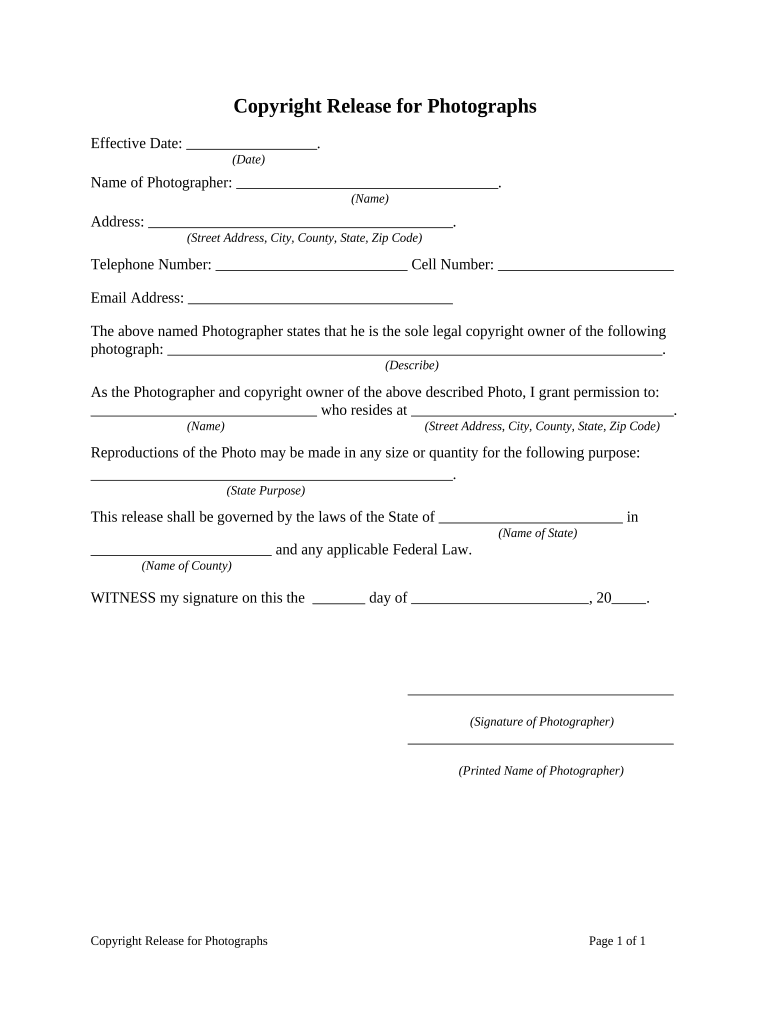
how to copyright photographs Preview on Page 1

Here's how it works

01. Edit your form online
Type text, add images, blackout confidential details, add comments, highlights and more.
02. Sign it in a few clicks
Draw your signature, type it, upload its image, or use your mobile device as a signature pad.
03. Share your form with others
Send it via email, link, or fax. You can also download it, export it or print it out.

How to Use or Fill Out the Copyright Release for Photographs

Form edit decoration
9.5
Ease of Setup
DocHub User Ratings on G2
9.0
Ease of Use
DocHub User Ratings on G2
  1. Click ‘Get Form’ to open it in the editor.
  2. Enter the effective date at the top of the form. This is crucial as it indicates when the copyright release becomes valid.
  3. Fill in your name as the photographer, ensuring accuracy to establish your identity as the copyright owner.
  4. Provide your complete address, including street, city, county, state, and zip code. This information is necessary for legal identification.
  5. Input your telephone number and cell number for contact purposes. Ensure these are current and accessible.
  6. Include your email address for any correspondence related to this copyright release.
  7. Describe the photograph you are granting permission for. Be specific to avoid any ambiguity regarding which photo is covered by this release.
  8. Identify who you are granting permission to by filling in their name and address. This person will have rights to reproduce your photograph.
  9. State the purpose for which reproductions may be made. Clearly defining this helps protect your rights as a photographer.
  10. Specify the governing laws applicable to this release by entering the state and county names where you reside.
  11. Finally, sign and print your name on the designated lines to validate this document legally.

Start using our platform today to easily fill out and manage your copyright releases online for free!

be ready to get more

Complete this form in 5 minutes or less

Get form

Got questions?

We have answers to the most popular questions from our customers. If you can't find an answer to your question, please contact us.
Contact us
Use watermarks These marks create an-almost translucent logo that you can place strategically across your photographs. This makes it difficult for people to pass your images off as their own work. The image should still be visible, the watermark is merely to deter people from reusing your image without permission.
First, copyright protects original works of authorship, including original photographs. A work is original if it is independently created and is sufficiently creative.
Include a copyright notice (whether youve registered it or not) in the metadata or on the image. A copyright notification should look like [Year] [Your Name] or simply the copyright symbol, . Upload low-resolution or low-quality photographs online.
Copyright registration doesnt have to cost a fortuneDIY is the cheapest route. DIY legal services and guides are great middle-ground options. For complex or valuable projects, solo attorneys or small firms offer big value at small prices. Protecting your creative work is essential for small businesses and creators. Copyrights on a Shoestring: Protecting Your Work W/o Breaking the Bank Miller IP blogs cheapest-copyright Miller IP blogs cheapest-copyright

Security and compliance

At DocHub, your data security is our priority. We follow HIPAA, SOC2, GDPR, and other standards, so you can work on your documents with confidence.

Learn more
ccpa2
pci-dss
gdpr-compliance
hipaa
soc-compliance
be ready to get more

Complete this form in 5 minutes or less

Get form