Type text, add images, blackout confidential details, add comments, highlights and more.
02. Sign it in a few clicks
Draw your signature, type it, upload its image, or use your mobile device as a signature pad.
03. Share your form with others
Send it via email, link, or fax. You can also download it, export it or print it out.
How to use or fill out revocable trust form sample with our platform
Ease of Setup
DocHub User Ratings on G2
Ease of Use
DocHub User Ratings on G2
Click ‘Get Form’ to open the revocable trust form sample in the editor.
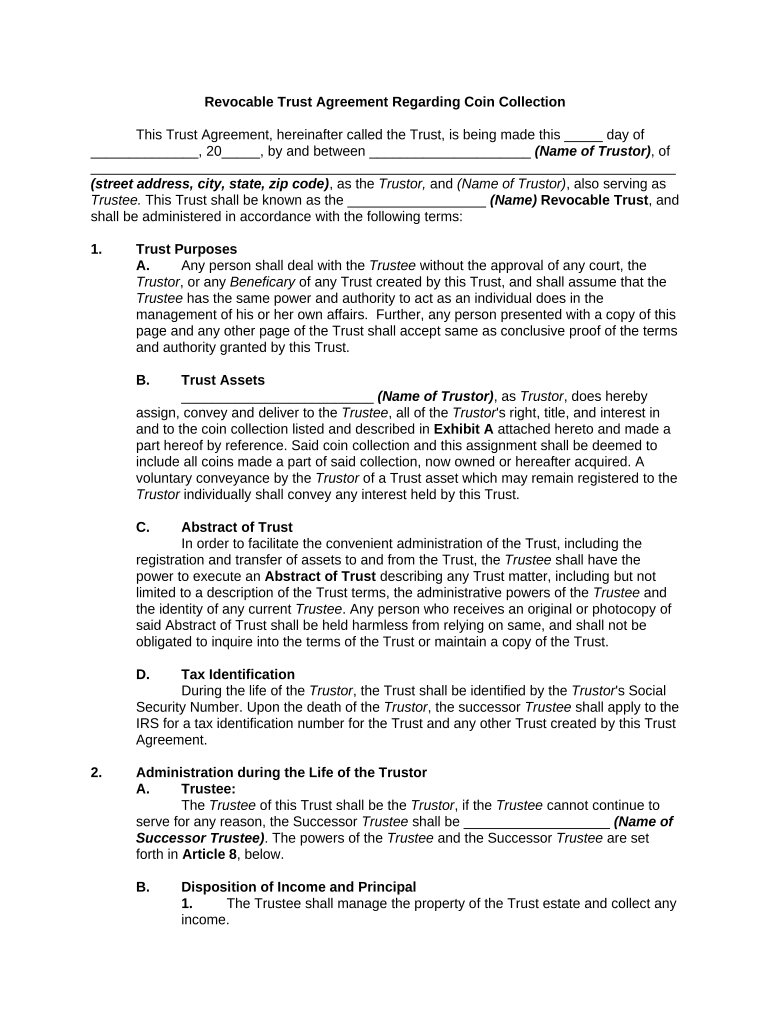
Begin by entering the date at the top of the form, followed by the name and address of the Trustor. This establishes who is creating the trust.
In the 'Trust Purposes' section, ensure you clearly outline any specific instructions regarding how the Trustee should manage assets. This may include details about your coin collection.
Fill in the 'Trust Assets' section by listing all items included in your trust, particularly focusing on your coin collection as described in Exhibit A.
Complete sections regarding administration during and after the life of the Trustor, specifying roles for both Trustee and Successor Trustee, along with their powers.
Review and finalize any additional clauses related to incapacity, rehabilitation, and guardianship to ensure they reflect your wishes accurately.
Once all fields are filled out correctly, save your document. You can then sign it digitally using our platform for a seamless process.
Start filling out your revocable trust form sample today for free on our platform!
Fill out revocable trust form sample online It's free
Oct 27, 2018 We intend to create a valid trust under the laws of California and under the laws of any state in which any trust created under this trustRead more
Revocable Living Trusts Booklet - Maryland Register of Wills
The purpose of this booklet is to inform you about revocable trusts, including their advantages and disadvantages, and to debunk myths regarding theseRead more
Cookie consent notice
This site uses cookies to enhance site navigation and personalize your experience.
By using this site you agree to our use of cookies as described in our Privacy Notice.
You can modify your selections by visiting our Cookie and Advertising Notice.