Shared Leave Request Form 2026

Get Form
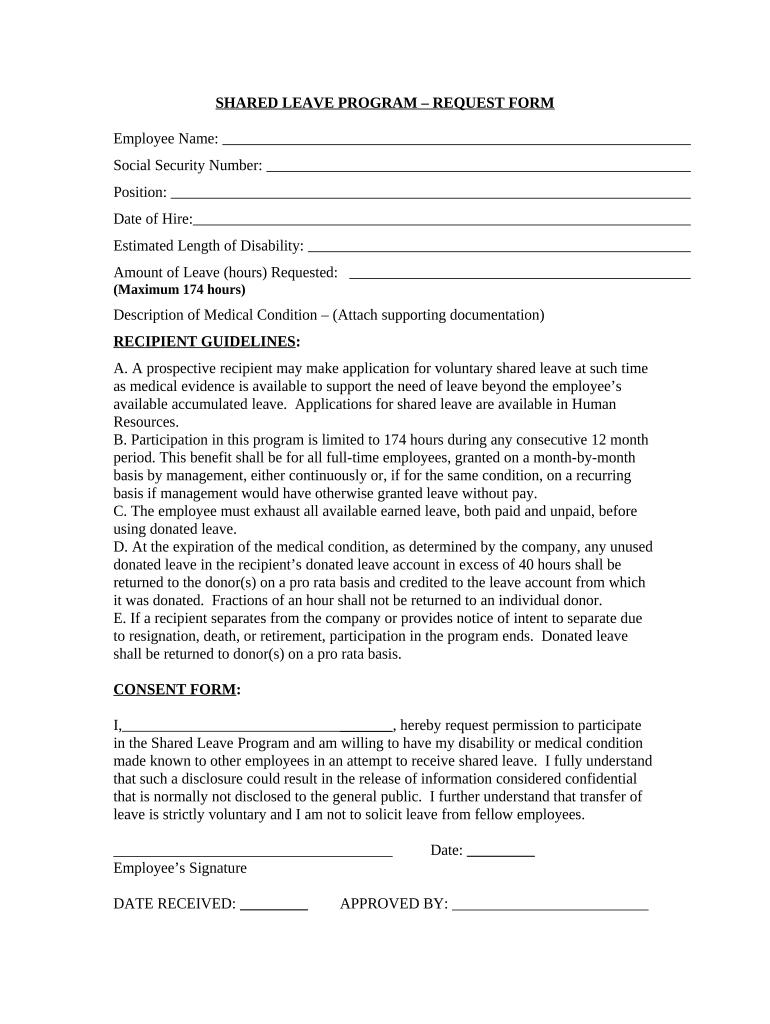
Shared Leave Request Form Preview on Page 1

Here's how it works

01. Edit your form online
Type text, add images, blackout confidential details, add comments, highlights and more.
02. Sign it in a few clicks
Draw your signature, type it, upload its image, or use your mobile device as a signature pad.
03. Share your form with others
Send it via email, link, or fax. You can also download it, export it or print it out.

How to use or fill out Shared Leave Request Form with DocHub

Form edit decoration
9.5
Ease of Setup
DocHub User Ratings on G2
9.0
Ease of Use
DocHub User Ratings on G2
  1. Click ‘Get Form’ to open the Shared Leave Request Form in our platform's editor.
  2. Begin by entering your Employee Name and Social Security Number in the designated fields. This information is crucial for identification purposes.
  3. Fill in your Position and Date of Hire. These details help verify your eligibility for the shared leave program.
  4. Estimate the Length of Disability and specify the Amount of Leave (hours) Requested, ensuring it does not exceed the maximum limit of 174 hours.
  5. In the Description of Medical Condition section, provide a brief overview of your medical situation. Remember to attach any supporting documentation as required.
  6. Complete the Consent Form by signing and dating it, acknowledging your understanding of the program's guidelines and confidentiality aspects.
  7. Finally, submit your completed form through our platform for processing. Ensure all fields are accurately filled to avoid delays.

Start using our platform today to easily fill out and submit your Shared Leave Request Form for free!

be ready to get more

Complete this form in 5 minutes or less

Get form

Got questions?

We have answers to the most popular questions from our customers. If you can't find an answer to your question, please contact us.
Contact us

With DocHub, you can easily sign your Shared Leave Request Form or any other document on iOS, even without installing additional programs. You can access your DocHub account from any internet-connected browser and fill out and sign your document in any way you like with just a few clicks.

As a comprehensive document modifying service, DocHub is available on mobile devices. Open DocHub in your choice of mobile internet browser and employ our smart mobile-friendly toolset to complete your Shared Leave Request Form.

Leave donation or leave sharing programs allow employees to donate accrued paid time off (PTO), vacation, or sick leave to a general pool to be used by fellow employees who experience medical emergencies or who are affected by major disasters and have exhausted all paid leave available to them.
An employer-sponsored leave-sharing program allows an employee to donate accrued hours of paid vacation, or personal and potentially sick leave for the benefit of other employees who are in need of taking more leave than they have available.
A time-off request form is a document that formally records when an employee asks for time off. It includes all the details of the request, such as the reason for the absence and the dates the employee will be gone. It also includes a spot to indicate if their supervisor approved or denied the request.

Security and compliance

At DocHub, your data security is our priority. We follow HIPAA, SOC2, GDPR, and other standards, so you can work on your documents with confidence.

Learn more
ccpa2
pci-dss
gdpr-compliance
hipaa
soc-compliance

People also ask

The Voluntary Leave Transfer Program (Leave Share) allows federal employees to donate annual leave to other federal employees (excluding the leave donors immediate supervisor) who are experiencing a medical emergency and have exhausted their available paid leave.
How to Write a One-Day Leave Application (Step-by-Step Guide) Start with a Proper Salutation. Mention the Subject Line (If Sending an Email) Clearly State the Reason for Leave. Specify the Leave Date and Duration. Mention Work Handover or Responsibility Management. Close with Gratitude and Contact Availability (if needed)

Related links