Type text, add images, blackout confidential details, add comments, highlights and more.
02. Sign it in a few clicks
Draw your signature, type it, upload its image, or use your mobile device as a signature pad.
03. Share your form with others
Send it via email, link, or fax. You can also download it, export it or print it out.
How to use or fill out Texas Claimant with Our Platform
Ease of Setup
DocHub User Ratings on G2
Ease of Use
DocHub User Ratings on G2
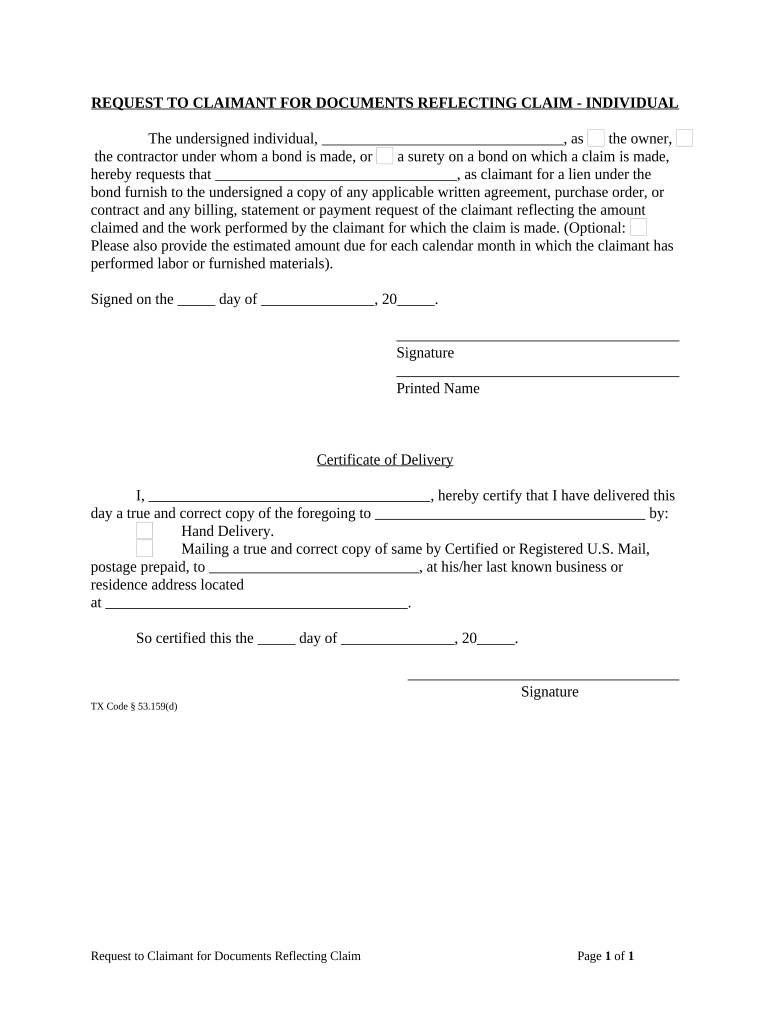
Click ‘Get Form’ to open the Texas Claimant document in the editor.
Begin by filling in your name in the designated space as the owner, contractor, or surety on the bond. This identifies who is making the request.
Next, enter the claimant's name in the appropriate field. This is crucial for ensuring that the request is directed to the correct party.
In the section requesting documents, specify any applicable written agreements, purchase orders, or contracts that relate to your claim. This helps clarify what documentation you are seeking.
If desired, include an estimated amount due for each month of labor or materials provided by the claimant. This optional detail can assist in expediting your request.
Sign and date the form at the bottom to validate your request. Ensure that all information is accurate before submission.
Complete the Certificate of Delivery section by certifying how you delivered this document to ensure proper record-keeping.
Start using our platform today for free to streamline your Texas Claimant form completion!
Are you an unclaimed property holder? - Texas Comptroller
Unclaimed property can be any financial asset or safe deposit box contents that has been abandoned by the property owner for one or more years.Read more
Cookie consent notice
This site uses cookies to enhance site navigation and personalize your experience.
By using this site you agree to our use of cookies as described in our Privacy Notice.
You can modify your selections by visiting our Cookie and Advertising Notice.