Type text, add images, blackout confidential details, add comments, highlights and more.
02. Sign it in a few clicks
Draw your signature, type it, upload its image, or use your mobile device as a signature pad.
03. Share your form with others
Send it via email, link, or fax. You can also download it, export it or print it out.
How to use or fill out tn statement property with our platform
Ease of Setup
DocHub User Ratings on G2
Ease of Use
DocHub User Ratings on G2
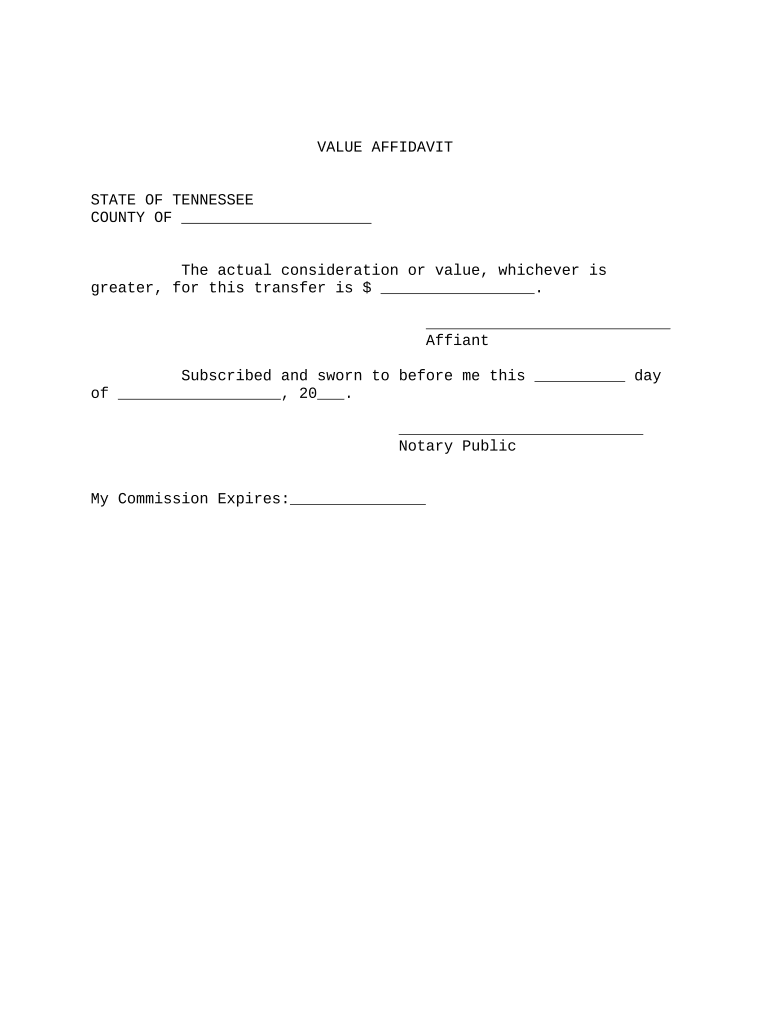
Click ‘Get Form’ to open the tn statement property in the editor.
Begin by entering the county name in the designated field. This is essential for identifying the jurisdiction of the affidavit.
Next, input the actual consideration or value of the transfer in the provided space. Ensure that this amount reflects either the actual consideration or market value, whichever is greater.
In the section labeled 'Affiant', sign your name as it appears on official documents. This confirms your identity and agreement to the stated value.
Finally, leave space for a notary public's signature and commission expiration date. This step is crucial for validating your affidavit legally.
Start using our platform today to fill out your tn statement property easily and for free!
BT0011 - Statement of Policy on Patents, Copyrights, and
The goal of The University of Tennessee Policy on Patents, Copyrights, other Intellectual Property is to promote the progress of science and the arts.Read more
Mar 16, 2026 Real Property Tax Property Tax Statement and Payments. Property tax statements are generated from the Tax Roll and mailed the first week ofRead more
Tennessee Valley Authority - Global Energy Monitor
It also maintains that under Tennessee law it has no legal duty to keep its reservoirs and shorelines safe for the plaintiffs recreational use and enjoyment.Read more
Cookie consent notice
This site uses cookies to enhance site navigation and personalize your experience.
By using this site you agree to our use of cookies as described in our Privacy Notice.
You can modify your selections by visiting our Cookie and Advertising Notice.