Sd corporation 2026

Get Form
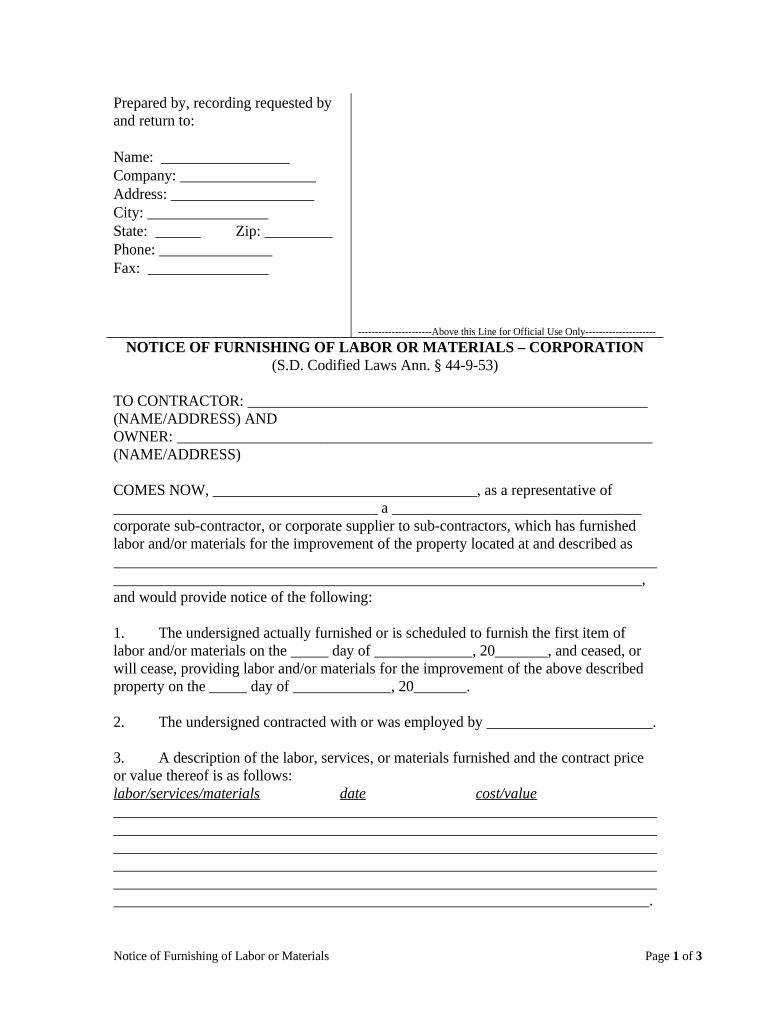
sd corporation Preview on Page 1

Here's how it works

01. Edit your form online
Type text, add images, blackout confidential details, add comments, highlights and more.
02. Sign it in a few clicks
Draw your signature, type it, upload its image, or use your mobile device as a signature pad.
03. Share your form with others
Send it via email, link, or fax. You can also download it, export it or print it out.

How to use or fill out sd corporation with our platform

Form edit decoration
9.5
Ease of Setup
DocHub User Ratings on G2
9.0
Ease of Use
DocHub User Ratings on G2
  1. Click ‘Get Form’ to open the sd corporation document in the editor.
  2. Begin by filling in your name, company, address, city, state, zip code, phone number, and fax number at the top of the form. This information is essential for identification.
  3. In the 'TO CONTRACTOR' section, enter the name and address of the contractor involved in the project.
  4. Next, provide your name as a representative and fill in your corporation's name and type (sub-contractor or supplier).
  5. Indicate the date you started providing labor/materials and when you ceased or will cease. Fill these dates accurately to ensure compliance.
  6. Describe the labor/services/materials provided along with their costs. Be detailed to avoid any disputes later.
  7. Complete the project description section clearly outlining what was done.
  8. Finally, sign and date the document at the bottom. Ensure that all required signatures are included for validation.

Start using our platform today to easily complete your sd corporation form online for free!

be ready to get more

Complete this form in 5 minutes or less

Get form

Got questions?

We have answers to the most popular questions from our customers. If you can't find an answer to your question, please contact us.
Contact us

Yes, electronically drawing your signature is acceptable, but only if you use a tool that complies with industry laws and regulations. Consider DocHub, which guarantees eSignature validity under ESIGN and UETA requirements. All you need to eSign your sd corporation is an account with DocHub and an internet connection. Once you open your paperwork in our editor, click Sign and select the Draw option.

It is a no-brainer on a computer or via a mobile device to fill out a sd corporation with DocHub. All you need to do is open any installed internet browser on your smartphone and proceed to the DocHub website. Once authenticated, add your document and open it in editing mode. Use our toolbar to make your edits and save modifications. Optionally, keep your file in your files or send it to a recipient immediately.

Widely respected for his technological and regulatory contribution to real estate, as co-driver for DA, Dilip Thacker is committed to take the groups real estate business to excellence by creating teams of dynamic professionals, driven by corporate social responsibility, and focused expansion.
Mistry has two sons and two daughters. His elder son, Shapoor Mistry (b. 1964), runs the Shapoorji Pallonji group, while his younger son, the late Cyrus Mistry (19682022), served for some years as chairman of the Tata group.
S D CORPORATION PRIVATE LIMITEDs Corporate Identification Number (CIN) is U70109MH1998PTC116091.

Security and compliance

At DocHub, your data security is our priority. We follow HIPAA, SOC2, GDPR, and other standards, so you can work on your documents with confidence.

Learn more
ccpa2
pci-dss
gdpr-compliance
hipaa
soc-compliance

People also ask

SD Corporation Pvt. Ltd. is a joint venture between Shapoorji Pallonji and The Dilip Thacker Group.
Financials of S D Corporation Private Limited S D Corporation Private Limited generated a revenue of ₹553Cr for the financial year ending on Mar 31, 2023.
Amit Thacker - Managing Director at SD Corporation P. Ltd | LinkedIn.

Related links