South carolina deed 2026

Get Form
south carolina deed Preview on Page 1

Here's how it works

01. Edit your form online
Type text, add images, blackout confidential details, add comments, highlights and more.
02. Sign it in a few clicks
Draw your signature, type it, upload its image, or use your mobile device as a signature pad.
03. Share your form with others
Send it via email, link, or fax. You can also download it, export it or print it out.

How to use or fill out South Carolina Deed with our platform

Form edit decoration
9.5
Ease of Setup
DocHub User Ratings on G2
9.0
Ease of Use
DocHub User Ratings on G2
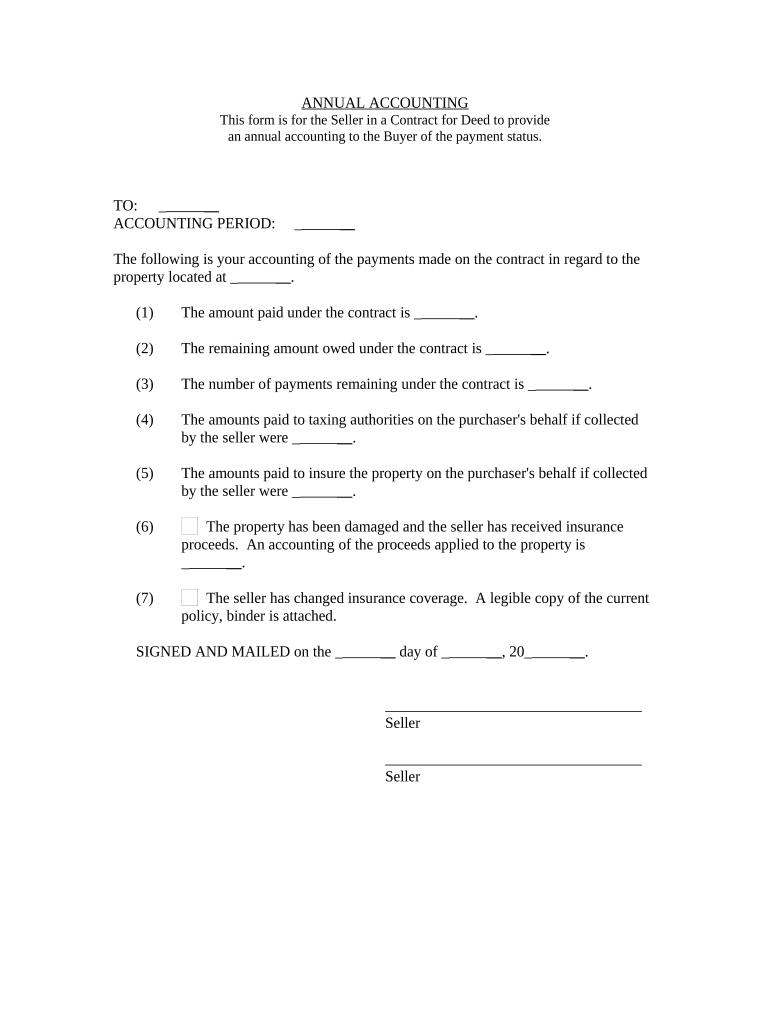
  1. Click ‘Get Form’ to open the South Carolina Deed in the editor.
  2. Begin by entering the names of the parties involved in the transaction at the top of the form. Ensure that all names are spelled correctly to avoid any legal issues.
  3. Fill in the accounting period, specifying the timeframe for which you are providing this annual accounting. This is crucial for clarity and record-keeping.
  4. In section (1), input the total amount paid under the contract. This figure should reflect all payments made up to this point.
  5. For section (2), indicate the remaining amount owed under the contract. This helps both parties understand outstanding obligations.
  6. Complete section (3) by noting how many payments remain on the contract, providing a clear timeline for future payments.
  7. In sections (4) and (5), detail any amounts paid on behalf of the purchaser for taxes and insurance, respectively, ensuring transparency in financial dealings.
  8. If applicable, document any insurance proceeds received due to property damage in section (6). This is important for accountability.
  9. Finally, sign and date the document at the bottom. Make sure all signatures are legible and dated correctly to validate your agreement.

Start using our platform today to streamline your document editing and signing process for free!

be ready to get more

Complete this form in 5 minutes or less

Get form

Got questions?

We have answers to the most popular questions from our customers. If you can't find an answer to your question, please contact us.
Contact us
The Register assures all recorded documents comply with the requirements of federal and state recording statutes and are available for public review. File, index and record deeds, mortgages and miscellaneous property related records and plats in a variety of formats.
We advise you to contact an attorney of your choice to have a deed prepared. You can visit our website go under Register of Deeds for forms available online. To add a name to your property you must sign a new deed conveying interest to an individual.
To obtain a copy of a plat or deed, contact the local Registers of Deeds office or Clerk of Court. Below is a list of counties with corresponding links to their Registers of Deeds office or Clerk of Court.

Security and compliance

At DocHub, your data security is our priority. We follow HIPAA, SOC2, GDPR, and other standards, so you can work on your documents with confidence.

Learn more
ccpa2
pci-dss
gdpr-compliance
hipaa
soc-compliance