Type text, add images, blackout confidential details, add comments, highlights and more.
02. Sign it in a few clicks
Draw your signature, type it, upload its image, or use your mobile device as a signature pad.
03. Share your form with others
Send dcnetworks login via email, link, or fax. You can also download it, export it or print it out.
How to use or fill out dc claim form with our platform
Ease of Setup
DocHub User Ratings on G2
Ease of Use
DocHub User Ratings on G2
Click ‘Get Form’ to open the dc claim form in the editor.
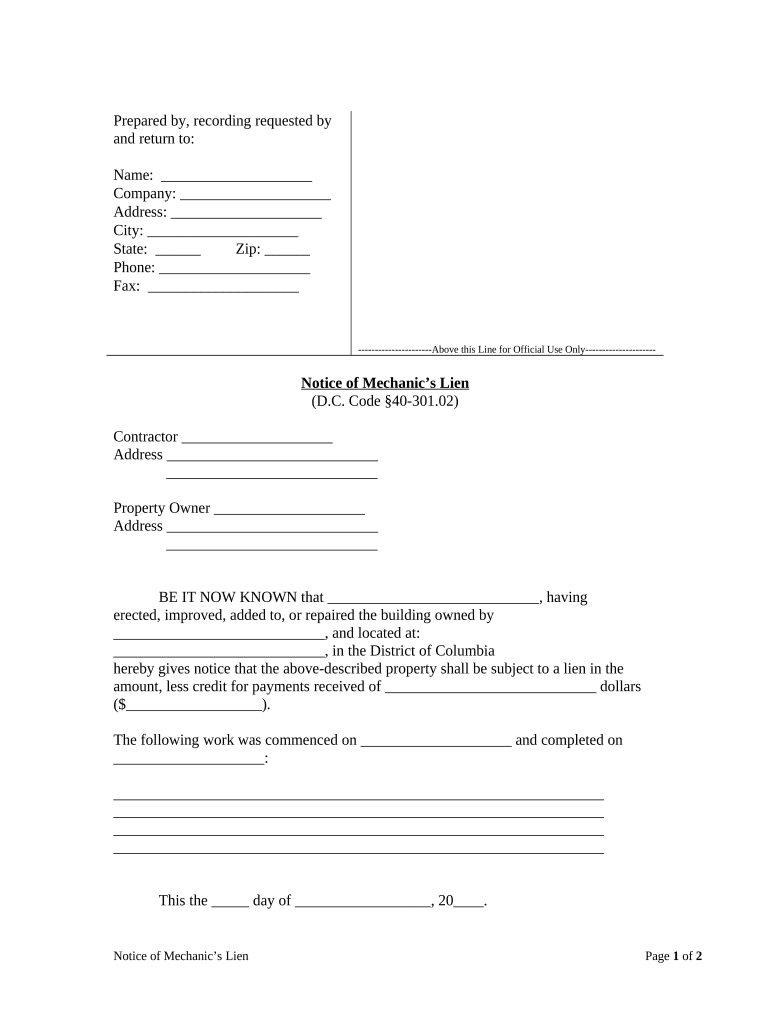
Begin by filling in your name, company, address, city, state, zip code, phone number, and fax number in the designated fields at the top of the form.
In the 'Notice of Mechanic’s Lien' section, enter the contractor's name and address. Ensure accuracy as this information is crucial for legal purposes.
Next, provide the property owner's name and address. This identifies who is responsible for the property related to the lien.
Fill in the details regarding the work performed: specify what improvements were made and include dates for when work commenced and was completed.
Indicate the lien amount after deducting any payments received. This should be clearly stated in dollars.
Finally, sign and print your name at the bottom of the form. If required, have a notarial officer acknowledge your signature.
Start using our platform today to fill out your dc claim form online for free!
Call (202) 715-3733 Contact DC-Net Support Services for: Trouble issues (24 hours a day, 7 days a week)
How to file a small claim in DC?
Cases must be filed by submitting forms called Statement of Claim and Information Sheet (see sample here) in the Small Claims Clerks Office. The Small Claims Clerks Office is located in Court Building B, 510 4th Street, NW, Room 120. The party who files the case is called the plaintiff.
How much will I get from DC unemployment?
AMOUNT OF MONEY RECEIVED WITH UI All claimants can receive a standard 26 weeks of benefits. The maximum weekly benefit amount you may receive is $444.
How do I file a complaint with DC?
Please contact the Consumer Mediation Program by submitting a complaint online at , call the Consumer Protection Hotline at 202.442. 9828, or email consumer.protection@dc.gov.
How do I file for DC weekly unemployment claim?
To docHub for benefits, you must file a weekly continued claim form online at does.dcnetworks.org, or by calling at (202) 724-7000.
A claim form is a formal written request to the government, an insurance company, or another organization for money that you think you are entitled to according to their rules.
What form is the DC refund request?
Residents of the District requesting refunds of income tax must file Form D-40.
How do I file a claim with DC networks?
To docHub for benefits, you must file a weekly continued claim form online at does.dcnetworks.org, or by calling at (202) 724-7000. Filing your claim form online or by phone is the fastest way to docHub for benefits.
dcnetworks org sign in
Dependent Care - How to File a Claim for Approval
Instructions to fill out this form: Complete ALL account holder information. Please give your employer name without abbreviation. Use your documentation toRead more
Please subpoena the witnesses below to appear before the Court on the date shown. (See Va. Code 17.1-617 regarding limitation on compensation ofRead more
Cookie consent notice
This site uses cookies to enhance site navigation and personalize your experience.
By using this site you agree to our use of cookies as described in our Privacy Notice.
You can modify your selections by visiting our Cookie and Advertising Notice.