Name Affidavit of Buyer - California 2026

Get Form
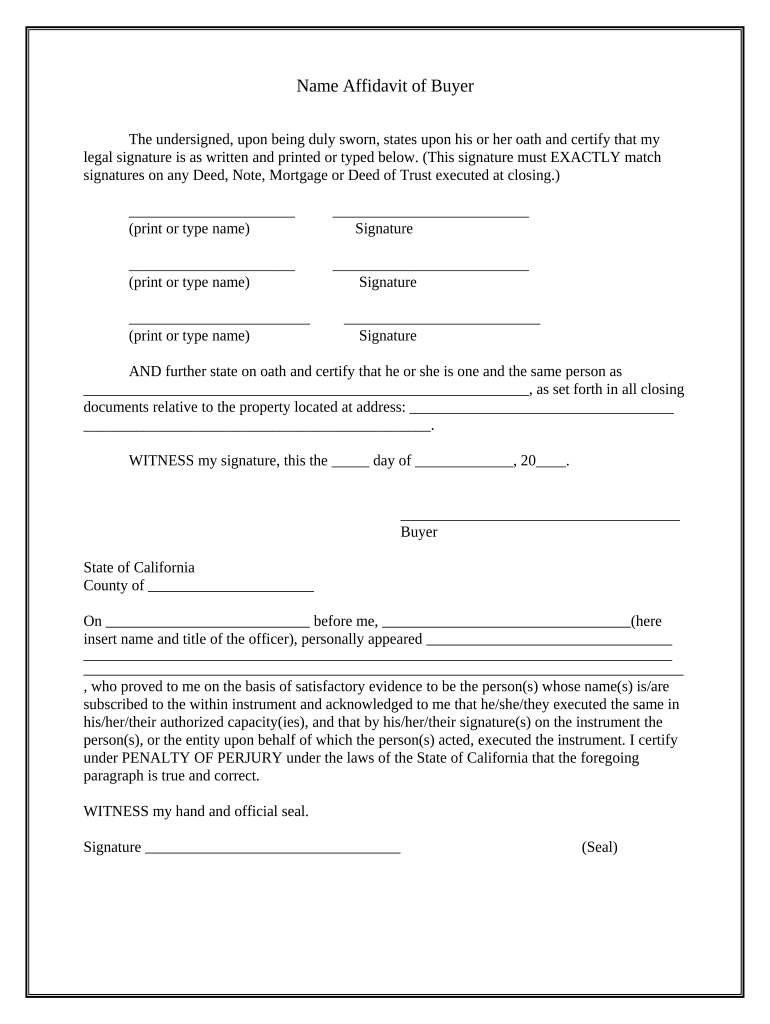
Name Affidavit of Buyer - California Preview on Page 1

Here's how it works

01. Edit your form online
Type text, add images, blackout confidential details, add comments, highlights and more.
02. Sign it in a few clicks
Draw your signature, type it, upload its image, or use your mobile device as a signature pad.
03. Share your form with others
Send it via email, link, or fax. You can also download it, export it or print it out.

How to use or fill out Name Affidavit of Buyer - California with DocHub

Form edit decoration
9.5
Ease of Setup
DocHub User Ratings on G2
9.0
Ease of Use
DocHub User Ratings on G2
  1. Click ‘Get Form’ to open it in the editor.
  2. Begin by entering your legal name in the first field. Ensure that it matches exactly with signatures on any related documents.
  3. Provide your signature in the designated area below your printed name. Repeat this process for each buyer listed on the affidavit.
  4. In the next section, state your full name as it appears in all closing documents related to the property. This is crucial for legal accuracy.
  5. Fill in the property address where indicated, ensuring all details are correct and complete.
  6. Finally, date the document and sign it before a notary public, who will also provide their signature and seal.

Start using our platform today to easily complete your Name Affidavit of Buyer - California for free!

be ready to get more

Complete this form in 5 minutes or less

Get form

Got questions?

We have answers to the most popular questions from our customers. If you can't find an answer to your question, please contact us.
Contact us
How to Write an Affidavit for Court: Step-by-Step Title Your Affidavit. Start with a title that identifies the purpose of the document, such as: Identify the Affiant. Write the Statement of Facts. Sign the Affidavit in the Presence of a Notary. Include the Notarys Certificate. Sample Affidavit for Family Court.
Although affidavits are considered legal documents, anyone can draft one. As long as it is signed, witnessed, and docHubd correctly, the affidavit will be valid. This means that you do not need to ask a lawyer to create an affidavit.
Each notarization of an affidavit must be logged with: Entry number. Date and time of notarization. Type of document docHubd (i.e., an affidavit) Name, address, and competent evidence of identity of the affiant. Signatures of the affiant and the notary public.
All affidavits must be sworn to be true under oath and, according to California law, this means you must have a notary publicor other agent certified by the state to administer oaths, such as a judgeexecute the affidavit.
0:33 3:41 However keep in mind that this amount does not include notoriization. Or any specialized legal helpMoreHowever keep in mind that this amount does not include notoriization. Or any specialized legal help which can increase the total cost docHubly.

Security and compliance

At DocHub, your data security is our priority. We follow HIPAA, SOC2, GDPR, and other standards, so you can work on your documents with confidence.

Learn more
ccpa2
pci-dss
gdpr-compliance
hipaa
soc-compliance