Financial Account Transfer to Living Trust - Alabama 2026

Get Form
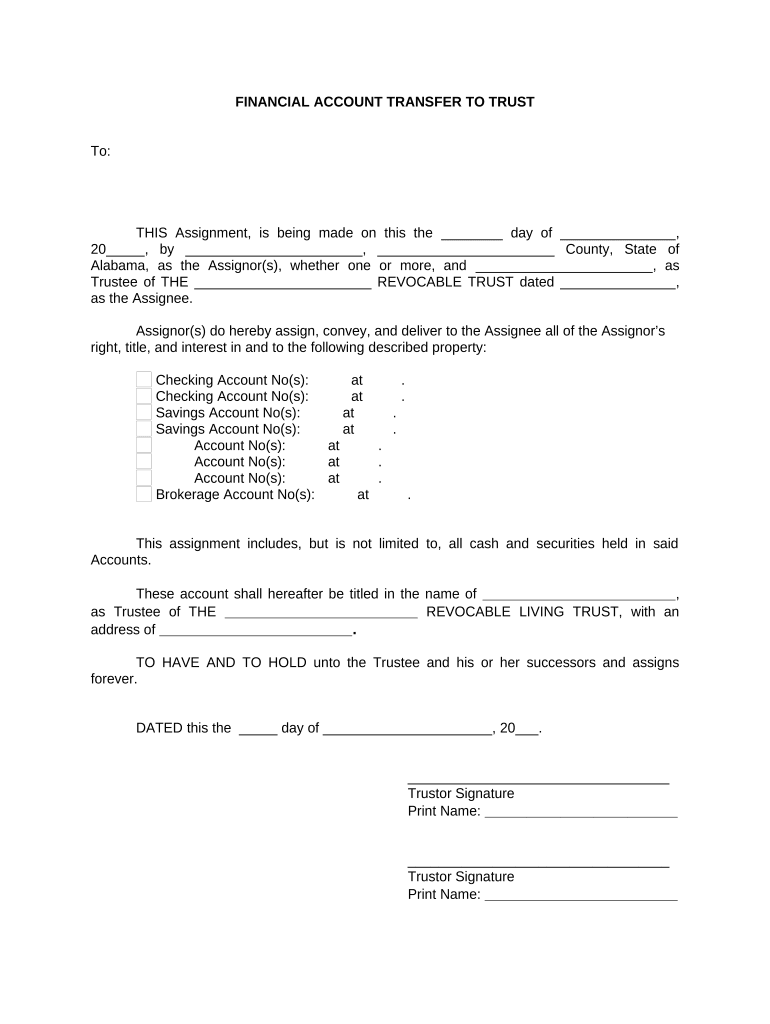
Financial Account Transfer to Living Trust - Alabama Preview on Page 1

Here's how it works

01. Edit your form online
Type text, add images, blackout confidential details, add comments, highlights and more.
02. Sign it in a few clicks
Draw your signature, type it, upload its image, or use your mobile device as a signature pad.
03. Share your form with others
Send it via email, link, or fax. You can also download it, export it or print it out.

How to use or fill out Financial Account Transfer to Living Trust - Alabama

Form edit decoration
9.5
Ease of Setup
DocHub User Ratings on G2
9.0
Ease of Use
DocHub User Ratings on G2
  1. Click ‘Get Form’ to open it in the editor.
  2. Begin by entering the date of the assignment in the designated field. This is crucial for legal documentation.
  3. Fill in your name as the Assignor(s) along with your county and state. Ensure accuracy to avoid any issues later.
  4. Specify the Trustee's name and the title of the Revocable Trust. This identifies who will manage the accounts moving forward.
  5. List all relevant account numbers, including checking, savings, and brokerage accounts. Be thorough to ensure all assets are transferred.
  6. Provide the new title for these accounts under the Trustee’s name and include their address for official records.
  7. Sign and print your name as Trustor at the bottom of the form. If there are multiple Assignors, ensure all signatures are included.
  8. Finally, a Notary Public must certify your signatures. Leave space for their signature and commission expiration date.

Start using our platform today to easily complete your Financial Account Transfer form online for free!

be ready to get more

Complete this form in 5 minutes or less

Get form

Got questions?

We have answers to the most popular questions from our customers. If you can't find an answer to your question, please contact us.
Contact us
Most banks prefer that you and your spouse come to a local branch of the bank and complete their trust transfer form. Typically this is a one or two page document that will ask you to list the name of your trust, the date of the trust and who the current trustees are.
A Trust keeps an account secure until the time comes for it to pay out to your Beneficiaries. You may use any or all of your accounts to fund your Trustchecking or savings accounts with banks, credit unions, and savings and loan associations.
Here are the cons: A living trust is more complex and typically more costly to set up, and you must retitle your assets in the name of the trust, which is also time-consuming. It doesnt offer any estate tax benefits or special asset protection.
When you create a living trust in Alabama, you pass your property outside of probate. This means there is no court process and no public record of what is in your trust or who you are giving it to, which can provide you and your beneficiaries with privacy.

Security and compliance

At DocHub, your data security is our priority. We follow HIPAA, SOC2, GDPR, and other standards, so you can work on your documents with confidence.

Learn more
ccpa2
pci-dss
gdpr-compliance
hipaa
soc-compliance
be ready to get more

Complete this form in 5 minutes or less

Get form