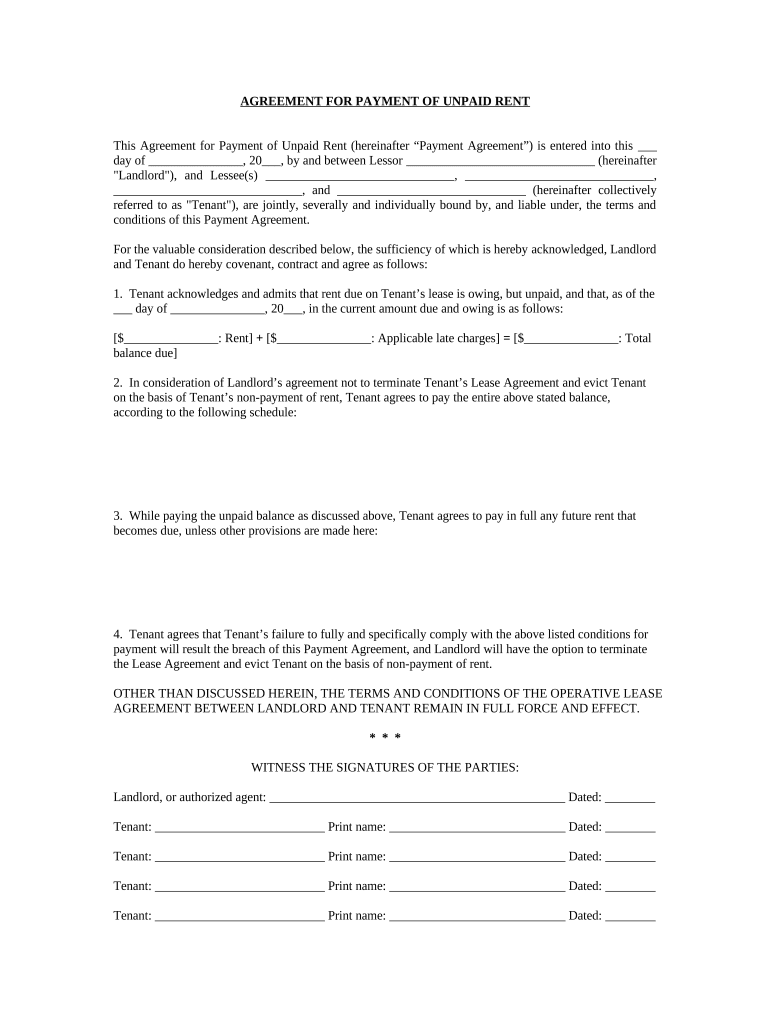
Agreement for Payment of Unpaid Rent - Alabama 2026

Get Form
past due rent payment plan agreement template Preview on Page 1

Here's how it works

01. Edit your past due rent payment plan agreement template online
Type text, add images, blackout confidential details, add comments, highlights and more.
02. Sign it in a few clicks
Draw your signature, type it, upload its image, or use your mobile device as a signature pad.
03. Share your form with others
Send rental payment agreement via email, link, or fax. You can also download it, export it or print it out.

How to use or fill out Agreement for Payment of Unpaid Rent - Alabama with our platform

Form edit decoration
9.5
Ease of Setup
DocHub User Ratings on G2
9.0
Ease of Use
DocHub User Ratings on G2
  1. Click ‘Get Form’ to open the Agreement for Payment of Unpaid Rent in the editor.
  2. Begin by entering the date at the top of the form where indicated. This is essential for establishing the timeline of your agreement.
  3. Fill in the names of both the Landlord and all Tenants in the designated fields. Ensure that all parties are accurately represented to avoid any legal issues.
  4. In Section 1, specify the total amount of unpaid rent and any applicable late charges. Clearly outline these figures to maintain transparency.
  5. For Section 2, detail the payment schedule agreed upon between Landlord and Tenant. This should include specific dates and amounts to be paid.
  6. Section 3 requires you to confirm that future rent payments will be made on time unless otherwise stated. Make sure this section reflects your intentions clearly.
  7. Review Section 4 carefully, as it outlines consequences for non-compliance with payment terms. Understanding this can help prevent misunderstandings later.
  8. Finally, ensure all parties sign and date the document at the bottom. This finalizes your agreement and makes it legally binding.

Start using our platform today to easily complete your Agreement for Payment of Unpaid Rent online, for free!

be ready to get more

Complete this form in 5 minutes or less

Get form

Got questions?

We have answers to the most popular questions from our customers. If you can't find an answer to your question, please contact us.
Contact us

Microsoft Word doesn’t have signing tools to generate legitimate eSignatures and enforceable paperwork. Luckily, DocHub is an online eSignature-compliant editor that supports various document formats, including .doc files. Log in to your account and upload the Word version of your late rent payment agreement template from your device and cloud, or URL - our editor will automatically turn it into an editable PDF. Make all required changes in your form and click Sign to generate your own legally-binding electronic signature. There are four signing options from which to choose.

When you edit your past due rent payment agreement with DocHub, you only need a stable internet connection and virtually any web browser installed on your device. No need to install any third-party applications or research tutorials. Simply open a tab with DocHub, drag and drop your file, and edit it on the spot.

While you can sue a tenant without a lease, there are a few things to consider before you proceed. First, tenants that do not have a written lease may still have docHub protection under the law. Second, it can be more difficult to argue and win your case without a written lease to refer to.
The Promise To Pay Rent Agreement is utilized when a tenant has fallen behind on rent payments or needs to establish a formal payment arrangement for future rent.
To write a past-due rent letter: State the tenants name and rental property address. Specify the overdue amount, original due date, and any applicable late fees. Provide a deadline for payment to avoid further action. Detail potential consequences for non-payment, such as legal action or eviction.

Security and compliance

At DocHub, your data security is our priority. We follow HIPAA, SOC2, GDPR, and other standards, so you can work on your documents with confidence.

Learn more
ccpa2
pci-dss
gdpr-compliance
hipaa
soc-compliance