Alabama tenant landlord 2026

Get Form
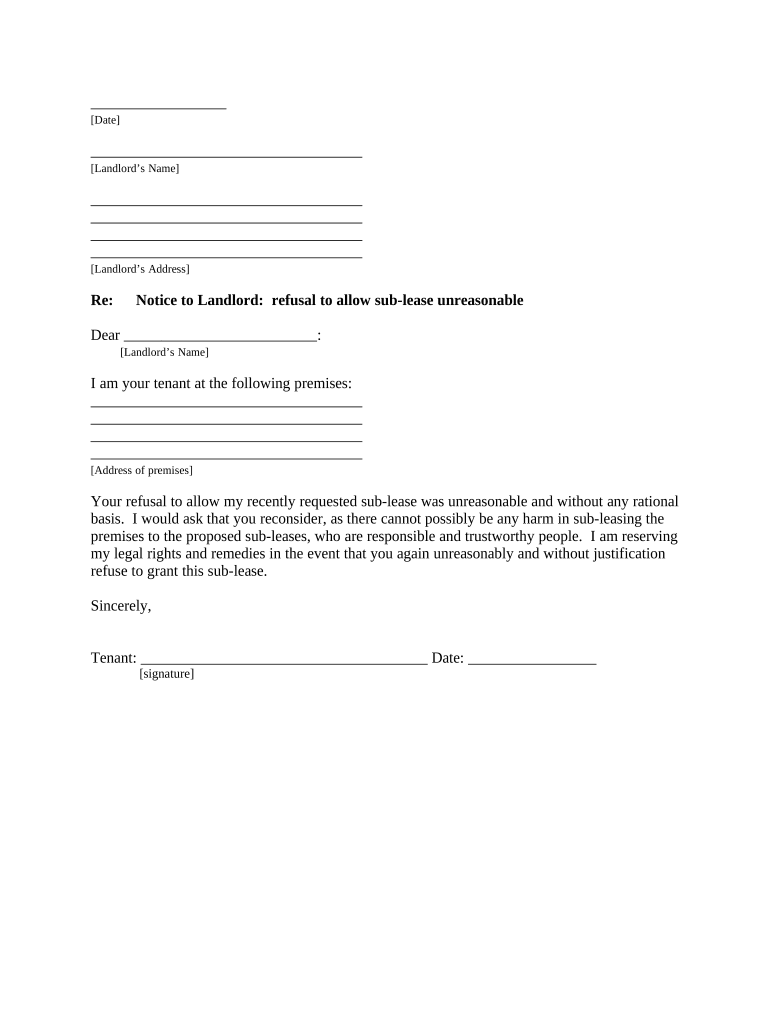
alabama tenant landlord Preview on Page 1

Here's how it works

01. Edit your form online
Type text, add images, blackout confidential details, add comments, highlights and more.
02. Sign it in a few clicks
Draw your signature, type it, upload its image, or use your mobile device as a signature pad.
03. Share your form with others
Send it via email, link, or fax. You can also download it, export it or print it out.

How to use or fill out Alabama Tenant Landlord Notice with Our Platform

Form edit decoration
9.5
Ease of Setup
DocHub User Ratings on G2
9.0
Ease of Use
DocHub User Ratings on G2
  1. Click ‘Get Form’ to open the Alabama Tenant Landlord Notice in the editor.
  2. Begin by entering the date at the top of the form. This is essential for record-keeping.
  3. Fill in the landlord’s name and address in the designated fields to ensure proper identification.
  4. In the greeting section, address your landlord directly by their name, maintaining a professional tone.
  5. Clearly state your premises address where you are currently residing as a tenant.
  6. Articulate your request regarding the sub-lease, emphasizing that it is reasonable and justified.
  7. Sign and date the document at the bottom to validate your notice formally.
  8. Select how you will deliver this notice to your landlord by checking one of the options provided under 'Proof of Delivery'.

Start using our platform today to easily complete and manage your tenant-landlord documents for free!

be ready to get more

Complete this form in 5 minutes or less

Get form

Got questions?

We have answers to the most popular questions from our customers. If you can't find an answer to your question, please contact us.
Contact us

Log in to your DocHub account and import your alabama tenant landlord to our editor using one of its upload methods - from your device, cloud storage, secure URL, or your DocHub folders if you have already managed your document before. Open our editor, click the Sign key in the top toolbar, and choose your signing method. You can use a picture of your handwritten signature, draw it, enter your name, or use a QR code as an alternative.

With a swift editing system like DocHub, you do not need anything but a browser and connection to the internet to modify your alabama tenant landlord on the internet easily. Add your file or find the relevant form in DocHub’s catalog, open our editor with one click, and complete it electronically. To revise your forms at any time, sign up a free account with DocHub.

Renters in Alabama have the right to a habitable living environment, protection against discrimination, and privacy. They are also entitled to the return of their security deposit within 35 days after vacating the property, minus any lawful deductions for damages or unpaid rent.
For yearly leases, a seven-day notice is required, while month-to-month leases or those without a formal agreement generally require a 30-day notice. If the tenant does not comply, the landlord may file an unlawful detainer lawsuit. This requires going to court to obtain an eviction order legally.
Alabama has attractive state laws for landlords. Property tax rates are among the lowest in the country. Landlords can raise the rent with a 30-day notice.

Security and compliance

At DocHub, your data security is our priority. We follow HIPAA, SOC2, GDPR, and other standards, so you can work on your documents with confidence.

Learn more
ccpa2
pci-dss
gdpr-compliance
hipaa
soc-compliance

People also ask

When the landlord wishes to end a month-to-month tenancy but doesnt have legal cause to evict the tenant, then the landlord can give the tenant a 30-day written notice to vacate. This notice must inform the tenant that the tenancy will expire in 30 days, and the tenant must move out of the rental unit by then.
Alabama remains one of the top landlord-friendly states in the country thanks to fast eviction timelines, no rent control, minimal regulatory interference, and very low property taxes.

Related links