Certification of Job Progress - Individual - Alaska 2026

Get Form
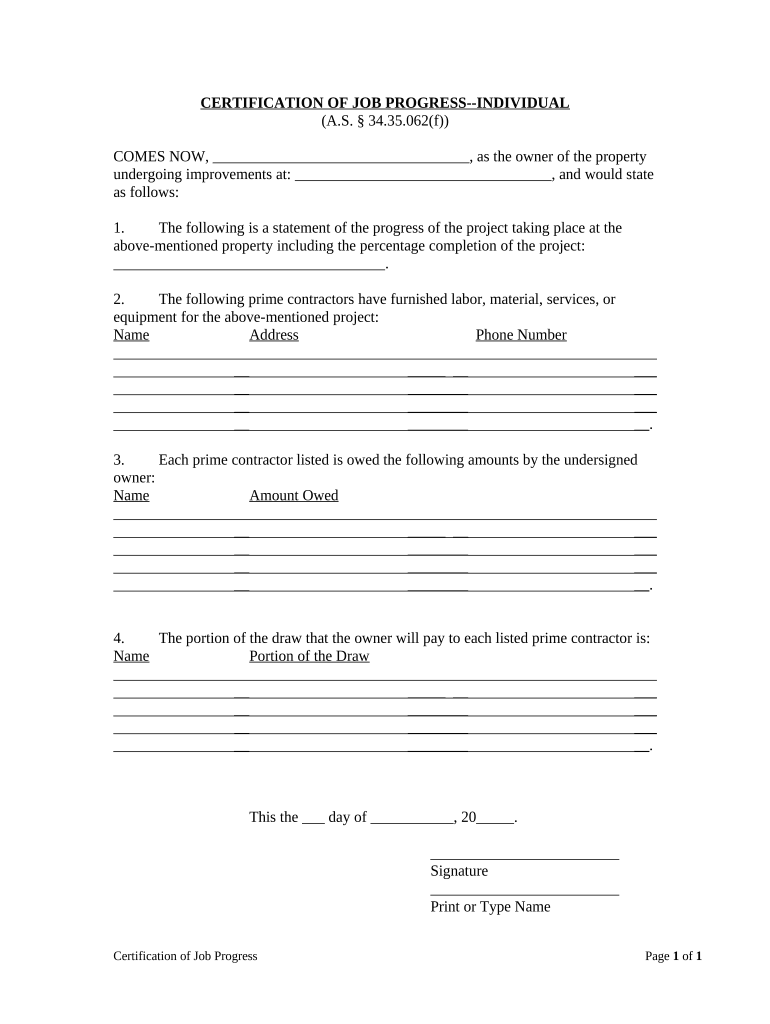
Certification of Job Progress - Individual - Alaska Preview on Page 1

Here's how it works

01. Edit your form online
Type text, add images, blackout confidential details, add comments, highlights and more.
02. Sign it in a few clicks
Draw your signature, type it, upload its image, or use your mobile device as a signature pad.
03. Share your form with others
Send it via email, link, or fax. You can also download it, export it or print it out.

How to use or fill out Certification of Job Progress - Individual - Alaska with our platform

Form edit decoration
9.5
Ease of Setup
DocHub User Ratings on G2
9.0
Ease of Use
DocHub User Ratings on G2
  1. Click ‘Get Form’ to open it in the editor.
  2. Begin by entering your name as the property owner in the first blank space provided. This identifies you as the individual responsible for the project.
  3. Next, fill in the address of the property undergoing improvements. This ensures clarity on where the project is taking place.
  4. In section one, provide a detailed statement regarding the progress of your project, including a percentage completion. This gives an overview of how far along you are.
  5. List all prime contractors who have contributed labor, materials, services, or equipment for your project in section two. Include their names, addresses, and phone numbers for easy reference.
  6. In section three, specify the amounts owed to each contractor listed previously. This helps maintain transparency regarding financial obligations.
  7. Finally, indicate how much of the draw will be paid to each contractor in section four. This clarifies payment distribution among contractors.
  8. Complete the form by signing and dating it at the bottom to validate your statements.

Start using our platform today to easily complete your Certification of Job Progress!

be ready to get more

Complete this form in 5 minutes or less

Get form

Got questions?

We have answers to the most popular questions from our customers. If you can't find an answer to your question, please contact us.
Contact us

Electronic signatures are an excellent replacement for traditional signing, as they save time, effort, and money people spend on printing, scanning, and paper delivery. You can electronically sign your Certification of Job Progress - Individual - Alaska utilizing a reliable and robust online document processing services like DocHub. It complies with primary eSignature regulations (ESIGN and UETA), so all forms approved there are legally binding and have the same validity as physically signed ones.

When you go for analog ways of completing your Certification of Job Progress - Individual - Alaska, you can easily download your file for printing. Search DocHub’s Forms & Templates catalog to locate the exact file template you need and open it for editing or download it on your gadget in the format of your choice. It is easy to complete your form electronically and put your handwritten signature on it after printing or eSign your file with DocHub.

Security and compliance

At DocHub, your data security is our priority. We follow HIPAA, SOC2, GDPR, and other standards, so you can work on your documents with confidence.

Learn more
ccpa2
pci-dss
gdpr-compliance
hipaa
soc-compliance