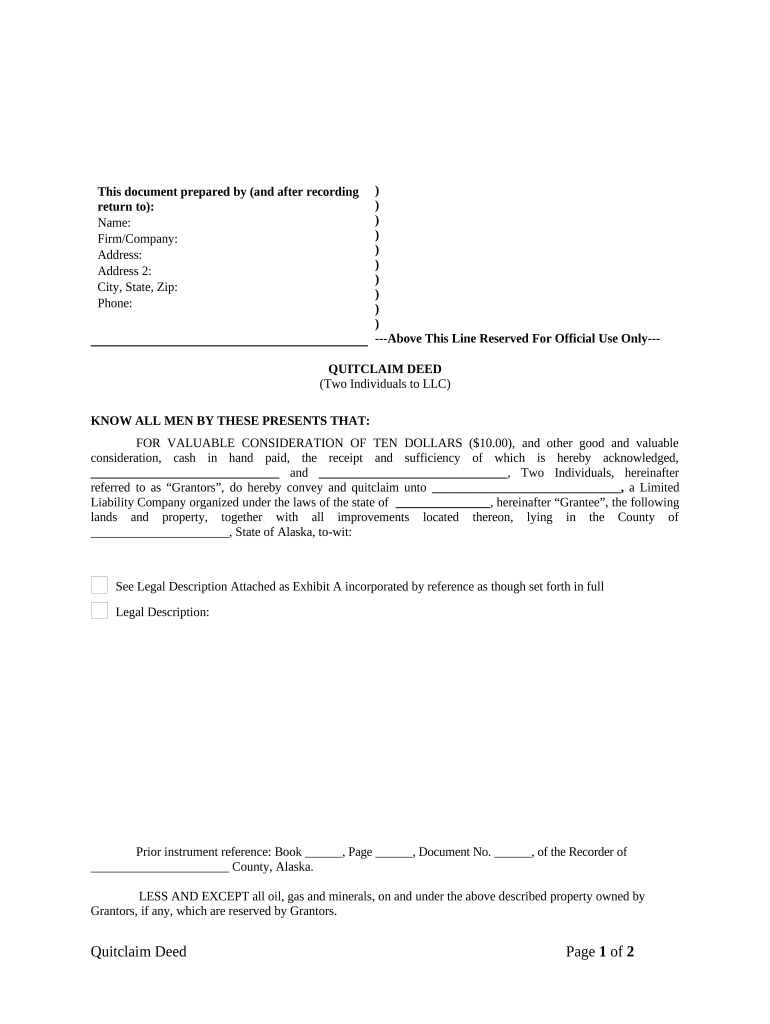
Quitclaim Deed by Two Individuals to LLC - Alaska 2026

Get Form
alaska quit claim deed form Preview on Page 1

Here's how it works

01. Edit your alaska quit claim deed form online
Type text, add images, blackout confidential details, add comments, highlights and more.
02. Sign it in a few clicks
Draw your signature, type it, upload its image, or use your mobile device as a signature pad.
03. Share your form with others
Send it via email, link, or fax. You can also download it, export it or print it out.

How to use or fill out Quitclaim Deed by Two Individuals to LLC - Alaska with our platform

Form edit decoration
9.5
Ease of Setup
DocHub User Ratings on G2
9.0
Ease of Use
DocHub User Ratings on G2
  1. Click ‘Get Form’ to open the Quitclaim Deed in the editor.
  2. Begin by filling in the 'Prepared by' section at the top. Enter your name, firm/company, address, city, state, zip code, and phone number.
  3. In the main body of the deed, identify the Grantors (the two individuals) by entering their names in the designated fields.
  4. Next, specify the Grantee by entering the name of the LLC and its state of organization.
  5. Provide a detailed legal description of the property being conveyed. If you have an attachment (Exhibit A), ensure it is referenced correctly.
  6. Fill in any prior instrument references if applicable, including book, page, and document numbers.
  7. Both Grantors must sign and print their names at the bottom of the form. Ensure that all signatures are dated appropriately.
  8. Complete the notary section by having a notary public acknowledge your signatures. Fill in their details as required.

Start using our platform today for free to complete your Quitclaim Deed efficiently!

be ready to get more

Complete this form in 5 minutes or less

Get form

Got questions?

We have answers to the most popular questions from our customers. If you can't find an answer to your question, please contact us.
Contact us
Failing to Verify the Titles Condition. One of the biggest mistakes people make when using a quitclaim deed is assuming that the propertys title is free and clear. A quitclaim deed transfers ownership, but it does not guarantee that the property is free from encumbrances such as liens, judgments, or unpaid taxes.
A quit claim deed to LLC transfers property ownership but does not guarantee the property is free from liens or encumbrances. LLCs provide liability protection for real estate owners, but transferring property using a quit claim deed does not remove personal liability from an existing mortgage.
How to File Step 1: Get a Copy of the Property Deed. Step 2: Identify Your DNR Recording District. Step 3: Complete the Document. Step 4: Sign the Quitclaim Form in the Presence of a Notary. Step 5: File the Deed With the Appropriate Recording District.
Yes. California LLC members can sell their ownership interests through either a partial transfer of just your interest or through a complete sale of the LLC. However, any other members in the LLC must agree to the transfer.
However, this approach has certain risks, so its not always the best option. Using a quitclaim deed might create tax issues or result in a loss of control of the property after the transfer. Additionally, the property could still require probate if you dont handle the transfer correctly.

Security and compliance

At DocHub, your data security is our priority. We follow HIPAA, SOC2, GDPR, and other standards, so you can work on your documents with confidence.

Learn more
ccpa2
pci-dss
gdpr-compliance
hipaa
soc-compliance

People also ask

A quitclaim deed is another type of deed that can be used to transfer property to an LLC. Unlike a warranty deed, a quitclaim deed does not provide any personal guarantee regarding the title or condition of the property. Instead, it transfers the interest or rights the seller has in the property to the buyer (the LLC).

Related links