Revocation of Stop Lending Notice by Corporation or LLC - Alaska 2026

Get Form
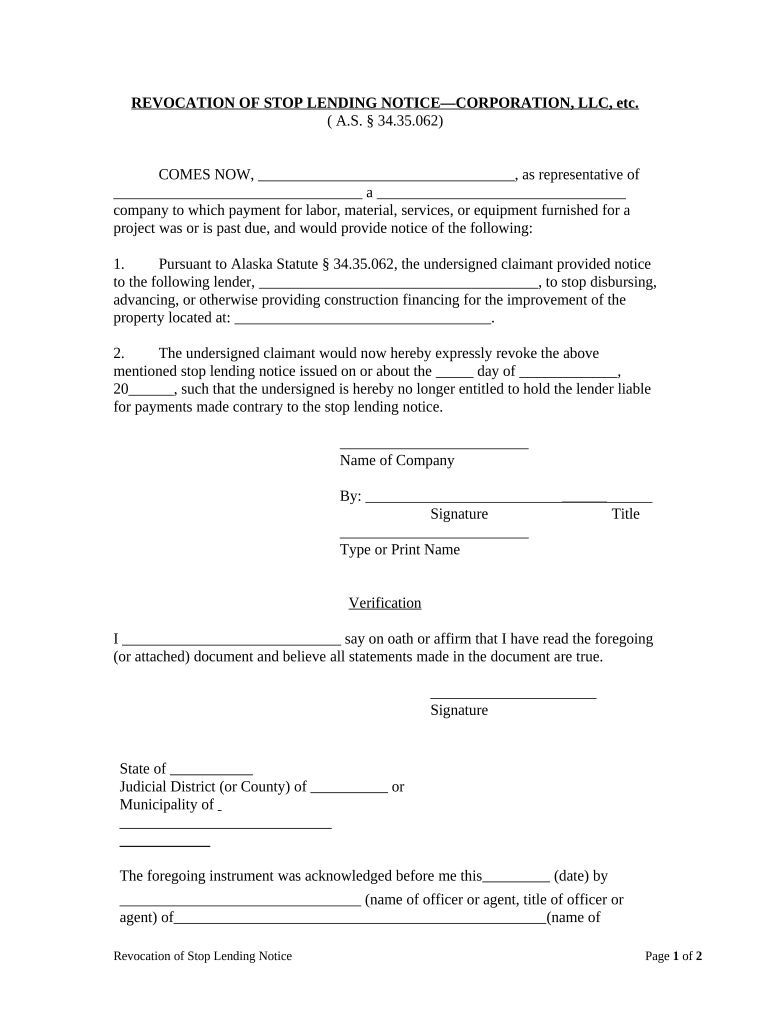
Revocation of Stop Lending Notice by Corporation or LLC - Alaska Preview on Page 1

Here's how it works

01. Edit your form online
Type text, add images, blackout confidential details, add comments, highlights and more.
02. Sign it in a few clicks
Draw your signature, type it, upload its image, or use your mobile device as a signature pad.
03. Share your form with others
Send it via email, link, or fax. You can also download it, export it or print it out.

How to use or fill out Revocation of Stop Lending Notice by Corporation or LLC - Alaska

Form edit decoration
9.5
Ease of Setup
DocHub User Ratings on G2
9.0
Ease of Use
DocHub User Ratings on G2
  1. Click ‘Get Form’ to open it in the editor.
  2. Begin by entering your name as the representative of the corporation or LLC in the first blank space. This identifies who is issuing the revocation.
  3. In the next section, provide the name of your company and its type (e.g., LLC, Corporation) to clarify which entity is involved.
  4. Fill in the lender's name who was previously notified to stop lending. This ensures that all parties are correctly identified.
  5. Specify the property location where construction financing was halted, ensuring accurate details for legal clarity.
  6. Indicate the date when the original stop lending notice was issued. This is crucial for legal records.
  7. Sign and print your name in the designated areas to validate your authority and acknowledgment of this document.
  8. Complete the verification section by affirming that all statements are true, followed by your signature.
  9. If required, have a notary public acknowledge your signature to add an extra layer of authenticity.
  10. Finally, certify delivery by filling out and signing the certificate of delivery section, indicating how you delivered this notice.

Start using our platform today to easily complete and manage your Revocation of Stop Lending Notice!

be ready to get more

Complete this form in 5 minutes or less

Get form

Got questions?

We have answers to the most popular questions from our customers. If you can't find an answer to your question, please contact us.
Contact us

Yes, it is possible with DocHub. This safe and compliant online editor features a phone-based signing option. When you log in to your DocHub account and import your Revocation of Stop Lending Notice by Corporation or LLC - Alaska to our editor, complete all necessary areas and use the Sign tool on the top barf. Click on Create your signature and select Phone from the available options. Here, you scan a QR code with your smartphone and draw your signature on your phone display, as you usually do when signing hard copies. If you access DocHub right from your mobile device, you can eSign your form by drawing your eSignature, adding its photo, or simply with a typed name.

If you store your paperwork in Google Drive, there is no need to download your Revocation of Stop Lending Notice by Corporation or LLC - Alaska on your computer and upload it back to our editor. A significantly simpler way is to install a browser extension created by DocHub to streamline this flow. The extension allows editing PDFs right in your browser. Alternatively, you can integrate your DocHub and Gmail accounts for more efficient modifying.

be ready to get more

Complete this form in 5 minutes or less

Get form