Type text, add images, blackout confidential details, add comments, highlights and more.
02. Sign it in a few clicks
Draw your signature, type it, upload its image, or use your mobile device as a signature pad.
03. Share your form with others
Send it via email, link, or fax. You can also download it, export it or print it out.
How to use or fill out Alaska Deed with our platform
Ease of Setup
DocHub User Ratings on G2
Ease of Use
DocHub User Ratings on G2
Click ‘Get Form’ to open the Alaska Deed in the editor.
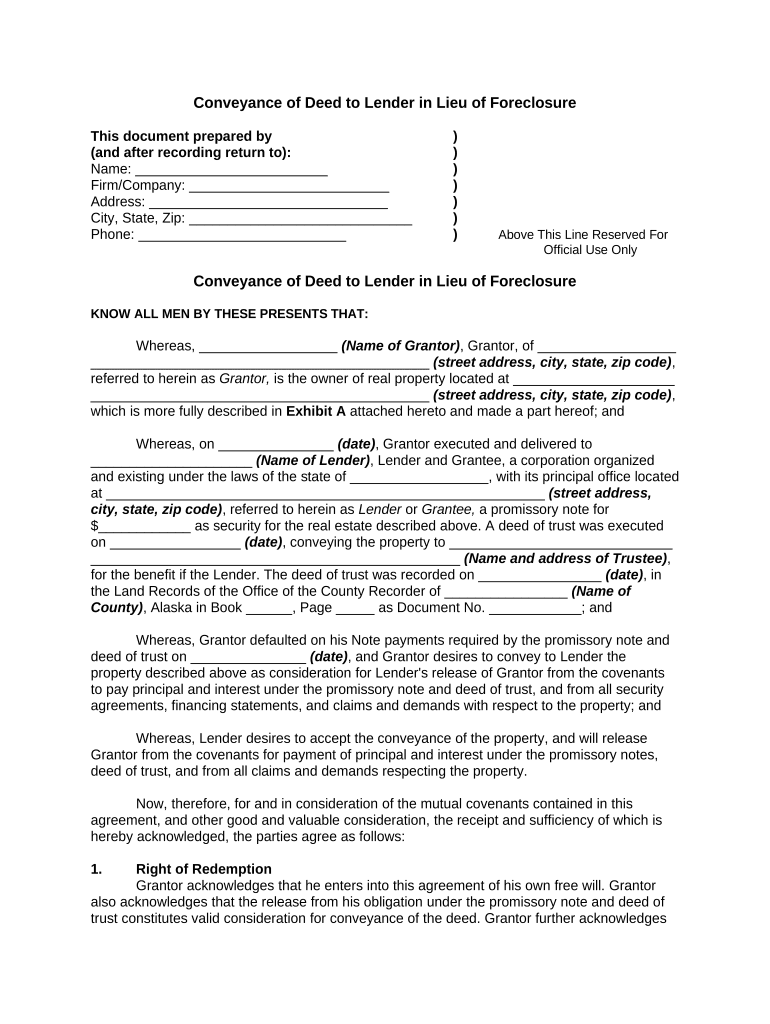
Begin by filling in your name, firm/company, address, city, state, and zip code at the top of the form. This information identifies you as the Grantor.
In the 'Whereas' section, enter the name of the Grantor and their property address. Ensure that all details are accurate for legal purposes.
Complete the sections regarding the Lender's information, including their name and address. This identifies who will receive the deed.
Fill in dates related to previous agreements and any relevant financial details such as amounts owed or agreed property value.
Review sections on rights of redemption and bankruptcy impact carefully; these are crucial for understanding your obligations.
Finally, ensure all parties sign where indicated and have their signatures notarized to validate the document legally.
Start using our platform today to streamline your Alaska Deed completion process for free!
Login Instructions: Applicant/Licensee. Enter your Username and Password, then select Login. First-time users must register to access the system.Read more
Once DEED processes your application, you will receive three copies of the Student-Teacher Authorization. Distribute these as follows: HR Office of the schoolRead more
Cookie consent notice
This site uses cookies to enhance site navigation and personalize your experience.
By using this site you agree to our use of cookies as described in our Privacy Notice.
You can modify your selections by visiting our Cookie and Advertising Notice.