Deed wife to 2026

Get Form
deed wife to Preview on Page 1

Here's how it works

01. Edit your form online
Type text, add images, blackout confidential details, add comments, highlights and more.
02. Sign it in a few clicks
Draw your signature, type it, upload its image, or use your mobile device as a signature pad.
03. Share your form with others
Send it via email, link, or fax. You can also download it, export it or print it out.

How to use or fill out deed wife to with our platform

Form edit decoration
9.5
Ease of Setup
DocHub User Ratings on G2
9.0
Ease of Use
DocHub User Ratings on G2
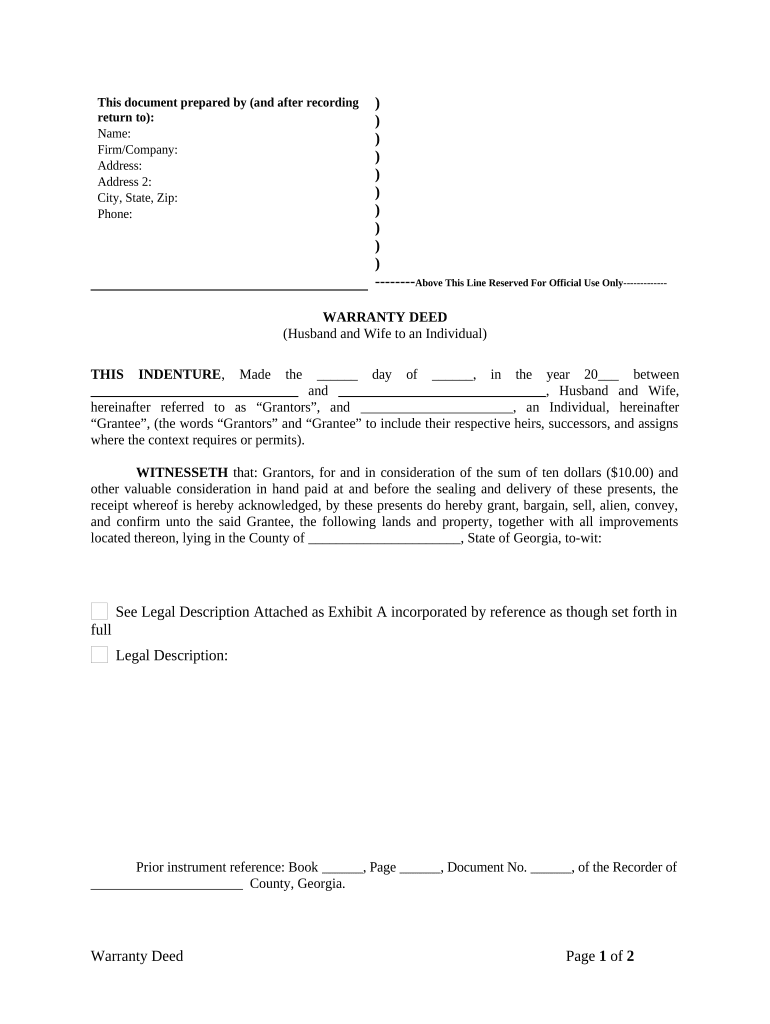
  1. Click ‘Get Form’ to open the deed wife to document in the editor.
  2. Begin by filling in the 'Prepared by' section with your name, firm/company, address, city, state, zip, and phone number.
  3. In the 'WARRANTY DEED' section, enter the date of execution and the names of both Grantors (Husband and Wife) as well as the Grantee (Individual).
  4. Provide a legal description of the property being conveyed. If you have an attached Exhibit A, ensure it is referenced correctly.
  5. Complete any prior instrument references if applicable, including book and page numbers.
  6. Sign and date the document in front of a witness and notary public. Ensure all signatures are clear and legible.
  7. Finally, review all entries for accuracy before saving or exporting your completed document.

Start using our platform today for free to streamline your document editing and signing process!

be ready to get more

Complete this form in 5 minutes or less

Get form

Got questions?

We have answers to the most popular questions from our customers. If you can't find an answer to your question, please contact us.
Contact us
At the time your quitclaim deed is recorded, you will need to pay a filing fee and any reassessed property taxes based on the change in ownership. The filing fee should be minimal, under $100, with most states charging under $50. The cost will depend upon your county and state.
You cant add a co-borrower without refinancing your mortgage. It allows you to change the terms of your home loan and add or remove names from mortgages. A mortgage can change the interest rate, payoff date, monthly payment, and name.
A declaration of trust is a simple form of trust deed, which records the actual beneficial ownership of a property, even if the legal title is held by one or both partners. A declaration of trust must be in writing, signed by all owners, and must reflect the actual intention of the parties.
Youll need to complete forms like the transfer form (TR1) and identity form (ID1), and if your home is leasehold or under a mortgage, obtaining the right permissions is essential. While you can handle it yourself, working with a solicitor often makes the process smoother and more efficient.
The good news is that yes, your spouse can add your name to the deed even if the mortgage is in their name only. However, there may be some regulations or requirements from the loan agreement that need to be followed, as it is common for banks to require notification and approval for changes in ownership.

Security and compliance

At DocHub, your data security is our priority. We follow HIPAA, SOC2, GDPR, and other standards, so you can work on your documents with confidence.

Learn more
ccpa2
pci-dss
gdpr-compliance
hipaa
soc-compliance

People also ask

For instance, if youre married, the most common way to title your home is Tenancy by the Entirety (TBE). That endows survivorship rights, some creditor protection, and allows for transfers only with the consent of both spouses.
You cant just add a name to an existing mortgage. Thats because mortgages are based on a borrowers credit, income, and debt. Adding someone new means adding new risk, so the lender must reassess everything, including credit scores, income, and more. That process requires refinancing.
Spouses can use a Deed of Assignment to share property income in a manner that suits their individual income tax position for the rental income and Capital Gains Tax or as part of Inheritance Tax planning.

Related links