Type text, add images, blackout confidential details, add comments, highlights and more.
02. Sign it in a few clicks
Draw your signature, type it, upload its image, or use your mobile device as a signature pad.
03. Share your form with others
Send it via email, link, or fax. You can also download it, export it or print it out.
How to use or fill out Florida Vacate with our platform
Ease of Setup
DocHub User Ratings on G2
Ease of Use
DocHub User Ratings on G2
Click ‘Get Form’ to open the Florida Vacate document in the editor.
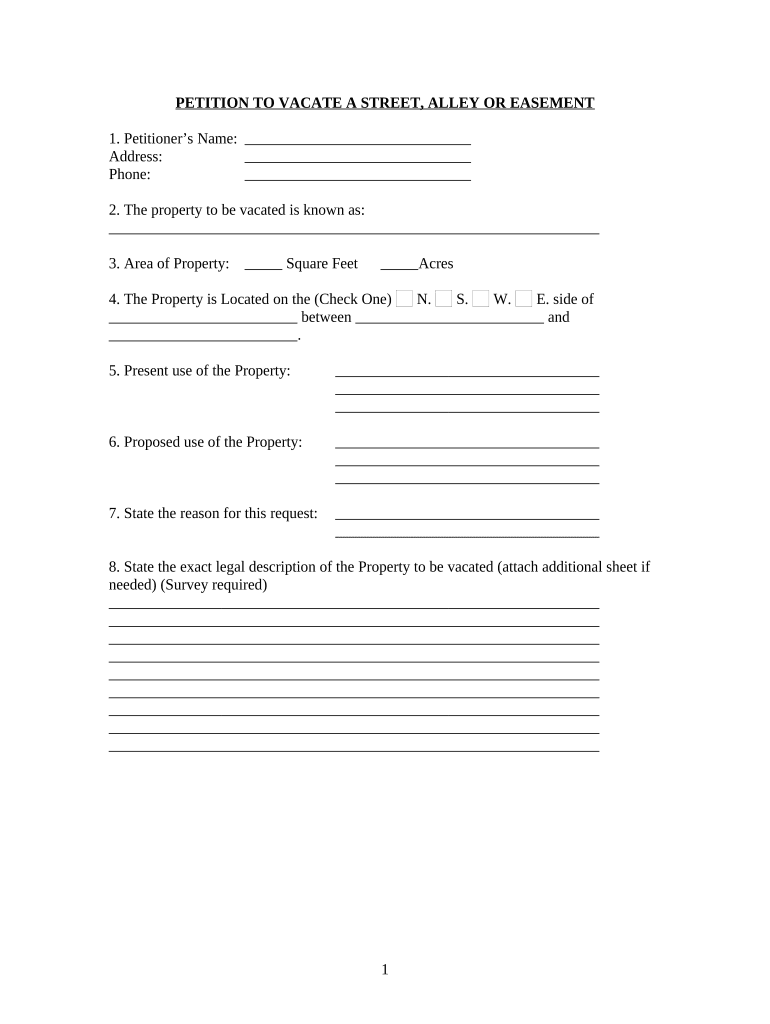
Begin by entering the Petitioner’s Name, Address, and Phone number in the designated fields. This information identifies who is requesting the vacate.
Specify the property to be vacated by filling in its known name and area in square feet or acres. This helps clarify what part of the property is under consideration.
Indicate the location of the property by checking the appropriate side (N, S, E, W) and providing details about nearby landmarks.
Describe both the present and proposed uses of the property. This section outlines how you intend to utilize the space after it has been vacated.
State your reason for this request clearly. Providing a solid rationale can strengthen your petition.
Attach a legal description of the property if necessary, ensuring all required documentation is included for review.
Start using our platform today to streamline your Florida Vacate form completion for free!
Notice to vacate Florida pdfFlorida notice to vacate no leaseNotice to Quit Florida7-day notice to cure Florida3 day eviction notice Florida template3-day notice FloridaFlorida Supreme Court Form 1.947(b) Answer--Residential Eviction7 day notice to cure FROM tenant to landlord
Security and compliance
At DocHub, your data security is our priority. We follow HIPAA, SOC2, GDPR, and other standards, so you can work on your documents with confidence.
the Court finds that one of the enumerated grounds apply to vacate an award, the Court has no authority to overturn an award. 130. VI. VOLUNTARY BINDINGRead more
Cookie consent notice
This site uses cookies to enhance site navigation and personalize your experience.
By using this site you agree to our use of cookies as described in our Privacy Notice.
You can modify your selections by visiting our Cookie and Advertising Notice.