Type text, add images, blackout confidential details, add comments, highlights and more.
02. Sign it in a few clicks
Draw your signature, type it, upload its image, or use your mobile device as a signature pad.
03. Share your form with others
Send it via email, link, or fax. You can also download it, export it or print it out.
How to use or fill out Florida Form Mechanic with Our Platform
Ease of Setup
DocHub User Ratings on G2
Ease of Use
DocHub User Ratings on G2
Click ‘Get Form’ to open the Florida Form Mechanic in the editor.
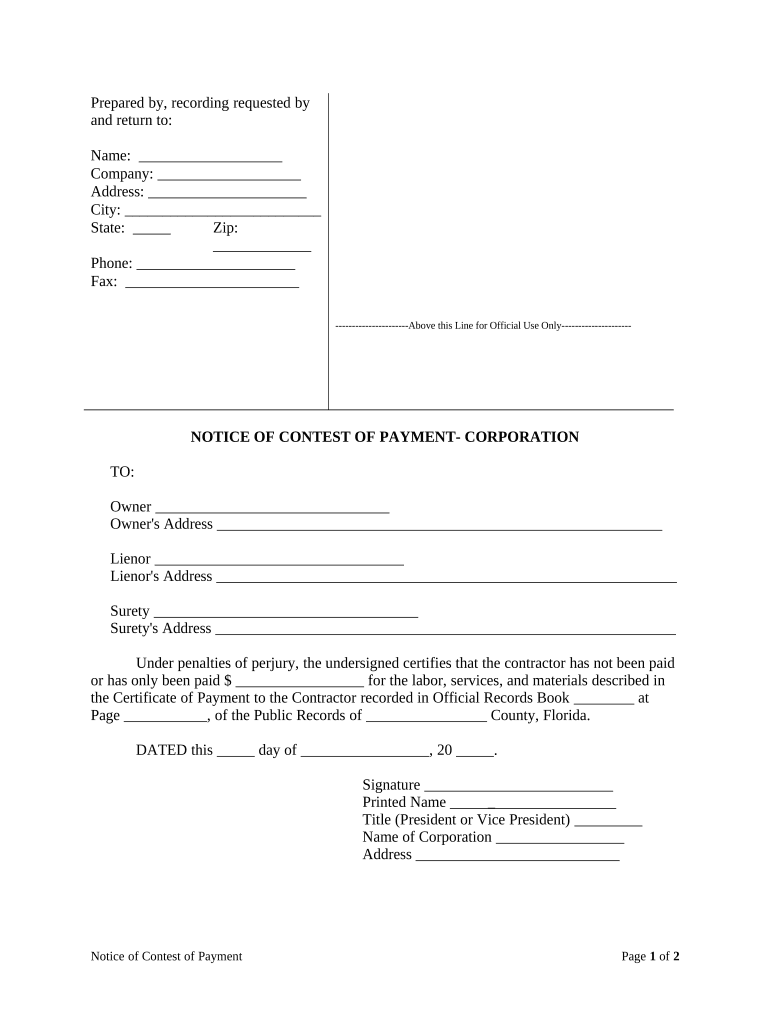
Begin by filling in your name, company, address, city, state, zip code, phone number, and fax number at the top of the form. Ensure all information is accurate for proper identification.
In the 'TO:' section, enter the owner's name and address. Follow this by providing the lienor's name and address as well.
Next, specify the surety's name and address. This information is crucial for legal purposes.
Indicate the amount that has been paid for labor, services, and materials in the designated field. Be precise to avoid any disputes.
Complete the date section and provide your signature along with your printed name and title. Make sure to include your corporation's name and address.
Finally, have a notary public witness your signature and complete their section before submitting the form.
Start using our platform today to easily fill out your Florida Form Mechanic for free!
Does Florida vehicle power of attorney need to be docHubd?
Section 709.2105(2), Florida Statutes, states: A power of attorney must be signed by the principal and by two subscribing witnesses and be acknowledged by the principal before a notary public or as otherwise provided in s. 695.03.
Does a Florida title transfer need to be docHubd?
Notarization is NOT required in the Transfer of Title by Seller section on the Florida title even if there is a place for notarization. Federal rule specifies that Odometer Disclosures for all non-exempt vehicles are to be made in the Transfer of Title by Seller section of the Florida Certificate of Title.
Does Florida Form 82053 need to be docHubd?
Steps to File a Mechanics Lien in Florida Serve a Notice to Owner (NTO) Ensure Compliance with Contractual Requirements. File the Mechanics Lien. Serve a Copy of the Lien. Enforce the Lien.
Does a contract need to be docHubd in Florida?
No, most business contracts in Florida do not require notarization to be legally binding. However, certain contracts, like real estate documents or specific financial agreements, may benefit from or require notarization for added legal protection.
Does a financial affidavit need to be docHubd in Florida?
You must file a completed, signed, docHubd financial affidavit. This is a rule of court. If you do not comply with this rule, you will be sanctioned.
Related Searches
Free florida form mechanicFlorida form mechanic pdfFlorida form mechanic requirementsFlorida form mechanic onlineFlorida form mechanic certificationFlorida form mechanic costFree printable auto repair estimate formAuto repair invoice PDF
Security and compliance
At DocHub, your data security is our priority. We follow HIPAA, SOC2, GDPR, and other standards, so you can work on your documents with confidence.
Enter a career in the transportation and logistics industry with our automotive service technology and mechanic school in Florida. Contact us to enroll!
Enter the name and address of the individual owner, or all general partners, or all corporate officers and directors. (Attach additional copies as needed usingRead more
Cookie consent notice
This site uses cookies to enhance site navigation and personalize your experience.
By using this site you agree to our use of cookies as described in our Privacy Notice.
You can modify your selections by visiting our Cookie and Advertising Notice.