Sample transmittal letter 2026

Get Form
transmittal letter Preview on Page 1

Here's how it works

01. Edit your transmittal letter online
Type text, add images, blackout confidential details, add comments, highlights and more.
02. Sign it in a few clicks
Draw your signature, type it, upload its image, or use your mobile device as a signature pad.
03. Share your form with others
Send example of transmittal letter via email, link, or fax. You can also download it, export it or print it out.

How to use or fill out sample transmittal letter with our platform

Form edit decoration
9.5
Ease of Setup
DocHub User Ratings on G2
9.0
Ease of Use
DocHub User Ratings on G2
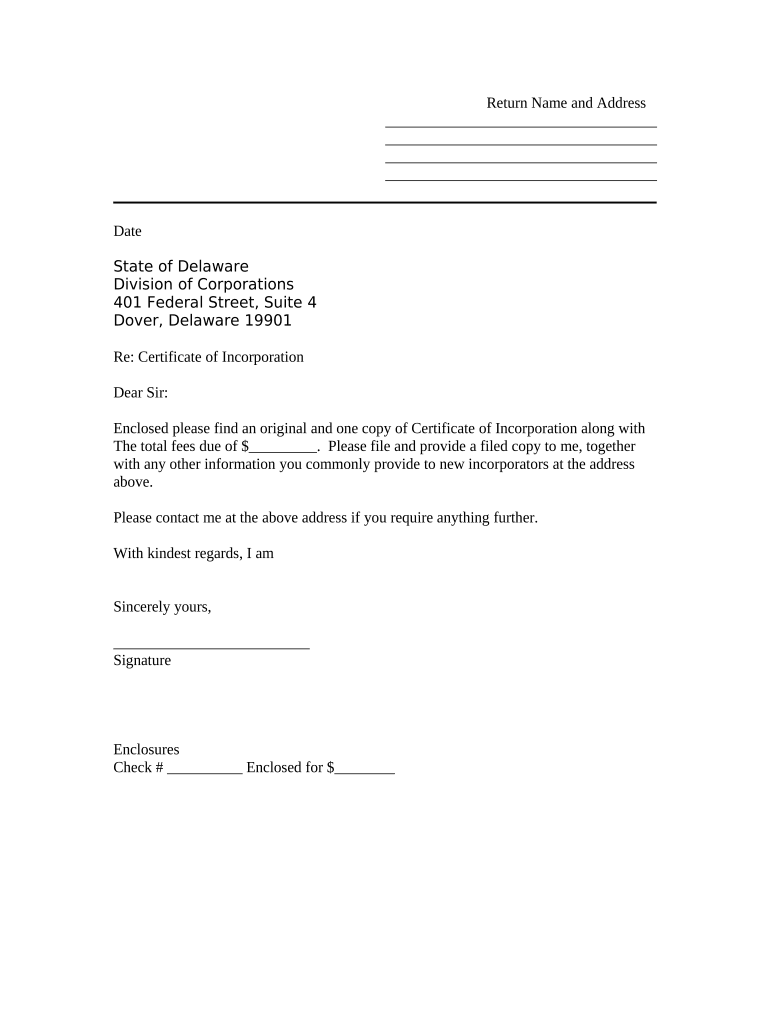
  1. Click ‘Get Form’ to open the sample transmittal letter in the editor.
  2. Begin by entering your name and address at the top of the document. This information is crucial as it identifies you as the sender.
  3. Next, input the date on which you are sending the letter. This helps establish a timeline for your correspondence.
  4. Fill in the recipient's details, including 'State of Delaware' and 'Division of Corporations', followed by their address. Ensure accuracy for proper delivery.
  5. In the body of the letter, specify that you are enclosing an original and one copy of the Certificate of Incorporation. Clearly state any fees due by filling in the blank provided.
  6. Conclude with your signature in the designated area, ensuring it reflects your official approval of the document.
  7. Lastly, if applicable, indicate any enclosures such as checks by filling in those fields before saving or sending your document.

Start using our platform today to streamline your document editing and signing process for free!

be ready to get more

Complete this form in 5 minutes or less

Get form

Got questions?

We have answers to the most popular questions from our customers. If you can't find an answer to your question, please contact us.
Contact us
How to write a letter of transmittal Include a heading with the date and recipients address. Include a heading with your full name and company address, located in the top left corner of the page. Greet the recipient appropriately. Write the letter body. Include a short closing paragraph.
How to Create a Transmittal Template The Recipients Information (Company, Name, Contact Info) The Senders Information (Company Branding, Name, Title, Contact Info, Address) Transmittal Information (Transmittal Number, Date, Purpose) Document List and Information (Filename/Description, Rev #, Rev Status)
A transmittal document is a packing slip for a document or collection of documents that are transferred from one company to another. The transmittal might be just the front page in an extensive document. But more often it is a separate document file that contains details of the documents that are sent.
A transmittal or cover letter accompanies a larger item, usually a document. The transmittal letter provides the recipient with a specific context in which to place the larger document and simultaneously gives the sender a permanent record of having sent the material.

Security and compliance

At DocHub, your data security is our priority. We follow HIPAA, SOC2, GDPR, and other standards, so you can work on your documents with confidence.

Learn more
ccpa2
pci-dss
gdpr-compliance
hipaa
soc-compliance