Type text, add images, blackout confidential details, add comments, highlights and more.
02. Sign it in a few clicks
Draw your signature, type it, upload its image, or use your mobile device as a signature pad.
03. Share your form with others
Send it via email, link, or fax. You can also download it, export it or print it out.
How to use or fill out show cause order with our platform
Ease of Setup
DocHub User Ratings on G2
Ease of Use
DocHub User Ratings on G2
Click ‘Get Form’ to open the show cause order in the editor.
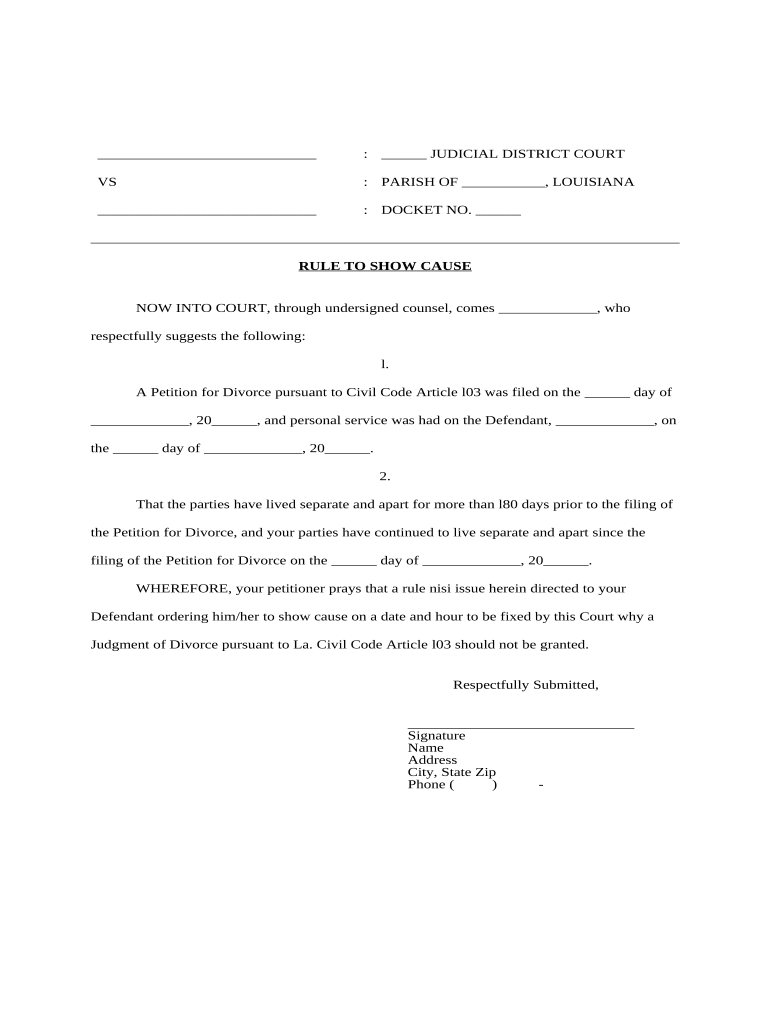
Begin by filling in the judicial district court and parish information at the top of the form. This identifies the court handling your case.
Enter the docket number, which is essential for tracking your case within the court system.
In the first section, provide details about the petition for divorce, including the date it was filed and confirmation of personal service on the defendant.
Indicate how long both parties have lived separately prior to filing. This is crucial for establishing grounds for divorce.
Complete the prayer section by requesting a rule nisi to be issued, specifying that you want a judgment of divorce granted.
Sign and print your name, address, and contact information at the bottom of the form to finalize your submission.
For the order section, specify when and where the defendant should appear in court to show cause regarding your request for divorce.
Start using our platform today to easily complete your show cause order online for free!
Show-cause order NCAAShow cause order child supportShow cause Order formWhat happens at an order to show Cause hearingWhat is an order to show cause in family courtMotion to show Cause exampleIs a show cause a warrantCan you go to jail at a show cause hearing
Security and compliance
At DocHub, your data security is our priority. We follow HIPAA, SOC2, GDPR, and other standards, so you can work on your documents with confidence.
A rule granted upon defendants as recited in said motion to show cause why a summary judgment of just compensation should not be entered in the sum of $ inRead more
This order supersedes the previous order issued by President Bush on March 25, 2003, EO 12958. EO 13526 directs that information should not be classifiedRead more
An order to show cause (OSC), is a court order or the demand of a judge requiring a party to justify or explain why the court should or should not grant aRead more
Cookie consent notice
This site uses cookies to enhance site navigation and personalize your experience.
By using this site you agree to our use of cookies as described in our Privacy Notice.
You can modify your selections by visiting our Cookie and Advertising Notice.