Rule show cause 2026

Get Form
rule show cause Preview on Page 1

Here's how it works

01. Edit your form online
Type text, add images, blackout confidential details, add comments, highlights and more.
02. Sign it in a few clicks
Draw your signature, type it, upload its image, or use your mobile device as a signature pad.
03. Share your form with others
Send it via email, link, or fax. You can also download it, export it or print it out.

How to use or fill out rule show cause with our platform

Form edit decoration
9.5
Ease of Setup
DocHub User Ratings on G2
9.0
Ease of Use
DocHub User Ratings on G2
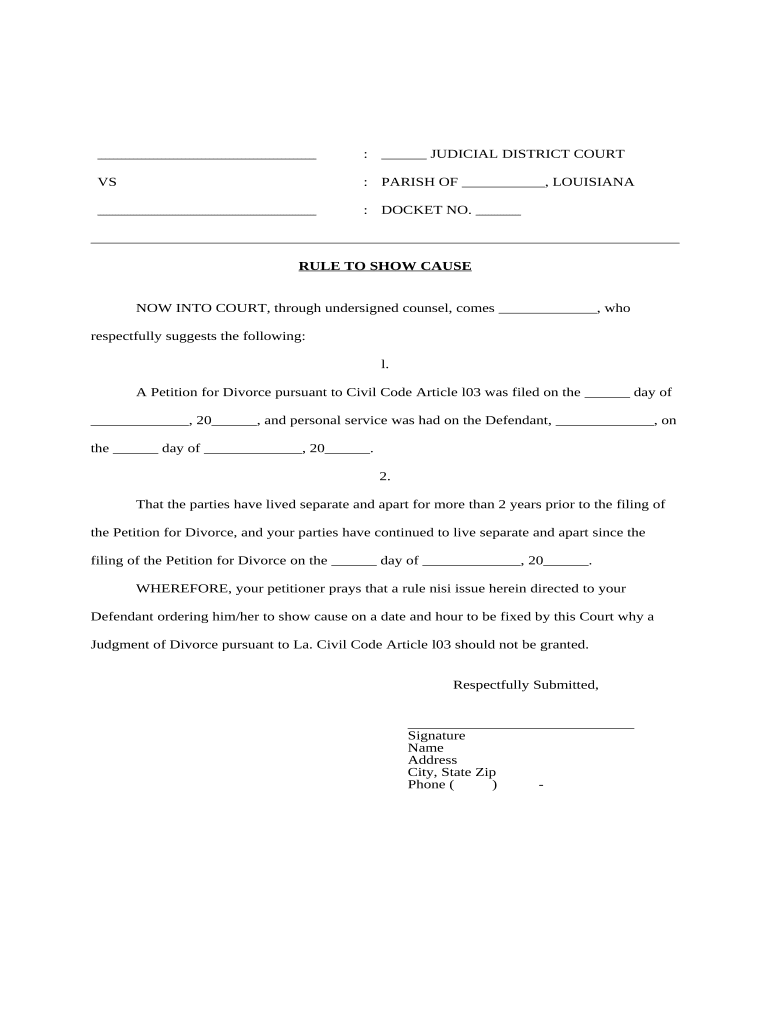
  1. Click ‘Get Form’ to open the rule show cause document in the editor.
  2. Begin by filling in the 'Judicial District Court' and 'Parish' fields at the top of the form. This identifies the court handling your case.
  3. Enter the 'Docket No.' assigned to your case, which is crucial for tracking purposes.
  4. In the first section, provide your name as the petitioner and fill in the date when you filed your Petition for Divorce.
  5. Indicate when personal service was completed on the Defendant by entering their name and service date.
  6. Next, confirm that you and your spouse have lived separately for over two years by filling in relevant dates.
  7. Complete the prayer section by specifying what you are requesting from the court regarding your divorce judgment.
  8. Finally, sign and provide your contact information at the bottom of the form before submitting it through our platform.

Start using our platform today to easily complete your rule show cause form online for free!

be ready to get more

Complete this form in 5 minutes or less

Get form

Got questions?

We have answers to the most popular questions from our customers. If you can't find an answer to your question, please contact us.
Contact us
Legal Consequences: Failure to respond to a Show Cause Order can result in serious legal consequences, including being held in contempt of court, fines, or other penalties. This underscores the seriousness of the order and the importance of compliance.
How to Fill Out an Order to Show Cause Write the county name. Write the Article for your case type: Write the name(s) of the petitioner(s). Write the name(s) of the respondent(s). Write the docket number, if it exists. Write your name. Write the date you signed the affidavit. Write the month you signed the affidavit.
Order Requiring Defendant to Appear and Show Why They Should Not be Held in Contempt.
It is mandatory that a Show Cause Notice (SCN) is issued if the department contemplates any action prejudicial to the assessee. The SCN would detail the provisions of law allegedly violated and ask the noticee to show cause why action should not be initiated against him under the relevant provisions of the Act/Rules.
A show cause is the opportunity to explain to the Judge why you are not doing as ordered.

Security and compliance

At DocHub, your data security is our priority. We follow HIPAA, SOC2, GDPR, and other standards, so you can work on your documents with confidence.

Learn more
ccpa2
pci-dss
gdpr-compliance
hipaa
soc-compliance

People also ask

Dear [Employee First Name], You have been interviewed on [Interview Date] in the presence of [Support Person] and you were provided with an opportunity to give your account. It was explained to you that your [Issue] does not meet [Company Name]s acceptable standards of [Policy].
An order to show cause is a court order that requires one or more of the parties to a case to justify, explain, or prove something to the court. Courts commonly use orders to show cause when the judge needs more information before deciding whether or not to issue an order requested by one of the parties.
An order to show cause (O.S.C.), is a court order or the demand of a judge requiring a party to justify or explain why the court should or should not grant a motion or a relief. For example, if a party requests a restraining order from a judge, the judge may need more information.

Related links