Judgment custody 2026

Get Form
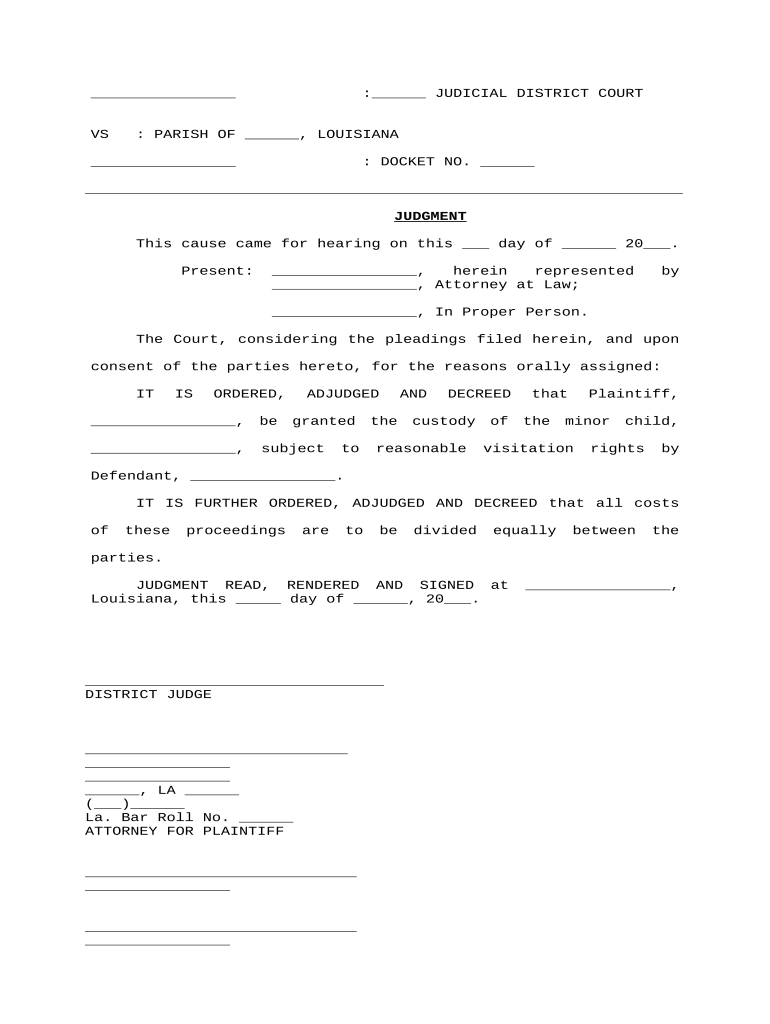
judgment custody Preview on Page 1

Here's how it works

01. Edit your form online
Type text, add images, blackout confidential details, add comments, highlights and more.
02. Sign it in a few clicks
Draw your signature, type it, upload its image, or use your mobile device as a signature pad.
03. Share your form with others
Send it via email, link, or fax. You can also download it, export it or print it out.

How to use or fill out judgment custody with our platform

Form edit decoration
9.5
Ease of Setup
DocHub User Ratings on G2
9.0
Ease of Use
DocHub User Ratings on G2
  1. Click ‘Get Form’ to open the judgment custody document in the editor.
  2. Begin by filling in the judicial district court and parish information at the top of the form. This sets the context for your custody judgment.
  3. Enter the docket number, which is essential for tracking your case within the court system.
  4. In the section labeled 'Present', list the names of all parties involved, including attorneys if applicable. This ensures clarity on who is represented.
  5. Fill in the date of hearing where indicated. This is crucial for establishing when the judgment was rendered.
  6. Clearly state who is granted custody of the minor child and specify any visitation rights for the other party. This section outlines parental responsibilities.
  7. Finally, ensure that all signatures are completed at the bottom of the form, including that of the district judge and attorney for plaintiff, if applicable.

Start using our platform today to easily complete your judgment custody form online for free!

be ready to get more

Complete this form in 5 minutes or less

Get form

Got questions?

We have answers to the most popular questions from our customers. If you can't find an answer to your question, please contact us.
Contact us
A judgment is a decision of the court that orders a person to do something, which is typically paying money to another person. Common examples of money judgments include Orders for Judgment from Conciliation Court and Orders for Restitution from criminal cases.
States the defendants plea, a jurys verdict or the courts findings, the adjudication, and the sentence imposed by the court.
Focus on how you provide for your children, how much time you spend with them, and how involved you have been throughout their lives, rather than bashing the other parent. Be prepared to answer a lot of basic questions such as your childrens clothing sizes, the names of their teachers, what their preferences are, etc.

Security and compliance

At DocHub, your data security is our priority. We follow HIPAA, SOC2, GDPR, and other standards, so you can work on your documents with confidence.

Learn more
ccpa2
pci-dss
gdpr-compliance
hipaa
soc-compliance
be ready to get more

Complete this form in 5 minutes or less

Get form