Name Affidavit of Seller - Kentucky 2026

Get Form
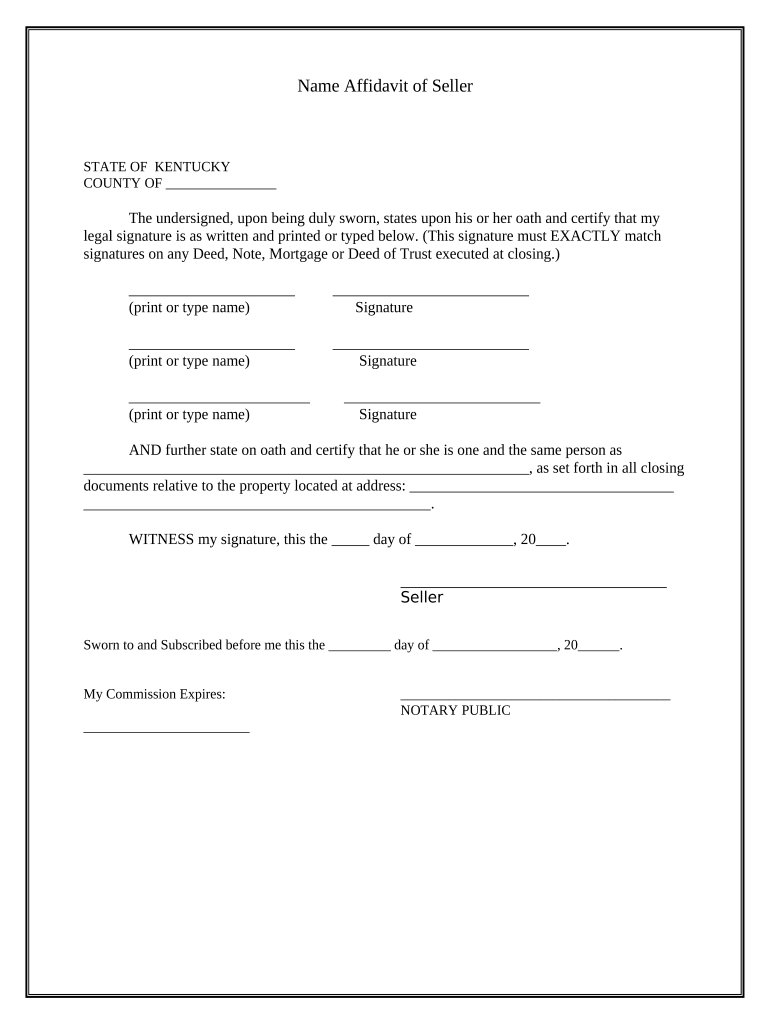
Name Affidavit of Seller - Kentucky Preview on Page 1

Here's how it works

01. Edit your form online
Type text, add images, blackout confidential details, add comments, highlights and more.
02. Sign it in a few clicks
Draw your signature, type it, upload its image, or use your mobile device as a signature pad.
03. Share your form with others
Send it via email, link, or fax. You can also download it, export it or print it out.

How to use or fill out Name Affidavit of Seller - Kentucky with our platform

Form edit decoration
9.5
Ease of Setup
DocHub User Ratings on G2
9.0
Ease of Use
DocHub User Ratings on G2
  1. Click ‘Get Form’ to open the Name Affidavit of Seller - Kentucky in the editor.
  2. Begin by entering the county name in the designated field at the top of the form.
  3. In the first section, print or type your legal name exactly as it appears on any related documents. This is crucial for consistency.
  4. Next, provide your signature in the space provided. Ensure that this signature matches those on any Deed, Note, Mortgage, or Deed of Trust executed at closing.
  5. Repeat steps 3 and 4 for any additional sellers listed on the affidavit.
  6. In the following section, state your full name again as it relates to all closing documents concerning the property.
  7. Fill in the property address where indicated to ensure clarity regarding which property this affidavit pertains to.
  8. Finally, date and sign at the bottom of the form before a Notary Public who will also complete their section.

Start using our platform today to easily fill out and manage your Name Affidavit of Seller - Kentucky for free!

be ready to get more

Complete this form in 5 minutes or less

Get form

Got questions?

We have answers to the most popular questions from our customers. If you can't find an answer to your question, please contact us.
Contact us
In circumstances where you are required to provide a bill of sale, you must provide a docHubd copy to the Commonwealth of Kentucky. Its always a good idea to make copies of bills of sale for buyers and sellers, as well.
What paperwork do I need to privately sell a car in Kentucky? Selling a car in Kentucky is a fairly straightforward process and only requires the following documents: Vehicle certificate of title. Application for Kentucky Certificate of Title or Registration (Form TC96-182) may be required for older titles prior to
AFFIDAVIT IN AID OF TITLE This document is filed to clear up a problem in the chain of title. Document must have signature of the Affiant (KRS 382.135), signature docHubd (KRS 382.130), preparation statement (KRS 382.335) and return mail address (KRS 382.335 KRS 382.240).
The Title and VTR may be completed and docHubd outside the County Clerks Office. In such cases anyone may bring the paperwork in for processing. If the buyer or sellers signature is docHubd by the County Clerks Office, the person must appear in person with a valid Kentucky I.D.
KENTUCKY CITIZEN TO KENTUCKY CITIZEN The buyer takes the signed title, proof of Kentucky Insurance, proof of Identification, and money for fees and applicable taxes to their local County Clerks office for transfer. Older Titles before 2000 may require a completed TC96-182​ to complete the transfer process.

Security and compliance

At DocHub, your data security is our priority. We follow HIPAA, SOC2, GDPR, and other standards, so you can work on your documents with confidence.

Learn more
ccpa2
pci-dss
gdpr-compliance
hipaa
soc-compliance

People also ask

7 Ways to Protect Yourself When Selling a Car Privately Screen Callers Thoroughly. Take Precautions With the Test Drive. Ensure a Safe Transaction. Maintain a Paper Trail. Block out Your Personal Information. Complete the Title Transfer. How to Avoid Scams and Fraud When Selling Your Car Privately.
Person to Person Transfer of a Kentucky Titled Vehicle The back of the title must be completed in its entirety. Must include: current mileage, the sale price, complete addresses, SSN for buyer(s), buyer(s)s birth month. The seller(s) and the buyer(s) must sign and have their signature docHubd.

Related links