




01. Edit your 5000a form online
Type text, add images, blackout confidential details, add comments, highlights and more.

Type text, add images, blackout confidential details, add comments, highlights and more.

Draw your signature, type it, upload its image, or use your mobile device as a signature pad.

Send form 5000a via email, link, or fax. You can also download it, export it or print it out.
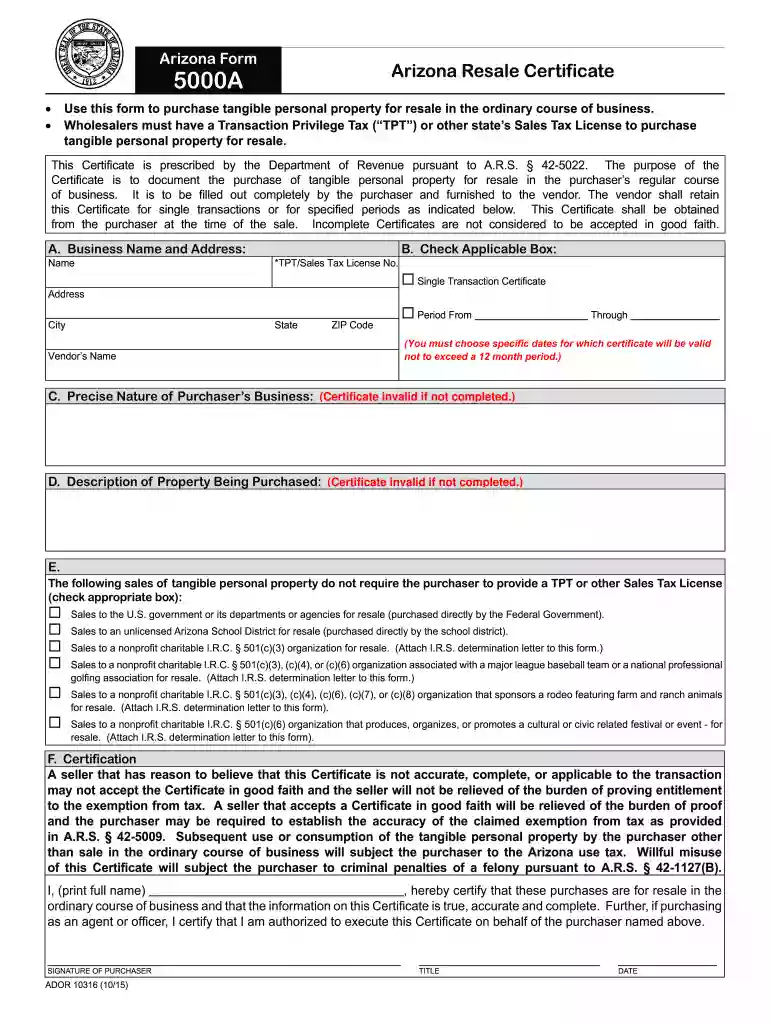
The Arizona Form 5000A, commonly known as the Arizona Tax Exempt Certificate, is designed for businesses to make tax-exempt purchases or sales transactions in Arizona. It serves as a declaration of tax-exempt status, allowing qualified entities, such as nonprofit organizations and government agencies, to acquire tangible personal property without paying sales tax. Understanding the purpose of this form is crucial for businesses seeking to optimize their tax obligations when purchasing goods for resale or use in exempt activities.
Form 5000A is crucial for both buyers and sellers in ensuring compliance with Arizona tax regulations. By filling out this form, the purchaser asserts that the transaction in question is exempt from sales tax based on the current tax statutes. Misuse of the form, such as claiming tax-exempt status when not eligible, can lead to severe penalties, including potential criminal charges.
Using the Arizona Form 5000A effectively requires understanding its function and the correct process for filling it out. This form is mainly utilized by entities that qualify for tax-exempt status. Here’s how to use it:
Identify Eligibility: Confirm that your business qualifies for tax-exempt status under Arizona law. Commonly eligible entities include nonprofit organizations, government bodies, and certain educational institutions.
Obtain the Form: The Arizona Form 5000A can be downloaded from the Arizona Department of Revenue's website or other reliable sources.
Complete Necessary Information: Fill out sections that include the purchaser's name, address, and details about the tax-exempt status. You will need to specify the type of exemption being claimed.
Provide Vendor Information: Include the seller's name and address. This information helps the seller verify that the exemption applies to the transaction in question.
Sign and Date: Both the purchaser and seller must sign the form, thereby affirming the validity of the documented claim and understanding their responsibilities regarding the transaction.
Proper usage ensures compliance and avoids unnecessary tax liabilities.
Completing the Arizona Form 5000A properly requires careful attention to detail. The following steps outline the process:
Download the Form: Access the Arizona Department of Revenue's website to obtain the up-to-date version of Form 5000A.
Enter Purchaser Information:
Tax-Exempt Status Identification:
Vendor Details:
Description of Goods/Services: Clearly describe the items that will be bought tax-free. This part should include the nature of goods or services and the purpose for which they will be used.
Signature Section: Both parties must sign and date the form, serving as a formal acknowledgment of the exemption status.
By following these steps systematically, businesses can ensure they meet the requirements set forth by the Arizona Department of Revenue while leveraging their tax-exempt status effectively.
Understanding important terms associated with the Arizona Form 5000A can facilitate compliance and proper use. Here are key definitions:
Tax-Exempt Status: This refers to the designation that allows qualifying organizations to purchase goods or services without incurring sales tax.
Purchaser: The entity or individual purchasing the goods or services under tax-exempt status.
Vendor: The seller or supplier providing the goods or services to the purchaser, responsible for validating the tax-exempt claim.
Exemption Certificate: A formal document that proves the purchaser's tax-exempt status, which includes the Form 5000A.
Sales Tax: A tax imposed by the state on the sale of goods and services, typically collected by the vendor at the point of sale.
Familiarity with these terms is vital for completing the form accurately and navigating tax-exemption claims in Arizona.
The Arizona Form 5000A includes several essential components that must be correctly filled out to maintain its validity. These elements include:
Purchaser Information:
Vendor Information:
Description of Goods/Services:
Exemption Clauses:
Signatures:
Each of these elements plays a critical role in the acceptance and verification of the exemption during sales transactions in Arizona, ensuring compliance with tax regulations.
Understanding the practical application of the Arizona Form 5000A can help entities leverage their tax-exempt status effectively. Here are common scenarios where the form may be utilized:
Nonprofit Organization Purchases: A nonprofit organization buys office supplies for its operations. By presenting the 5000A form to the vendor, the organization can purchase these items without incurring sales tax, aiding in maximizing available funds for charitable activities.
Government Purchases: A city government entity is acquiring new computers for public use. The form is filled out and shown to the vendor to ensure that sales tax is not applied to the transaction, thus saving taxpayer money.
Educational Institutions: A school district purchases educational materials from a supplier. They provide the completed Arizona Form 5000A to claim their tax-exempt status, ensuring that funds allocated for educational materials are used efficiently.
These examples illustrate how the Arizona Form 5000A can be applied in real-world transactions to maximize efficiency and compliance with state tax laws.
We've got more versions of the 5000a form form. Select the right 5000a form version from the list and start editing it straight away!
At DocHub, your data security is our priority. We follow HIPAA, SOC2, GDPR, and other standards, so you can work on your documents with confidence.
Arizona Form. 5000A. Arizona Resale Certificate. This Certificate is prescribed by the Department of Revenue pursuant to A.R.S. 42-5022. The purpose of the.Read more
Overview. The MULTI 9 modular system of miniature circuit breakers and supplementary protectors, accessories, and peripherals is ideal for use by OEMs toRead more


