Type text, add images, blackout confidential details, add comments, highlights and more.
02. Sign it in a few clicks
Draw your signature, type it, upload its image, or use your mobile device as a signature pad.
03. Share your form with others
Send it via email, link, or fax. You can also download it, export it or print it out.
How to use or fill out Kansas Will with our platform
Ease of Setup
DocHub User Ratings on G2
Ease of Use
DocHub User Ratings on G2
Click ‘Get Form’ to open the Kansas Will in the editor.
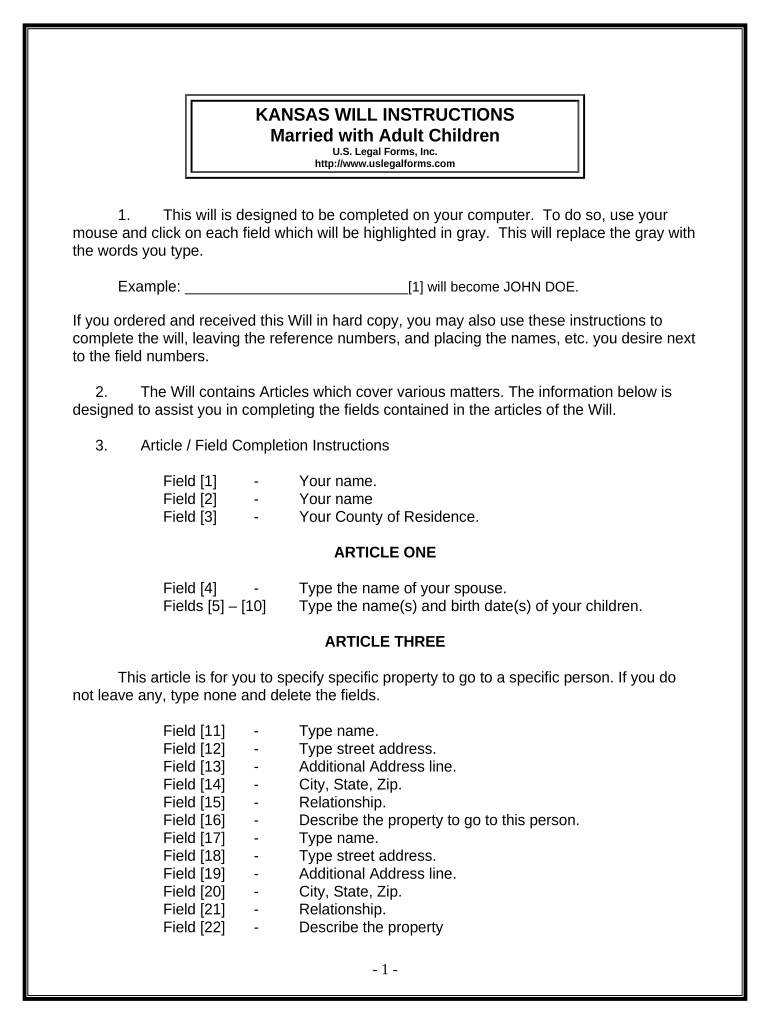
Begin by entering your name in Field [1], followed by your county of residence in Field [3].
In Article One, input your spouse's name in Field [4] and list your children's names and birth dates in Fields [5] to [10].
For Article Three, specify any specific property you wish to bequeath. If none, type 'none' in Field [11]. Fill out the corresponding fields for each item.
In Article Four, designate your spouse as the recipient of your homestead by entering their name in Field [29].
Complete Articles Five and Six by naming your spouse or children as beneficiaries for the remaining property.
Designate a Personal Representative in Article Seven by filling out Fields [34] and [35].
Review all entries for accuracy before printing. Ensure you sign the document in front of two witnesses.
Start using our platform today to easily complete your Kansas Will online for free!
Kansas will templateKansas will pdfFree printable kansas willKansas will sampleKansas will template wordKansas will requirementsKansas will form pdfKansas Legal documents
Security and compliance
At DocHub, your data security is our priority. We follow HIPAA, SOC2, GDPR, and other standards, so you can work on your documents with confidence.
Sep 21, 2024 Ji-Eun Jasper is a player for the Kansas City Breath Mints, and has been with the team since Fall Ball. Jasper has previously played for the
Living Wills in Kansas - K-State Extension Sedgwick County
by DM Sellers It allows you to record in writing, what type of care you want at the end of your life, should you have a terminal illness. The living will is basically anRead more
(a) Any person possessing a decedents will may file in the district court of the county of the decedents last residence the decedents will or a copy of suchRead more
Cookie consent notice
This site uses cookies to enhance site navigation and personalize your experience.
By using this site you agree to our use of cookies as described in our Privacy Notice.
You can modify your selections by visiting our Cookie and Advertising Notice.