Type text, add images, blackout confidential details, add comments, highlights and more.
02. Sign it in a few clicks
Draw your signature, type it, upload its image, or use your mobile device as a signature pad.
03. Share your form with others
Send lien release via email, link, or fax. You can also download it, export it or print it out.
How to use or fill out ks lien release with our platform
Ease of Setup
DocHub User Ratings on G2
Ease of Use
DocHub User Ratings on G2
Click ‘Get Form’ to open the ks lien release in the editor.
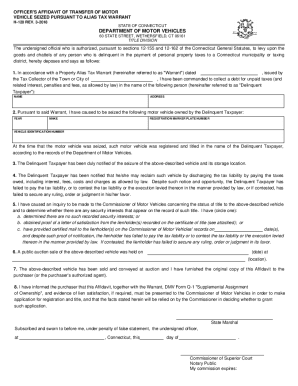
Begin by filling in the 'Prepared by, recording requested by and return to' section. Enter your name, company, address, city, state, phone, fax, and zip code.
In the 'RELEASE OF LIEN -- CORPORATION' section, provide the name of the representative and the corporation that has provided labor or materials for the property.
Fill in the property description where indicated. Be specific about the location and details of the property.
Complete the date fields regarding when you filed a notice of intent and when payment was made. Ensure accuracy for legal purposes.
Sign and date at the bottom of the form. Include your title and corporation name as required.
For notarization, complete the acknowledgment section with relevant details including date and notary public information.
Start using our platform today to fill out your ks lien release easily and for free!
Johnson County lien releaseKansas electronic title releaseMO lien releaseKansas lien release formTr 150 lien releaseKs e Lien loginI have a lien release but no titleSubmit lien release to DMV
Security and compliance
At DocHub, your data security is our priority. We follow HIPAA, SOC2, GDPR, and other standards, so you can work on your documents with confidence.
Browse press releases, fact sheets, contact info, logos, b-roll and multimedia assets, answers to common questions and additional corporate information.Read more
Aug 11, 2019 Thus, the Kansas tax process, like the overpaid unemployment benefits lien process, allows for the ability to appeal within a certain time frameRead more
Cookie consent notice
This site uses cookies to enhance site navigation and personalize your experience.
By using this site you agree to our use of cookies as described in our Privacy Notice.
You can modify your selections by visiting our Cookie and Advertising Notice.