Type text, add images, blackout confidential details, add comments, highlights and more.
02. Sign it in a few clicks
Draw your signature, type it, upload its image, or use your mobile device as a signature pad.
03. Share your form with others
Send cross claim via email, link, or fax. You can also download it, export it or print it out.
How to use or fill out Notice of Crossclaim - Indiana with our platform
Ease of Setup
DocHub User Ratings on G2
Ease of Use
DocHub User Ratings on G2
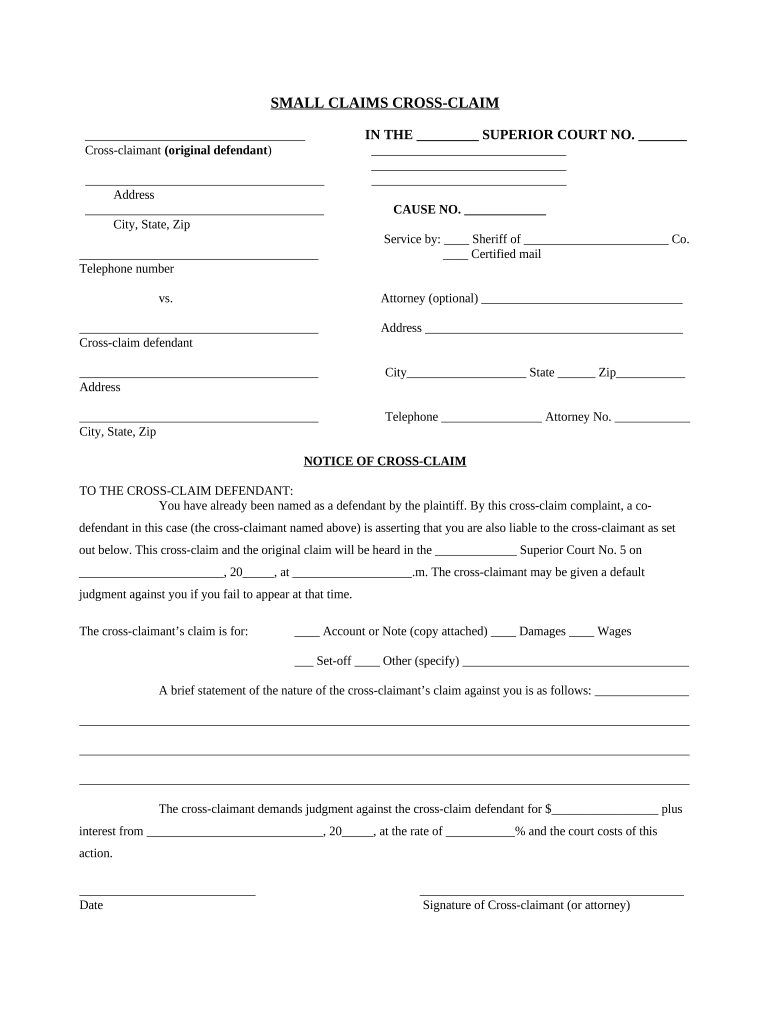
Click ‘Get Form’ to open the Notice of Crossclaim in the editor.
Begin by filling in the 'Cross-claimant' section with your name, address, city, state, zip code, and telephone number. This identifies you as the original defendant.
In the 'IN THE ___ SUPERIOR COURT NO. ____' section, enter the appropriate court name and case number.
Select your method of service for the cross-claim defendant by checking either 'Sheriff' or 'Certified mail'.
Complete the 'Cross-claim defendant' section with their name and contact information.
Clearly state your claim type by checking one of the options provided (e.g., Account or Note, Damages).
Provide a brief statement detailing your claim against the cross-claim defendant in the designated area.
Finally, indicate the amount you are claiming and sign at the bottom to validate your cross-claim.
Start using our platform today to easily complete your Notice of Crossclaim for free!
Fill out Notice of Crossclaim - Indiana online It's free
by MA DORELLI Cited by 5 The court in Gill also clarified that a cross-claim against an existing party does not require additional service of process under Trial Rule 4(A). Id. Finally,Read more
13. Counterclaim and cross-claim - Indiana Court Rules
Jan 1, 1971 A pleading shall state as a counterclaim any claim which at the time of serving the pleading the pleader has against any opposing party.Read more
Cookie consent notice
This site uses cookies to enhance site navigation and personalize your experience.
By using this site you agree to our use of cookies as described in our Privacy Notice.
You can modify your selections by visiting our Cookie and Advertising Notice.