Type text, add images, blackout confidential details, add comments, highlights and more.
02. Sign it in a few clicks
Draw your signature, type it, upload its image, or use your mobile device as a signature pad.
03. Share your form with others
Send it via email, link, or fax. You can also download it, export it or print it out.
How to use or fill out Indiana Damages with our platform
Ease of Setup
DocHub User Ratings on G2
Ease of Use
DocHub User Ratings on G2
Click ‘Get Form’ to open the Indiana Damages document in the editor.
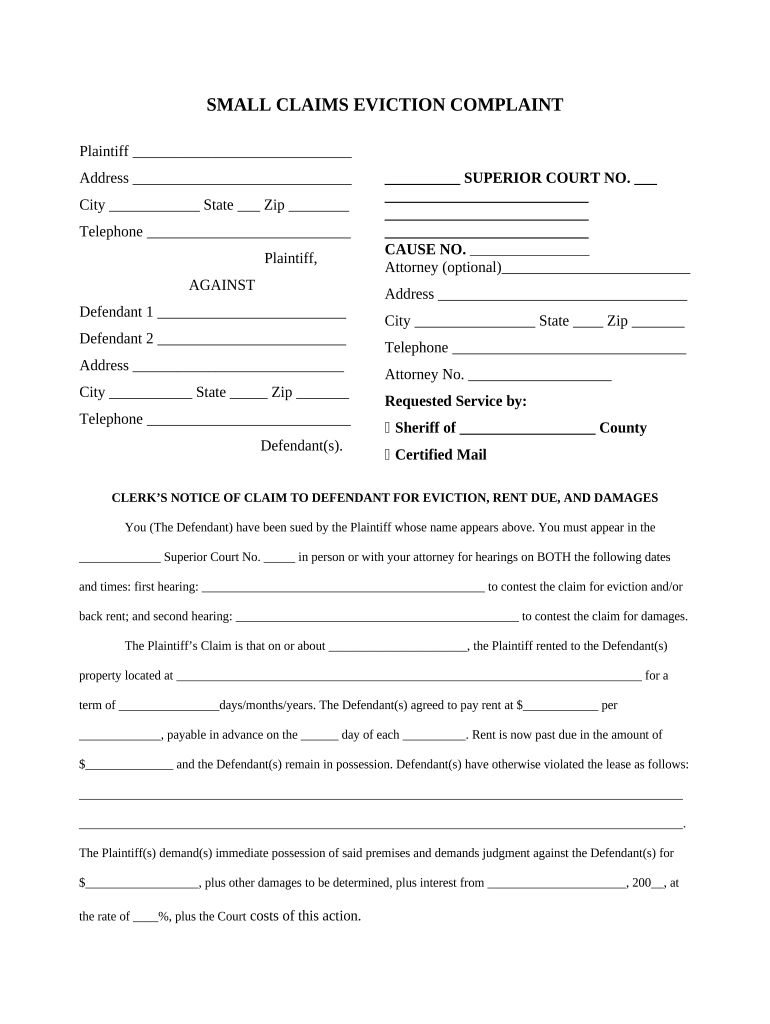
Begin by filling in the Plaintiff's information, including name, address, city, state, zip code, and telephone number. This identifies who is bringing the claim.
Next, enter the Defendant's details. Include their name, address, city, state, zip code, and telephone number. Ensure accuracy as this is crucial for legal notifications.
Specify the court details by entering the Superior Court number and cause number. This helps in tracking your case within the judicial system.
In the section regarding rent due and damages, clearly state the rental terms including amount due and any violations of lease agreements. Be specific to strengthen your claim.
Finally, sign and date the document at the bottom. This confirms that all information provided is accurate and complete.
Start using our platform today to fill out your Indiana Damages form easily and for free!
Sec. 2. (a) Actual damages, for purposes of IC 34-15-3, includes all damages that the plaintiff may have suffered in respect to the plaintiffs character,Read more
Indianas Allowance of Punitive Damages in Contract
by S Marguet 1980 Indiana courts have recently awarded punitive damages in con- tract actions even though the bDocHubing partys wrongful conduct.Read more
Cookie consent notice
This site uses cookies to enhance site navigation and personalize your experience.
By using this site you agree to our use of cookies as described in our Privacy Notice.
You can modify your selections by visiting our Cookie and Advertising Notice.