Type text, add images, blackout confidential details, add comments, highlights and more.

02. Sign it in a few clicks
Draw your signature, type it, upload its image, or use your mobile device as a signature pad.

03. Share your form with others
Send it via email, link, or fax. You can also download it, export it or print it out.

How to use or fill out weekly summary with our platform
Ease of Setup
DocHub User Ratings on G2
Ease of Use
DocHub User Ratings on G2
Click ‘Get Form’ to open the weekly summary in the editor.
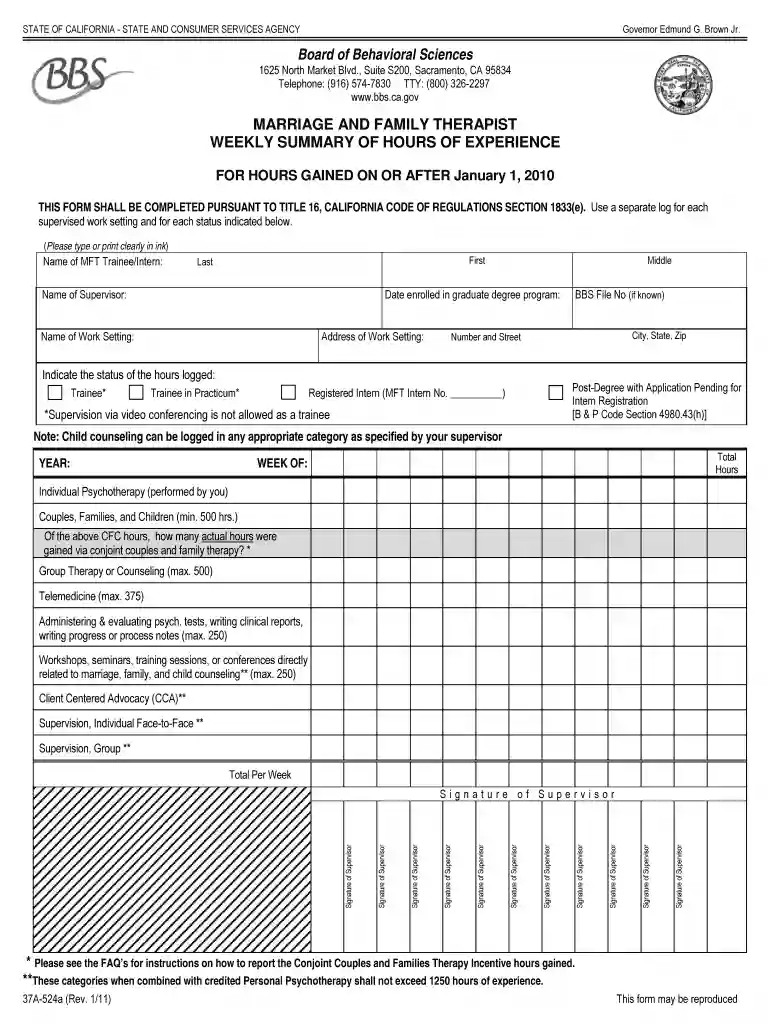
Begin by entering your name as the MFT Trainee/Intern in the designated field. Ensure you type clearly for accurate processing.
Next, input your supervisor's name and the date you enrolled in your graduate degree program. This information is crucial for verification.
Fill in the name and address of your work setting, including city, state, and zip code. This helps in identifying where your experience was gained.
Indicate your status regarding logged hours by selecting from options such as Trainee or Registered Intern. Make sure to check any relevant notes about supervision requirements.
Record the total hours worked for each category listed, such as Individual Psychotherapy and Group Therapy. Be mindful of maximum limits specified for each category.
Finally, ensure all required signatures from supervisors are included before submitting the form for processing.
Start using our platform today to streamline your weekly summary completion effortlessly!
Conclude with next weeks priorities, key tasks, deadlines, and focus areas. Keep the report clear and structured. When creating a weekly report, be concise, use simple language (minus jargon) and let your activities be result-focused.
How to do a weekly recap?
In your report, list your deliverables and the important tasks you complete each day of the week. Consider separate sections for detailing your completed tasks and the tasks youre still working on. This information shows your supervisor how you are working towards completing important goals.
What is a weekly overview?
A weekly review is an opportunity to direct your life with intention. Its dedicated time to think about the past week, reflect on what went well and what didnt, and plan for the week ahead. Its a chance to get aligned with your goals and ensure that the work youre doing on a daily basis is helping you docHub them.
How to write a weekly summary?
How to write a weekly report in 5 steps Start with a clear summary. Begin your report with a brief overview of the main accomplishments, challenges, and upcoming priorities for the week. Highlight key accomplishments. Address challenges and solutions. Outline upcoming priorities. Keep it concise and organized.
How do you write a good summary report?
DO: Report the overall topic right away. Begin with the name of the essay and the author. Write in present tense. Describe the main points covered in the text. Include supporting details as needed depending upon the length and depth of the summary desired. Mention any important conclusions drawn.
Key Components of an Effective Weekly Report A summary of your activities over the past week. An analysis of progress towards your goals. Highlights of any challenges or obstacles you faced. Recommendations for how to address those challenges in the future.
What is a weekly summary?
QUICK SUMMARY: A weekly report summarizes progress, performance, and activities over seven days, offering transparency and promoting client collaboration. These reports track key metrics, highlight achievements, and maintain clear communication.
Related links
Time Management Weekly Summary
This worksheet demonstrates that if you manage your time wisely, you can fit in everything you want to do.
The Weekly Summary of Decisions is a digest of decisions issued by the Board each week, with a short description of the issues and facts of the case and a link
Cookie consent notice
This site uses cookies to enhance site navigation and personalize your experience.
By using this site you agree to our use of cookies as described in our Privacy Notice.
You can modify your selections by visiting our Cookie and Advertising Notice.