Type text, add images, blackout confidential details, add comments, highlights and more.
02. Sign it in a few clicks
Draw your signature, type it, upload its image, or use your mobile device as a signature pad.
03. Share your form with others
Send fillable cobra via email, link, or fax. You can also download it, export it or print it out.
How to use or fill out cobra form i get with our platform
Ease of Setup
DocHub User Ratings on G2
Ease of Use
DocHub User Ratings on G2
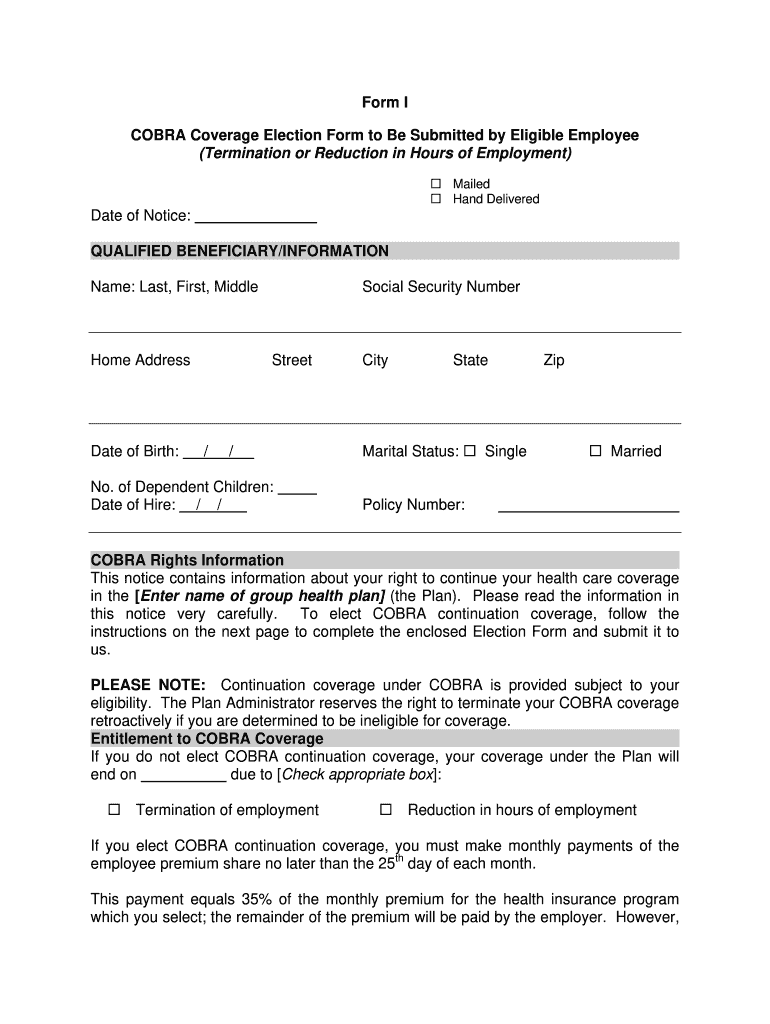
Click ‘Get Form’ to open the COBRA Coverage Election Form in the editor.
Begin by filling in your personal information. Enter your name, home address, date of birth, and social security number in the designated fields.
Indicate your marital status by checking either 'Single' or 'Married'. Also, provide the policy number associated with your health plan.
In the section regarding entitlement to COBRA coverage, check the appropriate box that applies to your situation: termination of employment or reduction in hours.
List all qualified beneficiaries who are entitled to elect COBRA continuation coverage. Ensure you include their names, dates of birth, and relationships to you.
Select the health insurance plan you wish to continue coverage for by checking the corresponding box and providing any additional required details.
Finally, review the form for accuracy, sign it, and enter the date before submitting it as instructed.
Start using our platform today for free to easily complete your COBRA form!
Cobra form i get pdfCobra form i get templateCobra form i get downloadCOBRA Election Form pdfCOBRA letter to terminated employeeCOBRA loophole 60 daysCOBRA letter templateHow to enroll in COBRA
Security and compliance
At DocHub, your data security is our priority. We follow HIPAA, SOC2, GDPR, and other standards, so you can work on your documents with confidence.
To elect COBRA continuation coverage, complete this Election Form and return it to your employer/plan administrator. Under federal law, you must have 60 daysRead more
Cookie consent notice
This site uses cookies to enhance site navigation and personalize your experience.
By using this site you agree to our use of cookies as described in our Privacy Notice.
You can modify your selections by visiting our Cookie and Advertising Notice.