Letter with demand 2026

Get Form
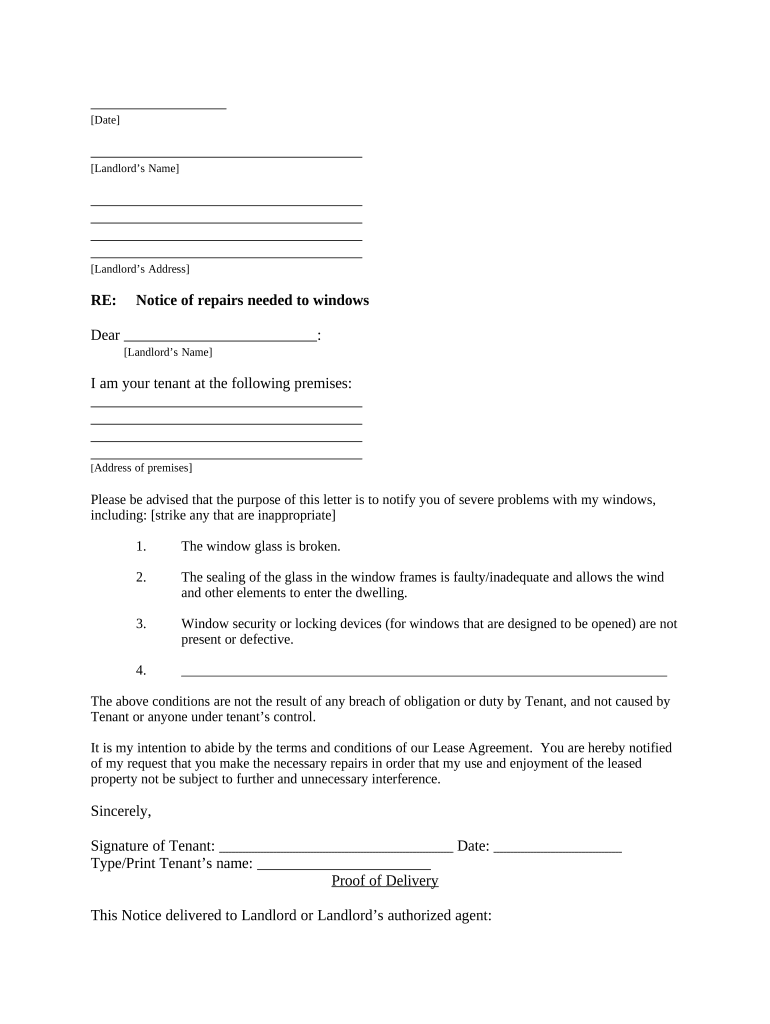
letter with demand Preview on Page 1

Here's how it works

01. Edit your form online
Type text, add images, blackout confidential details, add comments, highlights and more.
02. Sign it in a few clicks
Draw your signature, type it, upload its image, or use your mobile device as a signature pad.
03. Share your form with others
Send it via email, link, or fax. You can also download it, export it or print it out.

How to use or fill out letter with demand with our platform

Form edit decoration
9.5
Ease of Setup
DocHub User Ratings on G2
9.0
Ease of Use
DocHub User Ratings on G2
  1. Click ‘Get Form’ to open the letter with demand in the editor.
  2. Begin by entering the date at the top of the document. This is essential for record-keeping.
  3. Fill in the landlord’s name and address in the designated fields to ensure proper delivery.
  4. In the greeting section, address your landlord directly by typing their name after 'Dear'.
  5. Provide your address as the tenant in the specified area to clarify your location.
  6. List any issues with your windows by checking or striking through items that do not apply. Be specific about each problem.
  7. Reiterate that these issues are not due to any fault of yours, ensuring clarity on responsibility.
  8. Sign and date the document at the bottom, then type or print your name for clarity.
  9. Select a method of delivery for this notice and sign again to confirm how it was delivered.

Start using our platform today to easily fill out and manage your documents online for free!

be ready to get more

Complete this form in 5 minutes or less

Get form

Got questions?

We have answers to the most popular questions from our customers. If you can't find an answer to your question, please contact us.
Contact us
A demand letter outlines your case and requests fair compensation, setting a deadlinetypically 30 daysfor the insurance company to respond. The insurer will investigate your claim after receiving the letter, and response times vary based on workload, case complexity, and quality of documentation.

Security and compliance

At DocHub, your data security is our priority. We follow HIPAA, SOC2, GDPR, and other standards, so you can work on your documents with confidence.

Learn more
ccpa2
pci-dss
gdpr-compliance
hipaa
soc-compliance
be ready to get more

Complete this form in 5 minutes or less

Get form