Type text, add images, blackout confidential details, add comments, highlights and more.
02. Sign it in a few clicks
Draw your signature, type it, upload its image, or use your mobile device as a signature pad.
03. Share your form with others
Send it via email, link, or fax. You can also download it, export it or print it out.
How to use or fill out Iowa Odometer with our platform
Ease of Setup
DocHub User Ratings on G2
Ease of Use
DocHub User Ratings on G2
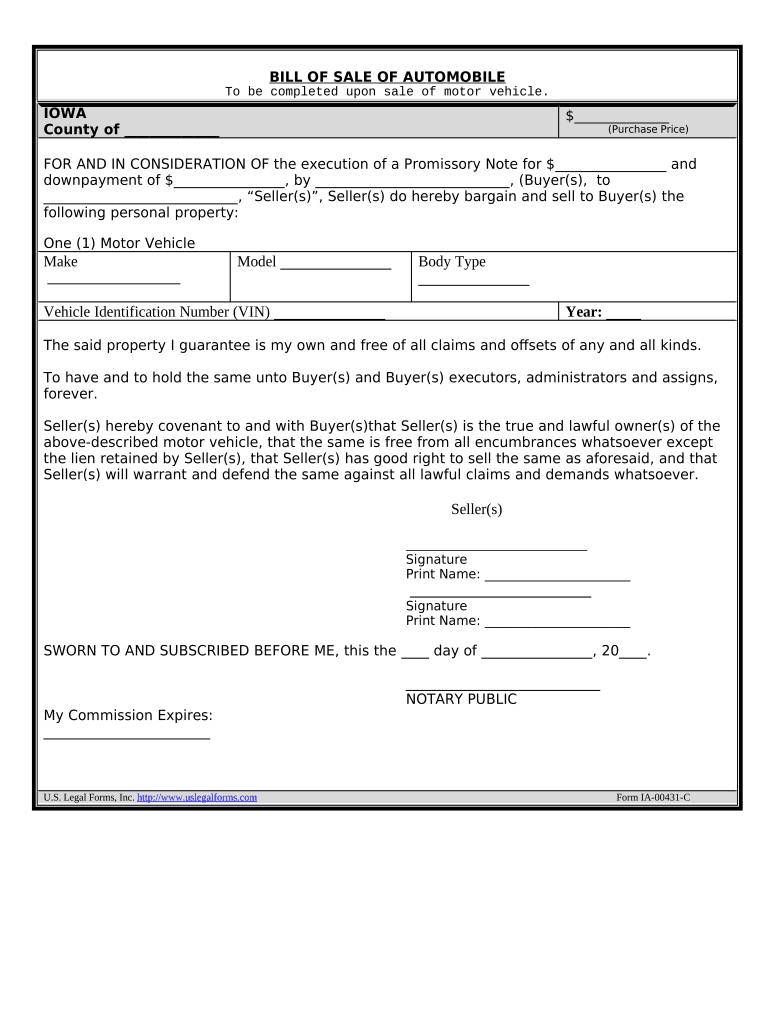
Click ‘Get Form’ to open the Iowa Odometer document in the editor.
Begin by entering the County and Purchase Price at the top of the form. This sets the context for your transaction.
In the section for Buyer(s) and Seller(s), fill in the names and signatures of both parties. Ensure that all information is accurate to avoid future disputes.
Next, complete the Motor Vehicle details including Make, Model, Body Type, VIN, and Year. This information is crucial for identifying the vehicle being sold.
Proceed to the Odometer Disclosure Statement. Enter your name and state the current odometer reading. If applicable, check any statements regarding mileage discrepancies.
Fill in both Transferor's (Seller's) and Transferee's (Buyer's) information accurately, including addresses and signatures.
Finally, ensure that all fields are completed before saving or printing your document for submission.
Start using our platform today to streamline your Iowa Odometer form completion for free!
Copies of repair orders or other receipts that include the odometer mileage and date that the vehicle was serviced. Each receipt should be signed by a qualified.Read more
Iowa Admin. Code r. 761-400.40 - Odometer statement
(1) Pursuant to Iowa Code section 321.71 and 49 U.S.C. Section 32705, an odometer disclosure statement shall be submitted with an application forRead more
Odometer Disclosure Statement. Identity Theft Forms Resources. Identity Theft Complaint ID Theft Checklist - What to Do if Your Identity is StolenRead more
Cookie consent notice
This site uses cookies to enhance site navigation and personalize your experience.
By using this site you agree to our use of cookies as described in our Privacy Notice.
You can modify your selections by visiting our Cookie and Advertising Notice.