Estate Planning Questionnaire and Worksheets - Wisconsin 2026

Get Form
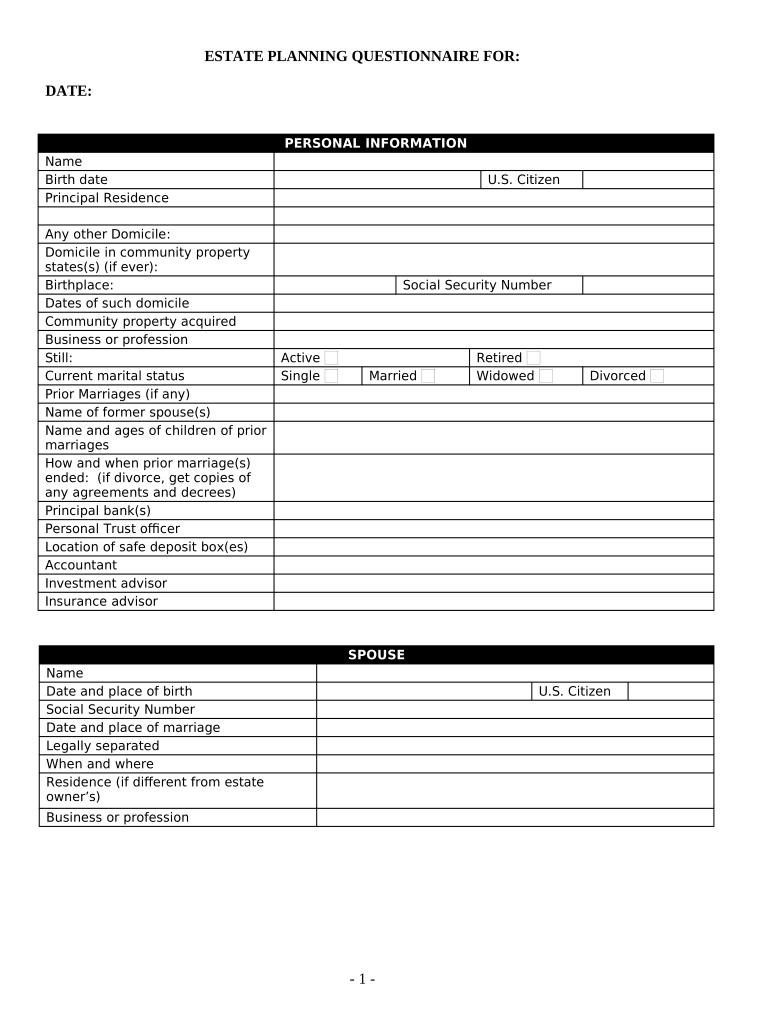
Estate Planning Questionnaire and Worksheets - Wisconsin Preview on Page 1

Here's how it works

01. Edit your form online
Type text, add images, blackout confidential details, add comments, highlights and more.
02. Sign it in a few clicks
Draw your signature, type it, upload its image, or use your mobile device as a signature pad.
03. Share your form with others
Send it via email, link, or fax. You can also download it, export it or print it out.

How to use or fill out Estate Planning Questionnaire and Worksheets - Wisconsin with our platform

Form edit decoration
9.5
Ease of Setup
DocHub User Ratings on G2
9.0
Ease of Use
DocHub User Ratings on G2
  1. Click ‘Get Form’ to open the Estate Planning Questionnaire and Worksheets in the editor.
  2. Begin by filling out the 'Personal Information' section. Enter your name, birth date, principal residence, and any other domicile details. This information is crucial for establishing your identity and residency.
  3. Proceed to the 'Spouse' section if applicable. Provide your spouse's name, date of birth, and social security number. If legally separated, include that information as well.
  4. In the 'Children and Grandchildren' section, list all children or grandchildren, indicating any adoptions or stepchildren. This ensures clarity on beneficiaries.
  5. Complete the 'Who Will Benefit Under Will' section by detailing beneficiaries’ names, addresses, ages, and their relationship to you.
  6. Fill out the 'Fiduciaries' section with names and addresses of executors, trustees, and guardians. This is essential for appointing responsible parties.
  7. Continue through financial sections detailing assets like real estate, stocks, bonds, cash accounts, and liabilities. Be thorough to avoid confusion later.
  8. Finally, review your entries for accuracy before saving or sharing your completed questionnaire using our platform’s features.

Start filling out your Estate Planning Questionnaire today for free using our platform!

be ready to get more

Complete this form in 5 minutes or less

Get form

Got questions?

We have answers to the most popular questions from our customers. If you can't find an answer to your question, please contact us.
Contact us

Electronic signatures are an excellent alternative to traditional signing, as they save time, effort, and costs people spend on printing, scanning, and paper delivery. You can eSign your Estate Planning Questionnaire and Worksheets - Wisconsin using a reliable and powerful online document management tool like DocHub. It complies with primary eSignature policies (ESIGN and UETA), so all forms approved there are legally binding and have the same validity as manually signed ones.

If you are using Chrome, there are two simple methods to modify your Estate Planning Questionnaire and Worksheets - Wisconsin online. First, visit the DocHub site, add your file, and modify it using our toolbar. You may also install our Chrome extension and modify any document by dragging and dropping it in your browser tab.

The 6 Steps to a Successful Estate Plan Step 1: Define your Estate Planning Goals. What do you want to happen? Step 2: Gather and Organize your Financial Data. Gather your documents. Step 3: Analyze Discuss. Step 4: Develop your Estate Strategies. Step 5: Implement your Estate Plan. Step 6: Track Monitor your Progress.
Estate planning checklist: Everything you need to think about Your will. Your will sets out how your assets are distributed and who is nominated to handle your affairs. Power of attorney. Life insurance. Funeral wishes. Financial planning. Digital assets.
The 6 Steps to a Successful Estate Plan Step 1: Define your Estate Planning Goals. What do you want to happen? Step 2: Gather and Organize your Financial Data. Gather your documents. Step 3: Analyze Discuss. Step 4: Develop your Estate Strategies. Step 5: Implement your Estate Plan. Step 6: Track Monitor your Progress.

Security and compliance

At DocHub, your data security is our priority. We follow HIPAA, SOC2, GDPR, and other standards, so you can work on your documents with confidence.

Learn more
ccpa2
pci-dss
gdpr-compliance
hipaa
soc-compliance

People also ask

Here, our estate planning attorneys lay out the 5 main components of estate planning: Wills and Trusts. Durable Power of Attorney. Medical or Healthcare Power of Attorney. Living Wills and Advance Directives for Medical Decisions. Beneficiary Designations.
How to make a will in 7 steps List all your assets. These might include: Decide who gets your money and belongings when you die. Choose guardians for minor children. Make your own will or work with a professional. Name an executor for your will. Make your will official. Keep it updated.
Seven steps to basic estate planning Inventory your stuff. You may think you dont have enough to justify estate planning. Account for your familys needs. Establish your directives. Review your beneficiaries. Note your states estate tax laws. Weigh the value of professional help. Plan to reassess.

Related links