Letter to Lienholder to Notify of Trust - Vermont 2026

Get Form
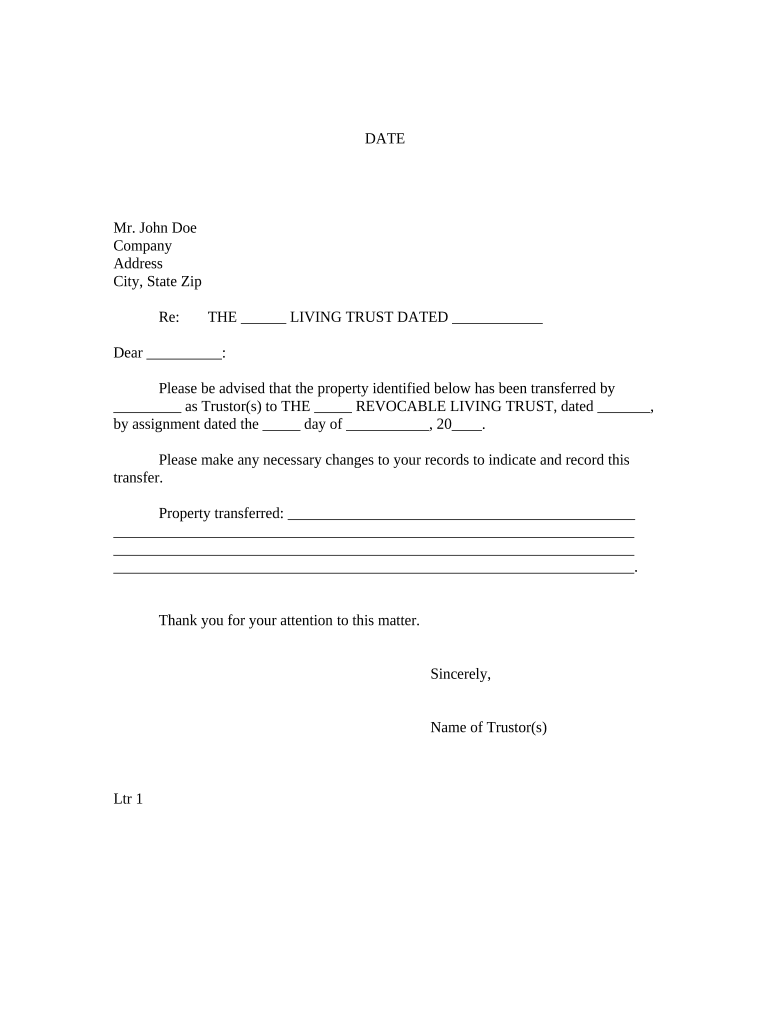
Letter to Lienholder to Notify of Trust - Vermont Preview on Page 1

Here's how it works

01. Edit your form online
Type text, add images, blackout confidential details, add comments, highlights and more.
02. Sign it in a few clicks
Draw your signature, type it, upload its image, or use your mobile device as a signature pad.
03. Share your form with others
Send it via email, link, or fax. You can also download it, export it or print it out.

How to use or fill out Letter to Lienholder to Notify of Trust - Vermont with DocHub

Form edit decoration
9.5
Ease of Setup
DocHub User Ratings on G2
9.0
Ease of Use
DocHub User Ratings on G2
  1. Click ‘Get Form’ to open the Letter to Lienholder in our editor.
  2. Begin by entering the date at the top of the document. This is essential for record-keeping purposes.
  3. Fill in the recipient's name, company, and address details in the designated fields. Ensure accuracy to avoid any delays.
  4. In the 'Re:' section, specify the name of the living trust and its date. This identifies which trust is being referenced.
  5. Complete the body of the letter by filling in the names of the Trustor(s) and providing a detailed description of the property transferred.
  6. Sign off with your name as Trustor(s) at the bottom of the letter.
  7. If required, complete the notary section by filling in details about the notary public and their commission expiration date.

Start using our platform today for free to streamline your document editing and signing process!

be ready to get more

Complete this form in 5 minutes or less

Get form

Got questions?

We have answers to the most popular questions from our customers. If you can't find an answer to your question, please contact us.
Contact us

Signing paperwork on a mobile device is fast, easy, and doesn’t require software installation if you have an account with DocHub. Sign in from any browser, fill in your blank fields with your information, and click on Sign → Create your signature. You can draw your eSignature the same way you usually do on paper, add its image to your Letter to Lienholder to Notify of Trust - Vermont, or type in your name and stylize its look. No matter what option you select, your document will be valid.

With DocHub, you have several convenient methods to edit your Letter to Lienholder to Notify of Trust - Vermont online. You can drag and drop the form and modify it straight at the DocHub website or use our browser extension to fill out your form immediately. Additionally, you can modify your PDF on your smartphone, as DocHub is compatible with all the available mobile platforms.

In California, liens against a trustee personally may affect trust property if creditors improperly record liens on trust assets. Trustees should review lien validity and trust documents carefully.
To make a living trust in Vermont, you: Choose whether to make an individual or shared trust. Decide what property to include in the trust. Choose a successor trustee. Decide who will be the trusts beneficiariesthat is, who will get the trust property. Create the trust document.
A lien can be placed against an irrevocable living trust in some circumstances, depending on whether the lien is against the grantor or the beneficiary. Voluntary and mechanics liens remain in place, regardless of assets being part of the trust or not.

Security and compliance

At DocHub, your data security is our priority. We follow HIPAA, SOC2, GDPR, and other standards, so you can work on your documents with confidence.

Learn more
ccpa2
pci-dss
gdpr-compliance
hipaa
soc-compliance

People also ask

An irrevocable trust works by permanently transferring ownership of your assets into the trust, and removing them from your personal estate. This structure limits exposure to creditors, lawsuits, and, in many cases, IRS claims. Unlike revocable trusts, you relinquish control, which strengthens protection.

Related links