Type text, add images, blackout confidential details, add comments, highlights and more.
02. Sign it in a few clicks
Draw your signature, type it, upload its image, or use your mobile device as a signature pad.
03. Share your form with others
Send it via email, link, or fax. You can also download it, export it or print it out.
How to use or fill out deed gift trust with our platform
Ease of Setup
DocHub User Ratings on G2
Ease of Use
DocHub User Ratings on G2
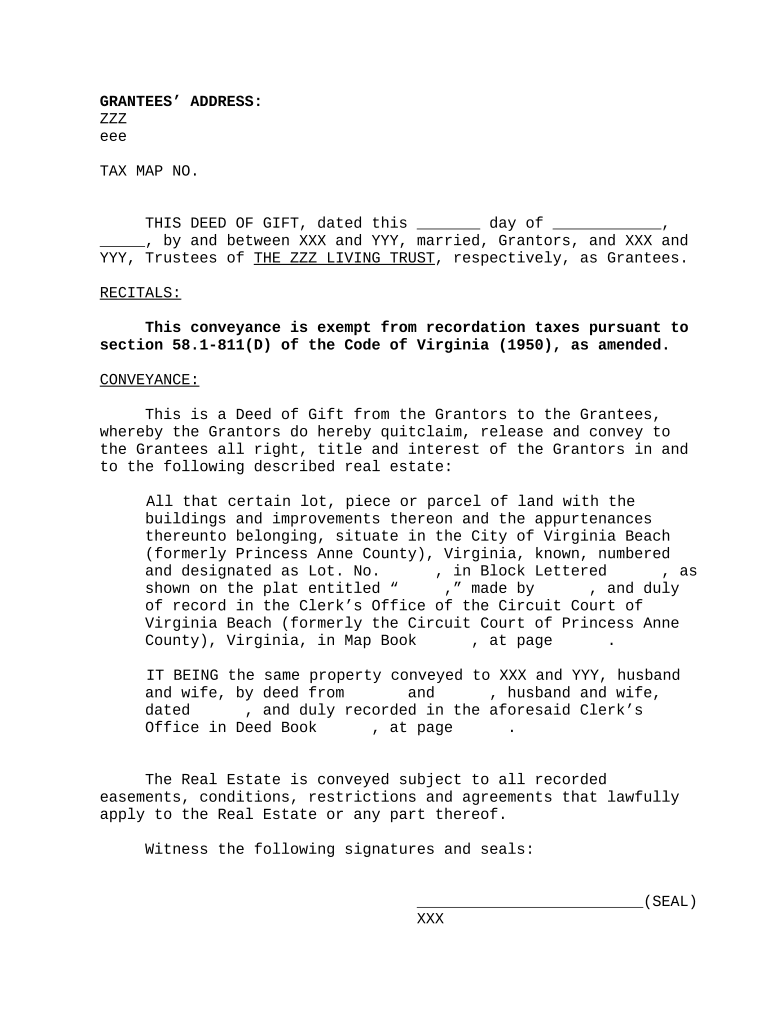
Click ‘Get Form’ to open the deed gift trust in the editor.
Begin by entering the Grantees' address in the designated field. Ensure accuracy as this information is crucial for legal purposes.
Fill in the Tax Map Number, which helps identify the property within local tax records.
In the 'Conveyance' section, clearly state the date of the deed and provide names of Grantors and Grantees. This establishes who is transferring and receiving ownership.
Describe the real estate being conveyed, including lot number and any relevant details from official records. This ensures clarity about what property is involved.
Review all sections for completeness and accuracy before finalizing your document. Utilize our platform's editing tools to make any necessary adjustments.
Start using our platform today to easily complete your deed gift trust online for free!
Deed gift trust templateDeed gift trust exampleDeed gift trust texasDeed gift trust ihtDeed of gift templateCan a deed of gift be revokedDeed of gift money templateDeed of gift property
Security and compliance
At DocHub, your data security is our priority. We follow HIPAA, SOC2, GDPR, and other standards, so you can work on your documents with confidence.
REVOCABLE TRUST Exempt from Grantee Tax - 58.1-811
Such deed shall state therein that it is a deed of gift. (Partial gifts are not exempt.) Exempt from Grantor Grantee Tax. 58.1-811 (D). REVOCABLE TRUST.Read more
Unlocking Generosity: How donating real property can
Real estate can also be gifted to charity through an estate gift, such as by transfer on death deed. This helps avoid having the real estate go through probate.Read more
Cookie consent notice
This site uses cookies to enhance site navigation and personalize your experience.
By using this site you agree to our use of cookies as described in our Privacy Notice.
You can modify your selections by visiting our Cookie and Advertising Notice.