Type text, add images, blackout confidential details, add comments, highlights and more.
02. Sign it in a few clicks
Draw your signature, type it, upload its image, or use your mobile device as a signature pad.
03. Share your form with others
Send it via email, link, or fax. You can also download it, export it or print it out.
How to use or fill out Notice of Lease for Recording - Virginia with DocHub
Ease of Setup
DocHub User Ratings on G2
Ease of Use
DocHub User Ratings on G2
Click ‘Get Form’ to open the Notice of Lease for Recording - Virginia in our editor.
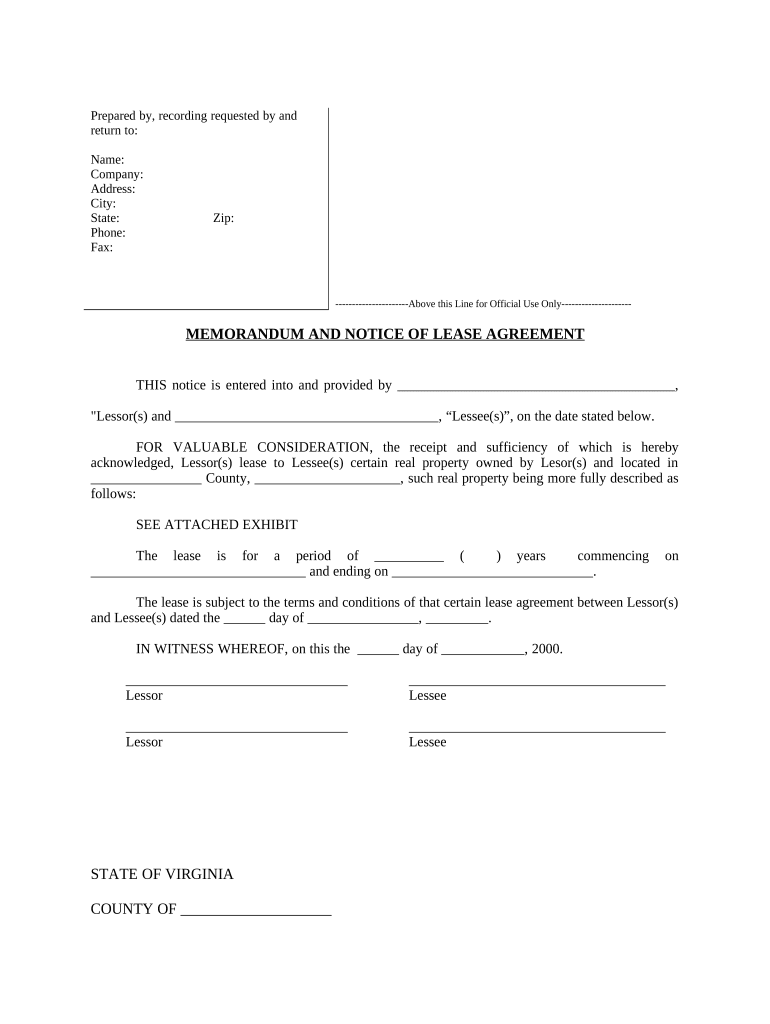
Begin by filling in the 'Prepared by, recording requested by and return to' section. Enter the name, company, address, city, state, phone, fax, and zip code as required.
In the 'MEMORANDUM AND NOTICE OF LEASE AGREEMENT' section, specify the names of the Lessor(s) and Lessee(s) in the designated spaces.
Indicate the county and provide a detailed description of the real property being leased. If necessary, attach an exhibit for further details.
Fill in the lease duration in years and specify the commencement and ending dates of the lease.
Complete the acknowledgment section by entering the date and signing as Lessor(s) and Lessee(s).
Finally, ensure that all notary sections are filled out correctly with printed names and commission expiration dates.
Start using our platform today to streamline your document editing process for free!
Fill out Notice of Lease for Recording - Virginia online It's free
Virginia code 55.1 1236Virginia code 55.1 1204Virginia code 55.1 1245Deed of confirmation VirginiaCode of vaVa 55.1 1227Property laws in VirginiaVirginia law 55.1 1226
Security and compliance
At DocHub, your data security is our priority. We follow HIPAA, SOC2, GDPR, and other standards, so you can work on your documents with confidence.
Recordation of Leases - The Research Repository @ WVU
RECORDATION OF LEASES. The pertinent parts of the West Virginia recording statutes to be discussed herein, and which have been the subject of some.Read more
Memoranda of leases and options. A. In lieu of the recording of a lease, a memorandum of such lease may be recorded, executed by the lessor and the lesseeRead more
Cookie consent notice
This site uses cookies to enhance site navigation and personalize your experience.
By using this site you agree to our use of cookies as described in our Privacy Notice.
You can modify your selections by visiting our Cookie and Advertising Notice.