Type text, add images, blackout confidential details, add comments, highlights and more.
02. Sign it in a few clicks
Draw your signature, type it, upload its image, or use your mobile device as a signature pad.
03. Share your form with others
Send virginia ucp sale holder meaning via email, link, or fax. You can also download it, export it or print it out.
How to use or fill out Virginia Escheat with our platform
Ease of Setup
DocHub User Ratings on G2
Ease of Use
DocHub User Ratings on G2
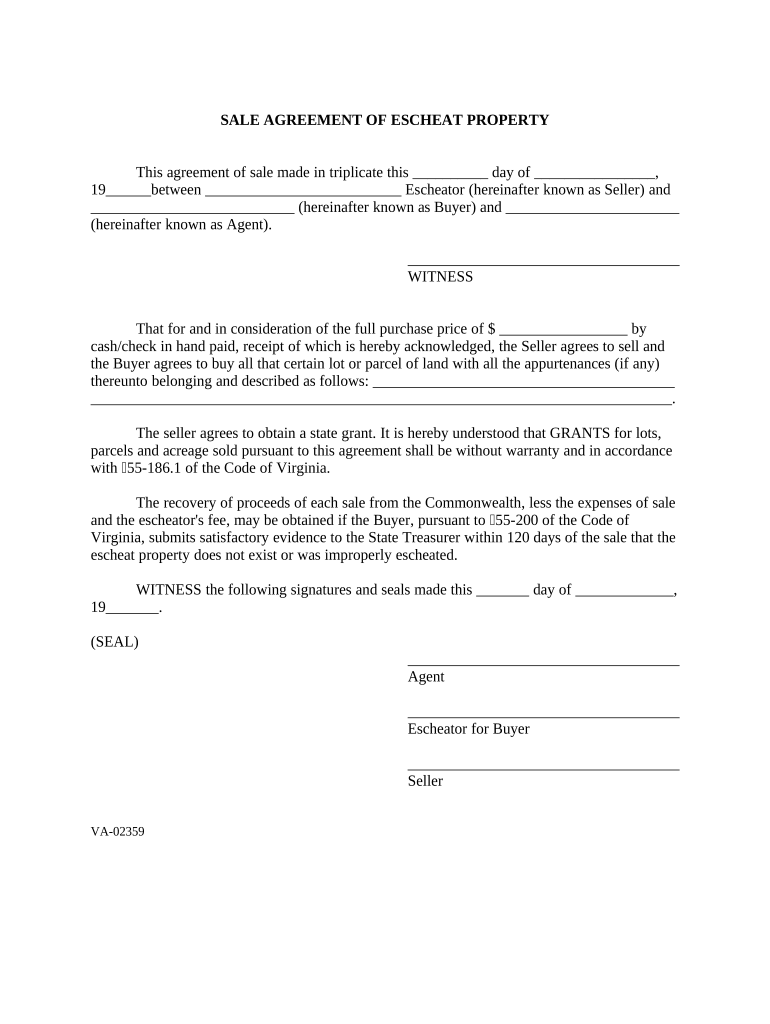
Click ‘Get Form’ to open the Virginia Escheat agreement in the editor.
Begin by entering the date of the agreement in the designated field. This should reflect the day, month, and year when the agreement is made.
Fill in the names of the Seller (Escheator), Buyer, and Agent in their respective fields. Ensure that all names are spelled correctly for legal accuracy.
In the section for purchase price, enter the total amount being paid for the property. This should be clearly stated in both numerical and written form if required.
Describe the property being sold in detail within the provided space. Include any relevant information about its location and characteristics.
Review and confirm that all information is accurate before proceeding to sign. Each party must provide their signature where indicated, along with any necessary seals.
Start using our platform today to fill out your Virginia Escheat form online for free!
What is Unclaimed Property? All tangible or intangible property that has remained unclaimed by its owner for an extended period of time. This includes but isRead more
Virginia Treasurys Unclaimed Property Division priority is to reunite rightful owners with lost or misplaced bank accounts, wages, stocks, dividends, utilityRead more
Cookie consent notice
This site uses cookies to enhance site navigation and personalize your experience.
By using this site you agree to our use of cookies as described in our Privacy Notice.
You can modify your selections by visiting our Cookie and Advertising Notice.