Virginia quitclaim 2026

Get Form
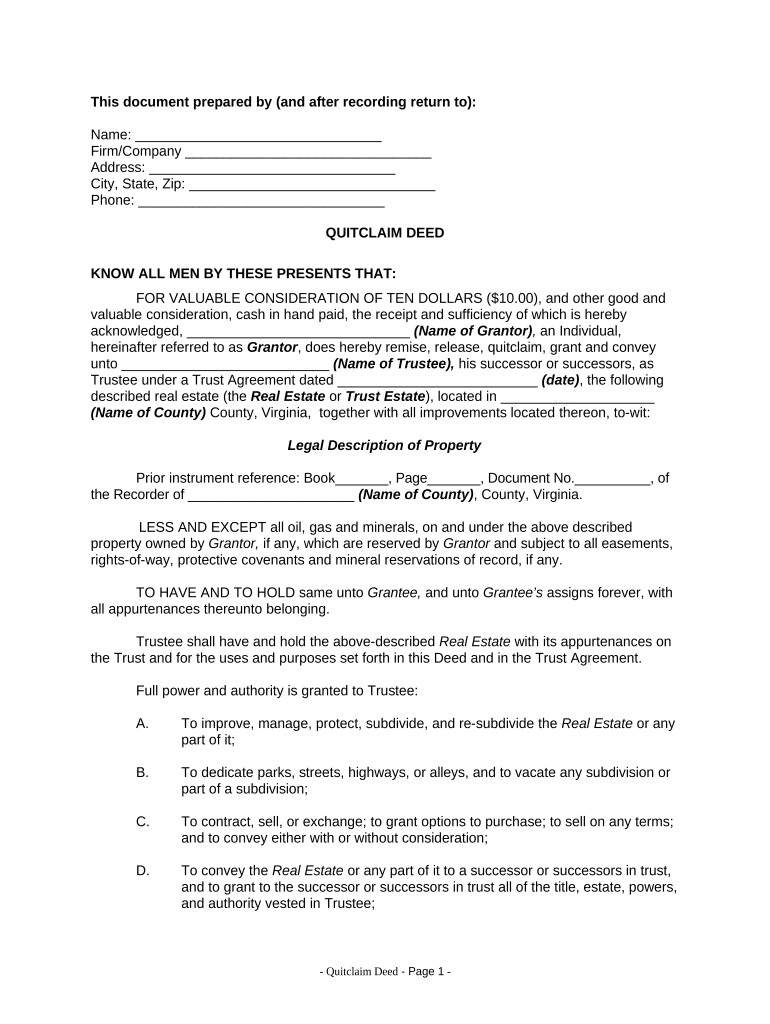
quitclaim deed virginia Preview on Page 1

Here's how it works

01. Edit your quitclaim deed virginia online
Type text, add images, blackout confidential details, add comments, highlights and more.
02. Sign it in a few clicks
Draw your signature, type it, upload its image, or use your mobile device as a signature pad.
03. Share your form with others
Send it via email, link, or fax. You can also download it, export it or print it out.

How to use or fill out Virginia Quitclaim with our platform

Form edit decoration
9.5
Ease of Setup
DocHub User Ratings on G2
9.0
Ease of Use
DocHub User Ratings on G2
  1. Click ‘Get Form’ to open the Virginia Quitclaim in the editor.
  2. Begin by entering the name of the Grantor and their firm or company in the designated fields. Ensure that all information is accurate to avoid any legal issues.
  3. Fill in the address, city, state, and zip code of the Grantor. This information is crucial for proper identification.
  4. In the section labeled 'KNOW ALL MEN BY THESE PRESENTS THAT', specify the name of the Grantor again and include details about the Trustee and Trust Agreement date.
  5. Provide a detailed legal description of the property being conveyed. This should be precise to ensure clarity regarding what is being transferred.
  6. Complete any additional sections regarding powers granted to the Trustee, ensuring you understand each authority being conferred.
  7. Finally, have the Grantor sign and date at the bottom of the form. A notary public must acknowledge this signature for it to be legally binding.

Start using our platform today for free to streamline your Virginia Quitclaim process!

be ready to get more

Complete this form in 5 minutes or less

Get form

Got questions?

We have answers to the most popular questions from our customers. If you can't find an answer to your question, please contact us.
Contact us

Yes, you can utilize DocHub for signing any business and private paperwork, including your virginia quitclaim. All eSignatures you generate with our service are legally binding and court-admissible, as DocHub complies with criteria required by ESIGN and UETA. Save your completed document with a detailed Audit Trail if necessary.

In addition to a comprehensive toolset for editing PDFs on mobile phones, DocHub enables you to sign your virginia quitclaim along the way. Open our editor in your internet browser, make modifications using DocHub’s toolset, and finish your editing by eSigning the finished form.

Quitclaim deeds transfer ownership without any guarantees, which means the grantee could inherit problems like unpaid taxes, liens, or title defects. Since the deed offers no legal protection, there is little recourse if issues arise after the transfer.
Obtain a quitclaim deed form There are many legal documents that you can write out yourself, and have it signed and docHubd in order for it to go into effect.
Filing a quitclaim deed in Virginia involves drafting the deed, getting it docHubd, and recording it with the local office. Handling each step correctly protects your ownership.

Security and compliance

At DocHub, your data security is our priority. We follow HIPAA, SOC2, GDPR, and other standards, so you can work on your documents with confidence.

Learn more
ccpa2
pci-dss
gdpr-compliance
hipaa
soc-compliance

People also ask

Instrument Fees ​Instrument​Fee​Explanation Quit Claim Deed ​$27.00 or Based on Consideration. ​Clerks Fee, Transfer Fee, Open Space Preservation Fee. If based on consideration, State Local Grantor taxes do apply Deed Processing fee will be assessed.22 more rows

Related links