01. Edit your virginia vehicle bill of sale online
Type text, add images, blackout confidential details, add comments, highlights and more.
02. Sign it in a few clicks
Draw your signature, type it, upload its image, or use your mobile device as a signature pad.
03. Share your form with others
Send virginia bill of sale via email, link, or fax. You can also download it, export it or print it out.
How to use or fill out Virginia Bill of Sale with our platform
Ease of Setup
DocHub User Ratings on G2
Ease of Use
DocHub User Ratings on G2
Click ‘Get Form’ to open the Virginia Bill of Sale in the editor.
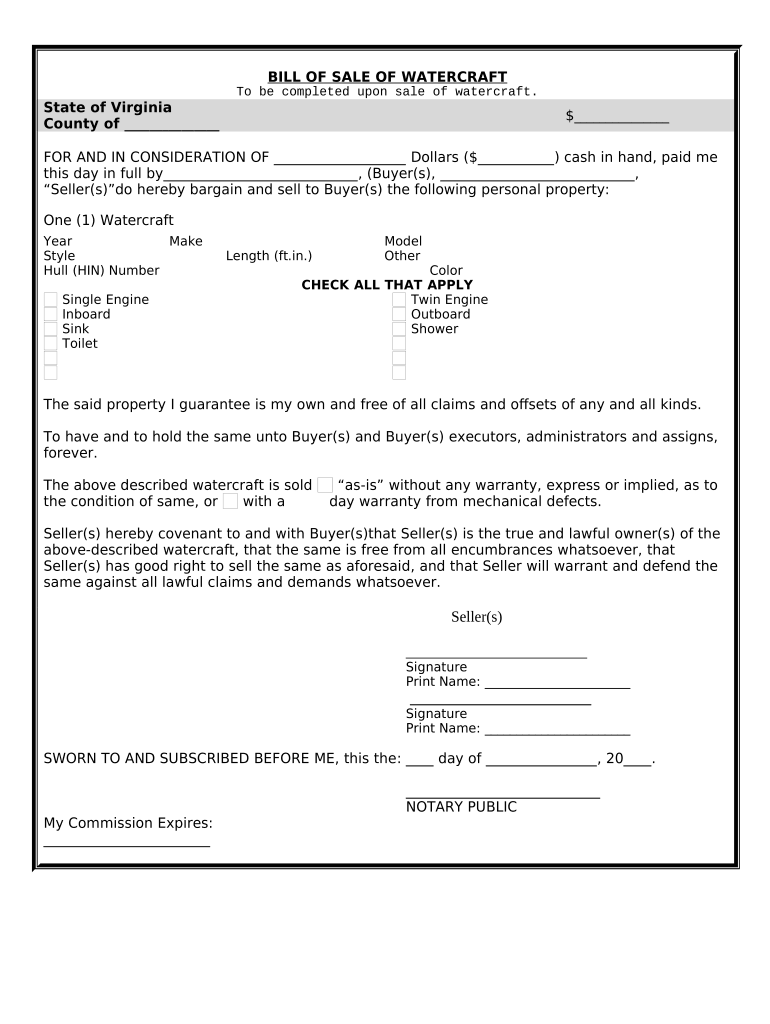
Begin by filling in the 'County' and 'State' fields at the top of the form. This identifies where the sale is taking place.
Enter the sale amount in the designated space, ensuring it reflects the total cash paid for the watercraft.
In the section labeled 'Buyer(s)', input the names of all buyers involved in this transaction.
Complete details about the watercraft, including Year, Make, Model, and Hull Identification Number (HIN). Check any applicable features such as engine type and amenities.
Sign and print your name as Seller(s) at the bottom of the form. Ensure that all sellers sign if there are multiple parties.
Finally, have a Notary Public witness your signatures and complete their section to finalize the document.
Start using our platform today to easily fill out your Virginia Bill of Sale for free!
Va DMV bill of sale pdfVirginia bill sale onlineSimple bill of sale VirginiaVa DMV bill of sale less than 5 yearsDo you need a bill of sale in vaVa DMV title transfer onlineVA DMV title and registration feesVa DMV SUT 1
Security and compliance
At DocHub, your data security is our priority. We follow HIPAA, SOC2, GDPR, and other standards, so you can work on your documents with confidence.
The bill of sale can be a handwritten statement signed by the seller and purchaser or a Vehicle Price Certification signed by the seller or purchaser. BuyingRead more
Learn what information to include in the contract and how to register the vehicle with the title. Are You Selling An Old Car, Motorcycle, Or Any Other Vehicle?Read more
Cookie consent notice
This site uses cookies to enhance site navigation and personalize your experience.
By using this site you agree to our use of cookies as described in our Privacy Notice.
You can modify your selections by visiting our Cookie and Advertising Notice.