Type text, add images, blackout confidential details, add comments, highlights and more.
02. Sign it in a few clicks
Draw your signature, type it, upload its image, or use your mobile device as a signature pad.
03. Share your form with others
Send it via email, link, or fax. You can also download it, export it or print it out.
How to use or fill out Utah Dissolve with our platform
Ease of Setup
DocHub User Ratings on G2
Ease of Use
DocHub User Ratings on G2
Click 'Get Form' to open the Utah Dissolve document in the editor.
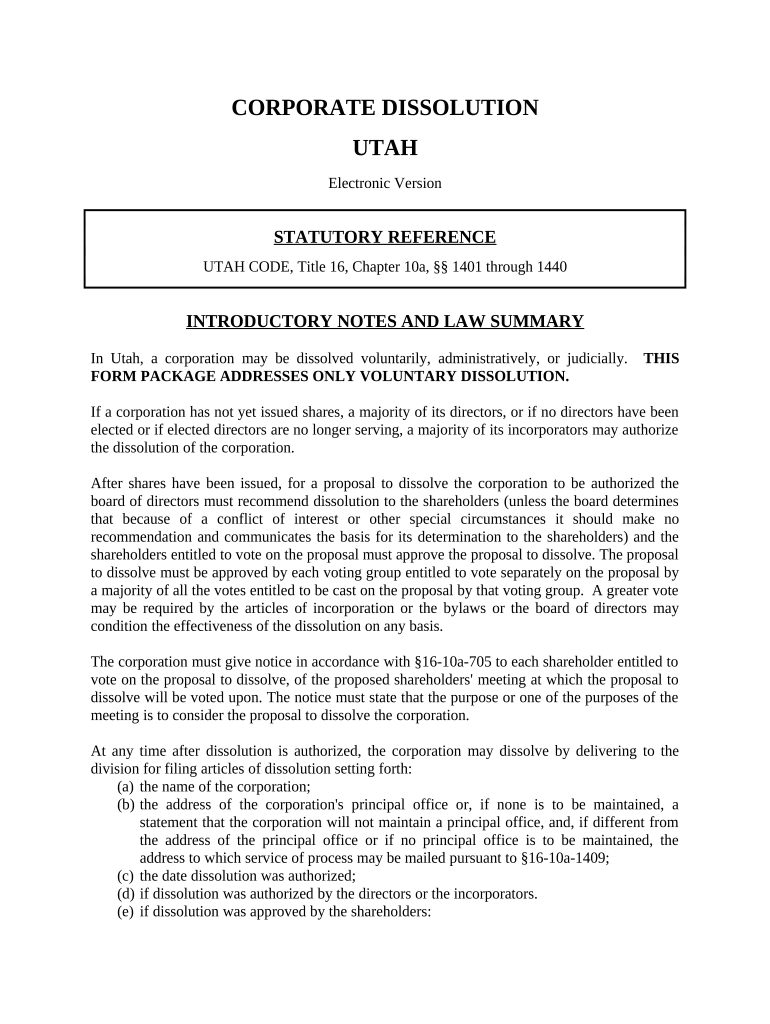
If your corporation has not issued stock, provide the name of the corporation and the date dissolution was authorized by the directors or incorporators.
Enter the address of the corporation's principal office. Ensure you include a signature and title of the authorized person executing the Articles.
For corporations that have issued stock, adopt a resolution recommending dissolution and mail a Notice of Special Meeting to each shareholder.
At the special meeting, shareholders must approve the resolution. If approved by written consent, attach this document when submitting your Articles of Dissolution.
Complete and submit your Articles of Dissolution along with any required forms as directed in your platform's editor.
Start using our platform today for free to streamline your Utah Dissolve process!
Utah LLC Dissolution formArticles of Dissolution UtahUtah business RegistrationUtah DBAUtah business RenewalCertificate of DissolutionStatement of TerminationUtah Secretary of state
Security and compliance
At DocHub, your data security is our priority. We follow HIPAA, SOC2, GDPR, and other standards, so you can work on your documents with confidence.
Coal plants cancelled in 2009 - Global Energy Monitor
Dec 25, 2019 A week before the cancellation, Dynegy agreed to dissolve its development venture with LS Power, in part because of the credit crisis. JanuaryRead more
Cookie consent notice
This site uses cookies to enhance site navigation and personalize your experience.
By using this site you agree to our use of cookies as described in our Privacy Notice.
You can modify your selections by visiting our Cookie and Advertising Notice.