Type text, add images, blackout confidential details, add comments, highlights and more.
02. Sign it in a few clicks
Draw your signature, type it, upload its image, or use your mobile device as a signature pad.
03. Share your form with others
Send it via email, link, or fax. You can also download it, export it or print it out.
How to use or fill out amendment 1 form with our platform
Ease of Setup
DocHub User Ratings on G2
Ease of Use
DocHub User Ratings on G2
Click ‘Get Form’ to open the amendment 1 form in the editor.
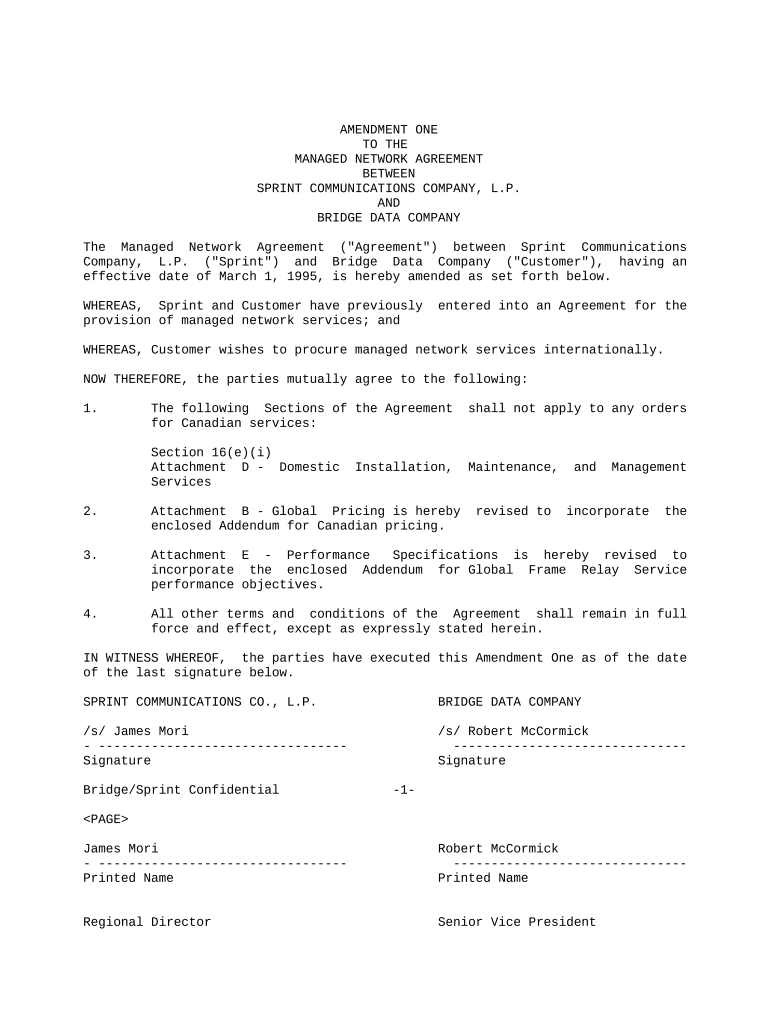
Begin by reviewing the introductory section, which outlines the parties involved and the purpose of the amendment. Ensure that all details are accurate.
Proceed to Section 1, where you will find specific amendments regarding Canadian services. Carefully read each clause and make any necessary adjustments based on your requirements.
In Section 2, review Attachment B for Global Pricing. If applicable, input any changes or additional information needed for pricing adjustments.
Next, check Section 3 regarding Performance Specifications. Incorporate any relevant addendums as required for Global Frame Relay Service performance objectives.
Finally, ensure all other terms remain unchanged as stated in Section 4. Once completed, proceed to sign the document by adding your signature and printed name in the designated fields.
Start using our platform today to easily fill out your amendment 1 form online for free!
2nd AmendmentFirst Amendment freedom of speech1st Amendment simplifiedFirst Amendment textFirst Amendment word for wordAmendments 1-10First Amendment freedom of religionAmendment Rights
Security and compliance
At DocHub, your data security is our priority. We follow HIPAA, SOC2, GDPR, and other standards, so you can work on your documents with confidence.
The following text is a transcription of the first ten amendments to the Constitution in their original form. These amendments were ratified December 15, 1791.Read more
Aug 7, 2025 Amendment I. Congress shall make no law respecting an establishment of religion, or prohibiting the free exercise thereof; or abridging theRead more
Cookie consent notice
This site uses cookies to enhance site navigation and personalize your experience.
By using this site you agree to our use of cookies as described in our Privacy Notice.
You can modify your selections by visiting our Cookie and Advertising Notice.