Type text, add images, blackout confidential details, add comments, highlights and more.
02. Sign it in a few clicks
Draw your signature, type it, upload its image, or use your mobile device as a signature pad.
03. Share your form with others
Send it via email, link, or fax. You can also download it, export it or print it out.
How to use or fill out agreement between international with our platform
Ease of Setup
DocHub User Ratings on G2
Ease of Use
DocHub User Ratings on G2
Click ‘Get Form’ to open the agreement in the editor.
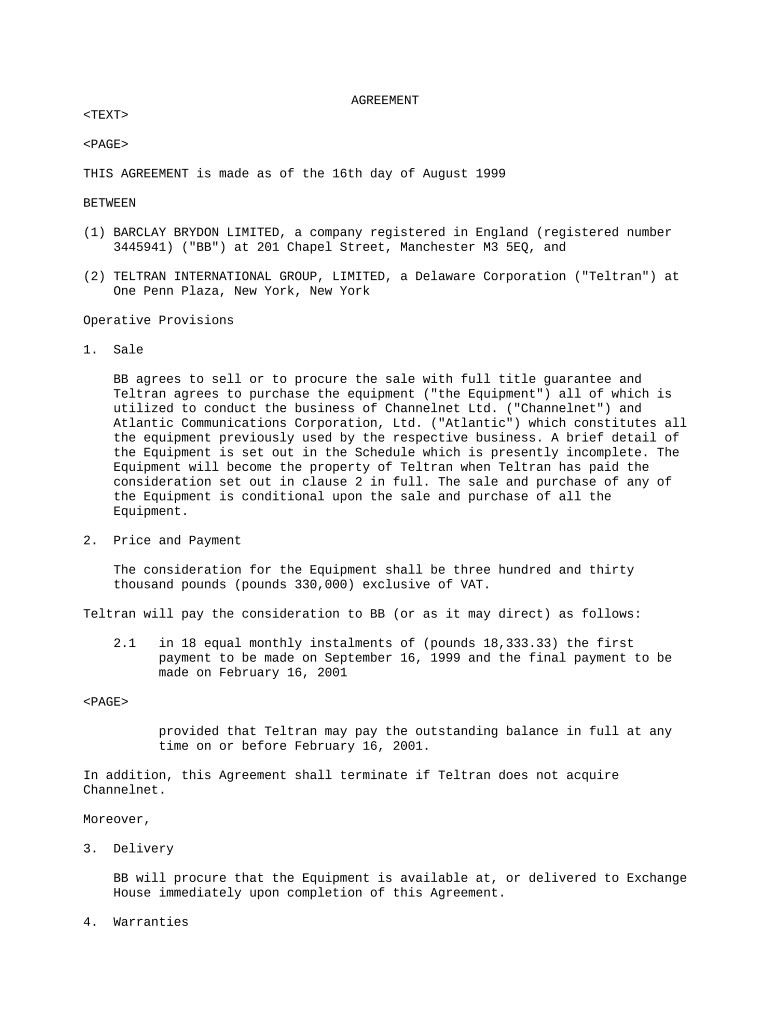
Begin by filling in the parties involved. Enter the full legal names and addresses of both BARCLAY BRYDON LIMITED and TELTRAN INTERNATIONAL GROUP, LIMITED in the designated fields.
In the 'Sale' section, ensure you accurately describe the equipment being sold. Refer to any attached schedules for details and complete this information as necessary.
Proceed to the 'Price and Payment' section. Input the total consideration amount and specify payment terms, including installment amounts and due dates.
Review the 'Delivery' clause to confirm that it reflects your intended delivery arrangements for the equipment.
Complete any warranties or obligations sections by providing necessary details about equipment usage and maintenance responsibilities.
Finally, ensure all parties sign electronically using our platform’s signature feature for a legally binding agreement.
Start editing your agreement today for free on our platform!
Fill out agreement between international online It's free
Simple agreement between internationalAgreement between international examplesInternational agreements examplesInternational Agreements listTypes of international agreementsInternational agreements pdfInternational agreement vs treatyDifference between treaty and agreement
Security and compliance
At DocHub, your data security is our priority. We follow HIPAA, SOC2, GDPR, and other standards, so you can work on your documents with confidence.
Treaties and other international agreements are written agreements between sovereign states (or between states and international organizations) governed byRead more
Cookie consent notice
This site uses cookies to enhance site navigation and personalize your experience.
By using this site you agree to our use of cookies as described in our Privacy Notice.
You can modify your selections by visiting our Cookie and Advertising Notice.