Type text, add images, blackout confidential details, add comments, highlights and more.
02. Sign it in a few clicks
Draw your signature, type it, upload its image, or use your mobile device as a signature pad.
03. Share your form with others
Send it via email, link, or fax. You can also download it, export it or print it out.
How to Use or Fill Out Names of Witnesses with Our Platform
Ease of Setup
DocHub User Ratings on G2
Ease of Use
DocHub User Ratings on G2
Click ‘Get Form’ to open it in the editor.
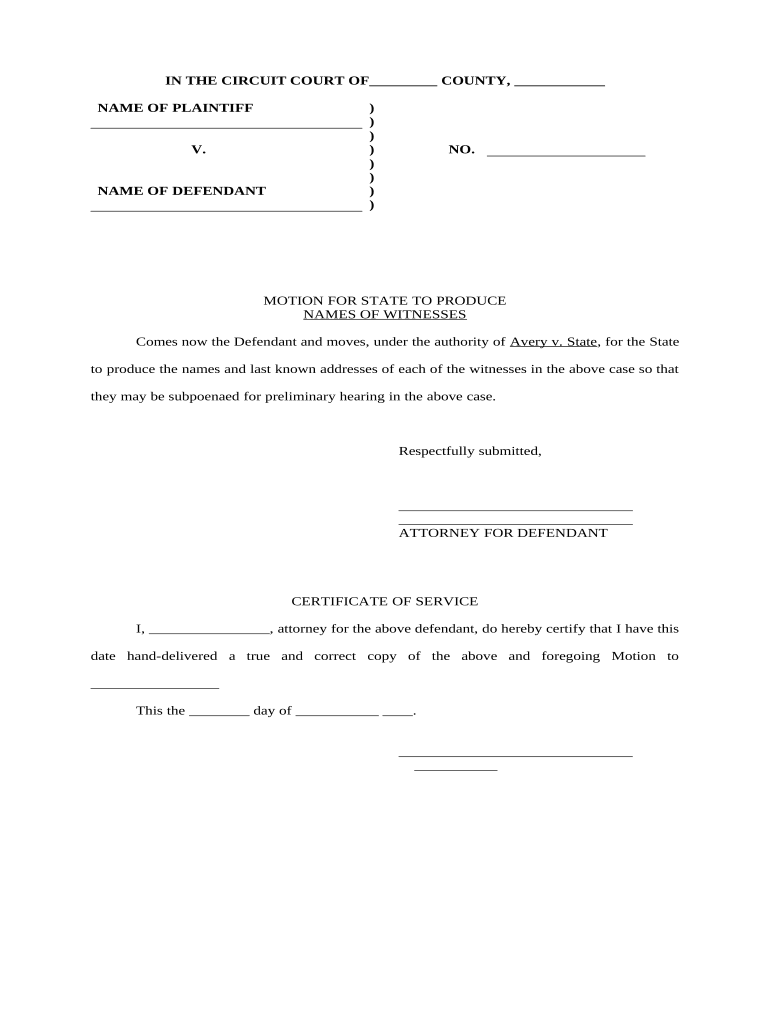
Locate the section labeled 'NAMES OF WITNESSES'. Here, you will need to input the names of all witnesses relevant to your case. Ensure that each name is clearly written for easy identification.
Next, fill in the last known addresses of each witness next to their respective names. This information is crucial for the subpoena process, so double-check for accuracy.
In the 'CERTIFICATE OF SERVICE' section, enter your name as the attorney for the defendant and provide details of who received a copy of this motion.
Finally, date and sign the document at the bottom to complete your submission. Make sure all fields are filled out correctly before saving or exporting your document.
Start using our platform today to streamline your document editing and witness management!
Notary witness requirements by stateWho can witness a signature on a legal documentNotary witness signature exampleHow to write a witness list for courtHow to get witnesses for notaryWitness signature rulesWhen a document requires signature witnessing the signer must bring a credible witnessWitness list for trial example
Security and compliance
At DocHub, your data security is our priority. We follow HIPAA, SOC2, GDPR, and other standards, so you can work on your documents with confidence.
The prosecuting attorney shall subscribe his or her name thereto and endorse thereon the names of the witnesses known to him or her at the time of filing. AfterRead more
An Apostle is a missionary and a special witness of the name of Christ. The name of Christ refers to the totality of the Saviors mission, death, andRead more
Requests for subpoenas for witnesses should be filed at least ten days prior to trial or hearing. WITNESSES (IF MAILING ADDRESS IS RFD, P.O. BOX, ETC., PLEASERead more
Cookie consent notice
This site uses cookies to enhance site navigation and personalize your experience.
By using this site you agree to our use of cookies as described in our Privacy Notice.
You can modify your selections by visiting our Cookie and Advertising Notice.