01. Edit your legal separation attorney kentucky online
Type text, add images, blackout confidential details, add comments, highlights and more.
02. Sign it in a few clicks
Draw your signature, type it, upload its image, or use your mobile device as a signature pad.
03. Share your form with others
Send it via email, link, or fax. You can also download it, export it or print it out.
How to use or fill out legal separation property with our platform
Ease of Setup
DocHub User Ratings on G2
Ease of Use
DocHub User Ratings on G2
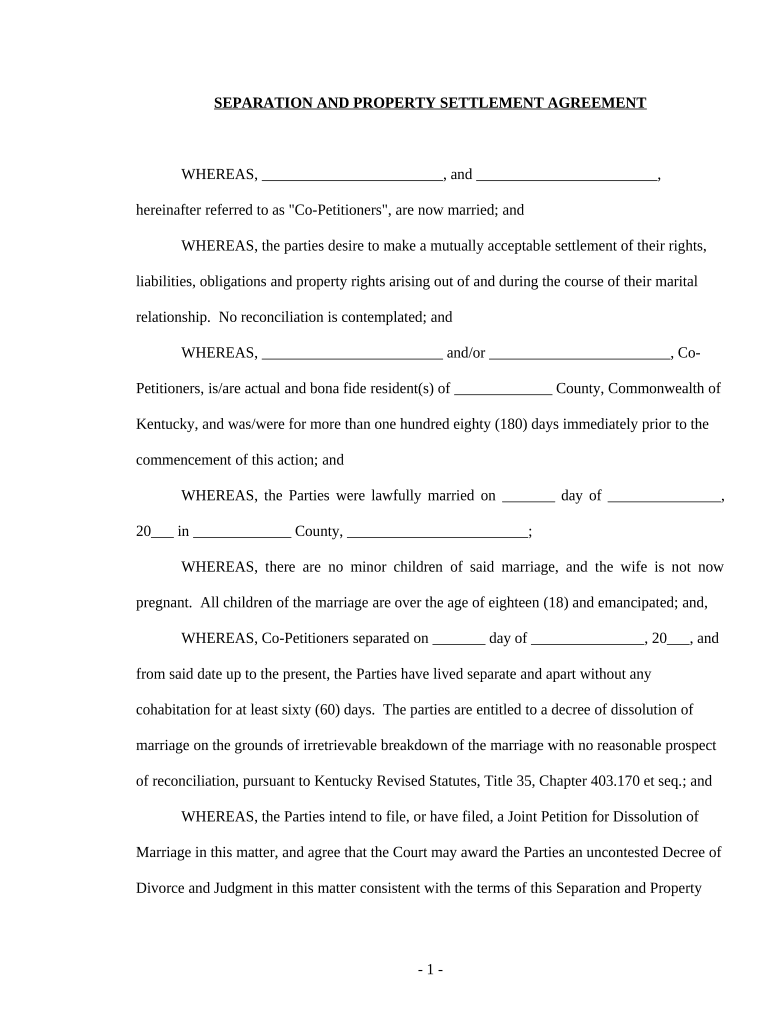
Click ‘Get Form’ to open the legal separation property document in the editor.
Begin by filling in the names of both Co-Petitioners at the top of the form. Ensure that you accurately represent your current marital status.
In the 'Property Settlement' section, list any personal property each party is entitled to. Clearly specify which assets belong to the Wife and which belong to the Husband.
Next, address any debts under the 'Debts' section. Indicate who will be responsible for each debt and provide details as necessary.
Review sections regarding alimony, legal representation disclosure, and ensure all parties understand their rights before signing.
Finally, have both parties sign and date the agreement at the bottom of the form. Make sure to include a notary public if required.
Start using our platform today for free to streamline your legal separation process!
Fill out legal separation property online It's free
Cost of legal separation vs divorceDisadvantages of legal separationSeparated vs legally separatedSeparation agreement TexasHow much does a legal separation costNot legally separated but living apartHow long can you be legally separatedCan you be legally separated and live in the same house
Security and compliance
At DocHub, your data security is our priority. We follow HIPAA, SOC2, GDPR, and other standards, so you can work on your documents with confidence.
Differences between Divorce and Separation - diff.wiki
Legal Separation[edit] A legal separation is a court-ordered arrangement that allows a married couple to live apart while remaining married. This process is
Separate property is property that is owned by one spouse and not the other. There are two categories of marital property; community property, and separateRead more
Cookie consent notice
This site uses cookies to enhance site navigation and personalize your experience.
By using this site you agree to our use of cookies as described in our Privacy Notice.
You can modify your selections by visiting our Cookie and Advertising Notice.