Ct disclaimer 2026

Get Form
ct disclaimer Preview on Page 1

Here's how it works

01. Edit your form online
Type text, add images, blackout confidential details, add comments, highlights and more.
02. Sign it in a few clicks
Draw your signature, type it, upload its image, or use your mobile device as a signature pad.
03. Share your form with others
Send it via email, link, or fax. You can also download it, export it or print it out.

How to use or fill out ct disclaimer with our platform

Form edit decoration
9.5
Ease of Setup
DocHub User Ratings on G2
9.0
Ease of Use
DocHub User Ratings on G2
  1. Click ‘Get Form’ to open the ct disclaimer in the editor.
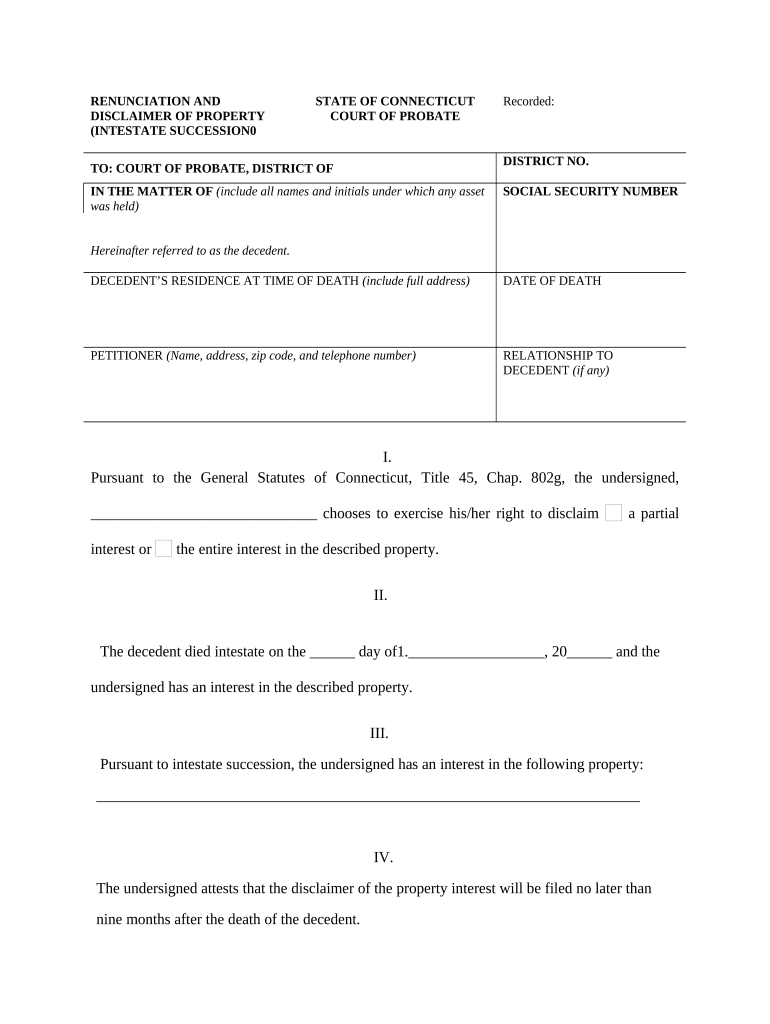
  2. Begin by entering the decedent's full name and social security number in the designated fields. This information is crucial for identifying the estate.
  3. Fill in the decedent’s residence at the time of death, including the complete address, and specify the date of death.
  4. Provide your details as the petitioner, including your name, address, zip code, and telephone number. Also, indicate your relationship to the decedent if applicable.
  5. In section I, choose whether you are disclaiming a partial or entire interest in the property by filling in your choice clearly.
  6. Detail any property interests you have in section III. Be specific about what assets are involved.
  7. Ensure that you attest to filing this disclaimer within nine months after the decedent's death as required by law.
  8. Finally, sign and date the document. If necessary, include notary acknowledgment and delivery confirmation sections as per legal requirements.

Start using our platform today for free to streamline your document editing and signing process!

be ready to get more

Complete this form in 5 minutes or less

Get form

Got questions?

We have answers to the most popular questions from our customers. If you can't find an answer to your question, please contact us.
Contact us
[The author] assumes no responsibility or liability for any errors or omissions in the content of this site. The information contained in this site is provided on an as is basis with no guarantees of completeness, accuracy, usefulness or timeliness
A disclaimer refers to: The refusal to take responsibility for someone elses claim, such as a refusal by an insurance company to grant coverage under an insurance policy; The refusal or renunciation by someone of their right to a property.
Heres a general no responsibility disclaimer template to help you get started: The information provided on this website is for general informational purposes only. [Business Name] assumes no responsibility for errors or omissions in the content or for any actions taken based on the information provided.
In law, a disclaimer is a statement denying responsibility intended to prevent civil liability arising for particular acts or omissions. Disclaimers are frequently made to escape the effects of the torts of negligence and of occupiers liability towards visitors.
If youre selling your home in the Nutmeg State, youll need to be mindful of Connecticuts disclosure requirements. Sellers of residential property are required by state law to disclose certain defects with their home that could negatively impact its value.

Security and compliance

At DocHub, your data security is our priority. We follow HIPAA, SOC2, GDPR, and other standards, so you can work on your documents with confidence.

Learn more
ccpa2
pci-dss
gdpr-compliance
hipaa
soc-compliance

People also ask

Whenever youre sharing information with people that they may actively use or follow, you should include the use at your own risk disclaimer so that your business cant be held liable. Heres an example why its useful to include this type of disclaimer.

Related links