Petition waive 2026

Get Form
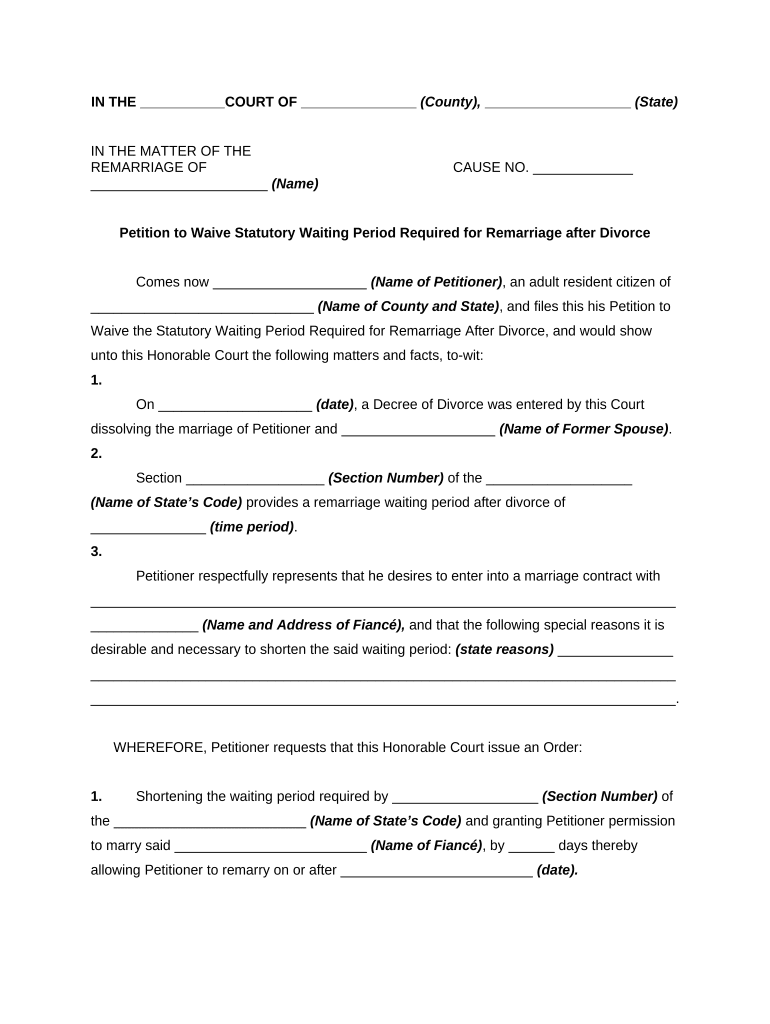
waiver petition Preview on Page 1

Here's how it works

01. Edit your waiver petition online
Type text, add images, blackout confidential details, add comments, highlights and more.
02. Sign it in a few clicks
Draw your signature, type it, upload its image, or use your mobile device as a signature pad.
03. Share your form with others
Send waiver petition format via email, link, or fax. You can also download it, export it or print it out.

How to use or fill out petition waive with our platform

Form edit decoration
9.5
Ease of Setup
DocHub User Ratings on G2
9.0
Ease of Use
DocHub User Ratings on G2
  1. Click ‘Get Form’ to open the petition waive in the editor.
  2. Begin by filling in the court name and county where you are filing. This information is crucial for proper jurisdiction.
  3. Enter your name as the petitioner, along with your county and state of residence. Ensure accuracy to avoid delays.
  4. Provide the date when your divorce decree was entered, followed by the name of your former spouse.
  5. Specify the section number of your state's code that outlines the remarriage waiting period, along with its duration.
  6. Clearly state your fiancé's name and address, followed by a detailed explanation of why you wish to shorten the waiting period.
  7. Conclude by requesting a specific number of days to shorten the waiting period and indicate the desired remarriage date.
  8. Sign and date the document at the bottom, ensuring all required signatures are included for validity.

Start using our platform today to complete your petition waive easily and for free!

be ready to get more

Complete this form in 5 minutes or less

Get form

Got questions?

We have answers to the most popular questions from our customers. If you can't find an answer to your question, please contact us.
Contact us

Sure, you’ll find many different apps for this on the web. However, if you need to eSign your petition waive without installing additional software, DocHub is the best choice you can make. This robust editor works on mobile devices just as on desktops. Open our editor in your preferred internet browser, register or log in to your account, and start managing your forms.

With DocHub, you have several convenient ways to edit your petition waive online. You can drag and drop the form and modify it straight at the DocHub website or use our browser extension to fill out your form immediately. On top of that, you can modify your PDF on your smartphone, as DocHub works with all the available mobile platforms.

Security and compliance

At DocHub, your data security is our priority. We follow HIPAA, SOC2, GDPR, and other standards, so you can work on your documents with confidence.

Learn more
ccpa2
pci-dss
gdpr-compliance
hipaa
soc-compliance
be ready to get more

Complete this form in 5 minutes or less

Get form