01. Edit your accredited investor questionnaire template online
Type text, add images, blackout confidential details, add comments, highlights and more.

02. Sign it in a few clicks
Draw your signature, type it, upload its image, or use your mobile device as a signature pad.

03. Share your form with others
Send accredited investor questionnaire pdf via email, link, or fax. You can also download it, export it or print it out.

How to use or fill out investor questionnaire with our platform
Ease of Setup
DocHub User Ratings on G2
Ease of Use
DocHub User Ratings on G2
Click ‘Get Form’ to open the investor questionnaire in the editor.
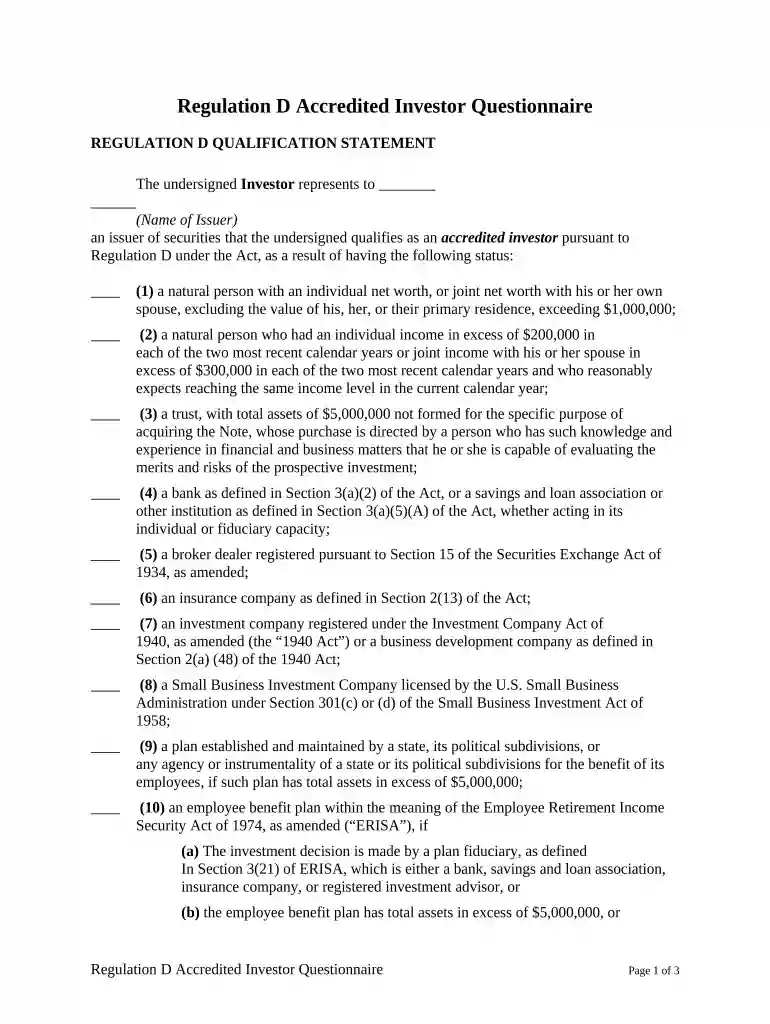
Begin by reviewing the Regulation D Qualification Statement. This section outlines the criteria for being classified as an accredited investor. Ensure you understand which category applies to you.
Fill in your personal information, including your name and status as an accredited investor. Be sure to provide accurate details regarding your net worth or income as specified in the form.
Complete the additional information section, detailing your education, investment experience, and tax bracket. This helps issuers assess your qualifications.
Review the certification statements carefully. Confirm that you have not been involved in bankruptcy proceedings and that all information provided is true and accurate.
Sign and date the form at the bottom. If applicable, include signatures from co-investors or officials of your entity.
Start filling out your investor questionnaire today for free using our platform!
Start by taking this quiz to get an idea of your risk toleranceone of the fundamental issues to consider when planning your investment strategy.Read more
Cookie consent notice
This site uses cookies to enhance site navigation and personalize your experience.
By using this site you agree to our use of cookies as described in our Privacy Notice.
You can modify your selections by visiting our Cookie and Advertising Notice.